> ## Documentation Index
> Fetch the complete documentation index at: https://docs.stackone.com/llms.txt
> Use this file to discover all available pages before exploring further.
# Connect Contentful with OAuth 2.0 – StackOne Hub
> Link a Contentful account in the StackOne Hub using OAuth 2.0. End-user guide to authorize the integration and start using Contentful actions.
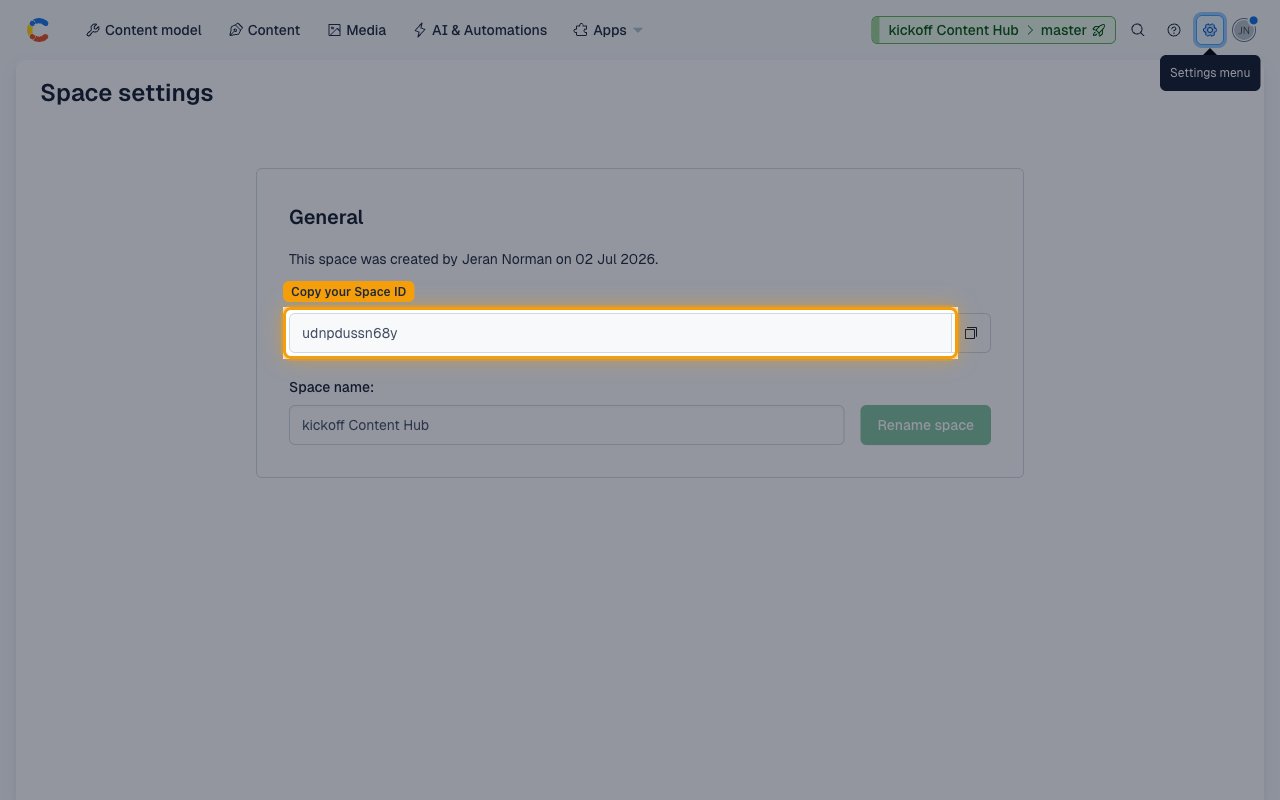
Find your Space ID
Space IDs are passed as an input parameter on each space-scoped CMS action call
(entries, assets, content types). For webhook event delivery, enter one or more
space IDs in the Webhook Space IDs field (comma-separated).
From inside any Contentful space, click the Settings gear icon in the top-right
navigation bar and select General settings under the Space settings section.
- Click the Settings menu (gear icon, top-right of the space navigation bar).
- Under Space settings, click General settings.
- Copy the value shown in the Space ID field. It is a 12-character alphanumeric string (e.g., `abc123xyz789`). Use this value as the `space_id` input when calling space-scoped CMS actions (entries, assets, content types), or enter it in Webhook Space IDs (comma-separated, e.g. `abc123xyz789,def456uvw012`) to receive webhook events from that space.
Linking the Account from the Hub
Use one of the three Linking Account Methods to access the Hub.
Fill out the following fields using details from your provider:
- Webhook Space IDs (Optional)
- Click Connect
- If applicable, the provider will redirect you to a sign-in or authorization page. Complete the provider's authorization flow.
- Once authorization is successful, you will see a confirmation popup
If the account linking is successful, you will see the newly linked account in your Accounts page.
## Next Steps
Configure receiving Events for Contentful into StackOne.