

 MCP
MCP A2A
A2AFind your Egnyte Domain
Every Egnyte account is scoped to a unique subdomain of egnyte.com. StackOne needs that subdomain to build the correct OAuth and API endpoints for your tenant.
Sign in to your Egnyte account
Open your browser and go to your Egnyte sign-in URL — the address you normally use to reach Egnyte, in the form https://acme.egnyte.com (replace acme with your organisation’s subdomain). If you don’t know your domain, ask an Egnyte Domain Admin at your organisation, or check a recent Egnyte email — links point at your workspace URL.
Locate your Egnyte subdomain
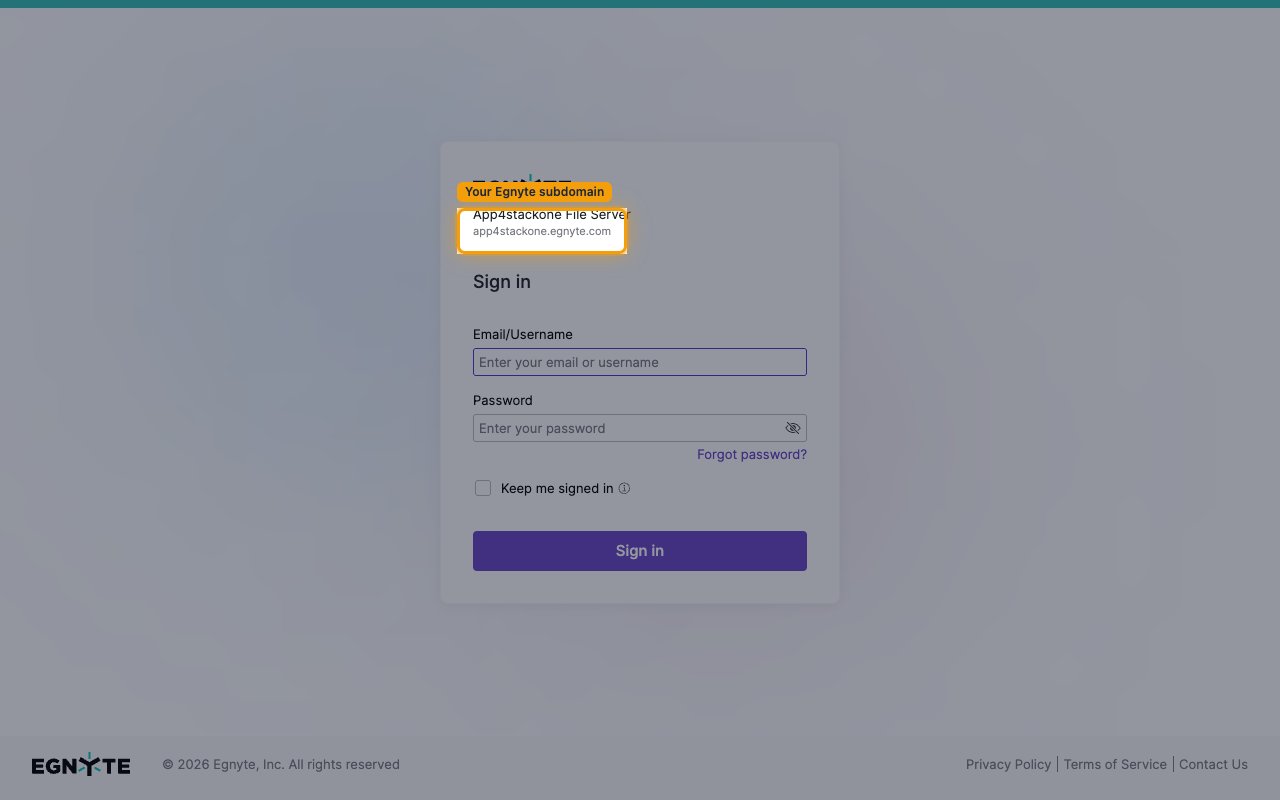
On the Egnyte Sign in page (and in the browser address bar) you will see your workspace URL. The part before .egnyte.com is your Egnyte Domain. For example, if the sign-in page shows app4stackone.egnyte.com, your Egnyte Domain is app4stackone.
- Enter only the subdomain part — omit any scheme prefix, the
.egnyte.comsuffix, and any trailing path. - The domain contains only letters, numbers, and hyphens — no spaces or special characters.
- Trial domains are not eligible for the Egnyte Public API.
Enter the domain in StackOne Hub
Paste the subdomain you identified into the Egnyte Domain field in StackOne Hub, then continue with the OAuth connection flow.
- Egnyte Domain — the customer’s Egnyte subdomain (for example,
acmeforhttps://acme.egnyte.com).
Linking the Account from the Hub
Navigate to the Hub
Fill out the fields
- Egnyte Domain
Connect
- Click Connect
- If applicable, the provider will redirect you to a sign-in or authorization page. Complete the provider’s authorization flow.
- Once authorization is successful, you will see a confirmation popup
If the account linking is successful, you will see the newly linked account in your Accounts page.