> ## Documentation Index
> Fetch the complete documentation index at: https://docs.stackone.com/llms.txt
> Use this file to discover all available pages before exploring further.

# Linear OAuth 2.0 connector profile – StackOne setup guide

> Set up the OAuth 2.0 connector profile for Linear in StackOne. One-time admin setup required before your users can link Linear accounts via Hub.

<Warning>Workspace Admin access is required to create OAuth2 applications in Linear.</Warning>

<Panel>
  <div className="not-prose guides-scope-selector" data-guides-scope-selector data-guide-actions-json="[{&#x22;id&#x22;:&#x22;linear_file_upload&#x22;,&#x22;label&#x22;:&#x22;File Upload&#x22;,&#x22;scopes&#x22;:[&#x22;write&#x22;]},{&#x22;id&#x22;:&#x22;linear_organization_update&#x22;,&#x22;label&#x22;:&#x22;Update Organization&#x22;,&#x22;scopes&#x22;:[&#x22;admin&#x22;]},{&#x22;id&#x22;:&#x22;linear_organization_invite_create&#x22;,&#x22;label&#x22;:&#x22;Create Organization Invite&#x22;,&#x22;scopes&#x22;:[&#x22;admin&#x22;]},{&#x22;id&#x22;:&#x22;linear_user_suspend&#x22;,&#x22;label&#x22;:&#x22;Suspend User&#x22;,&#x22;scopes&#x22;:[&#x22;admin&#x22;]},{&#x22;id&#x22;:&#x22;linear_list_agentSessions&#x22;,&#x22;label&#x22;:&#x22;List Agent Sessions&#x22;,&#x22;scopes&#x22;:[&#x22;read&#x22;]},{&#x22;id&#x22;:&#x22;linear_get_agentSession&#x22;,&#x22;label&#x22;:&#x22;Get Agent Session&#x22;,&#x22;scopes&#x22;:[&#x22;read&#x22;]},{&#x22;id&#x22;:&#x22;linear_unified_get_me&#x22;,&#x22;label&#x22;:&#x22;Get Unified Credentials&#x22;,&#x22;scopes&#x22;:[&#x22;read&#x22;]},{&#x22;id&#x22;:&#x22;linear_get_application_info&#x22;,&#x22;label&#x22;:&#x22;Get Application Info&#x22;,&#x22;scopes&#x22;:[&#x22;read&#x22;]},{&#x22;id&#x22;:&#x22;linear_create_attachment&#x22;,&#x22;label&#x22;:&#x22;Create Attachment&#x22;,&#x22;scopes&#x22;:[&#x22;write&#x22;]},{&#x22;id&#x22;:&#x22;linear_delete_attachment&#x22;,&#x22;label&#x22;:&#x22;Delete Attachment&#x22;,&#x22;scopes&#x22;:[&#x22;write&#x22;]},{&#x22;id&#x22;:&#x22;linear_update_attachment&#x22;,&#x22;label&#x22;:&#x22;Update Attachment&#x22;,&#x22;scopes&#x22;:[&#x22;write&#x22;]},{&#x22;id&#x22;:&#x22;linear_list_comments&#x22;,&#x22;label&#x22;:&#x22;List Comments&#x22;,&#x22;scopes&#x22;:[&#x22;read&#x22;]},{&#x22;id&#x22;:&#x22;linear_get_comment&#x22;,&#x22;label&#x22;:&#x22;Get Comment&#x22;,&#x22;scopes&#x22;:[&#x22;read&#x22;]},{&#x22;id&#x22;:&#x22;linear_create_comment&#x22;,&#x22;label&#x22;:&#x22;Create Comment&#x22;,&#x22;scopes&#x22;:[&#x22;comments:create&#x22;]},{&#x22;id&#x22;:&#x22;linear_update_comment&#x22;,&#x22;label&#x22;:&#x22;Update Comment&#x22;,&#x22;scopes&#x22;:[&#x22;write&#x22;]},{&#x22;id&#x22;:&#x22;linear_delete_comment&#x22;,&#x22;label&#x22;:&#x22;Delete Comment&#x22;,&#x22;scopes&#x22;:[&#x22;write&#x22;]},{&#x22;id&#x22;:&#x22;linear_resolve_comment&#x22;,&#x22;label&#x22;:&#x22;Resolve Comment&#x22;,&#x22;scopes&#x22;:[&#x22;write&#x22;]},{&#x22;id&#x22;:&#x22;linear_unresolve_comment&#x22;,&#x22;label&#x22;:&#x22;Unresolve Comment&#x22;,&#x22;scopes&#x22;:[&#x22;write&#x22;]},{&#x22;id&#x22;:&#x22;linear_list_customers&#x22;,&#x22;label&#x22;:&#x22;List Customers&#x22;,&#x22;scopes&#x22;:[&#x22;read&#x22;]},{&#x22;id&#x22;:&#x22;linear_get_customer&#x22;,&#x22;label&#x22;:&#x22;Get Customer&#x22;,&#x22;scopes&#x22;:[&#x22;read&#x22;]},{&#x22;id&#x22;:&#x22;linear_create_customer&#x22;,&#x22;label&#x22;:&#x22;Create Customer&#x22;,&#x22;scopes&#x22;:[&#x22;write&#x22;]},{&#x22;id&#x22;:&#x22;linear_update_customer&#x22;,&#x22;label&#x22;:&#x22;Update Customer&#x22;,&#x22;scopes&#x22;:[&#x22;write&#x22;]},{&#x22;id&#x22;:&#x22;linear_delete_customer&#x22;,&#x22;label&#x22;:&#x22;Delete Customer&#x22;,&#x22;scopes&#x22;:[&#x22;write&#x22;]},{&#x22;id&#x22;:&#x22;linear_upsert_customer&#x22;,&#x22;label&#x22;:&#x22;Upsert Customer&#x22;,&#x22;scopes&#x22;:[&#x22;write&#x22;]},{&#x22;id&#x22;:&#x22;linear_list_customer_needs&#x22;,&#x22;label&#x22;:&#x22;List Customer Needs&#x22;,&#x22;scopes&#x22;:[&#x22;read&#x22;]},{&#x22;id&#x22;:&#x22;linear_get_customer_need&#x22;,&#x22;label&#x22;:&#x22;Get Customer Need&#x22;,&#x22;scopes&#x22;:[&#x22;read&#x22;]},{&#x22;id&#x22;:&#x22;linear_create_customer_need&#x22;,&#x22;label&#x22;:&#x22;Create Customer Need&#x22;,&#x22;scopes&#x22;:[&#x22;write&#x22;]},{&#x22;id&#x22;:&#x22;linear_update_customer_need&#x22;,&#x22;label&#x22;:&#x22;Update Customer Need&#x22;,&#x22;scopes&#x22;:[&#x22;write&#x22;]},{&#x22;id&#x22;:&#x22;linear_delete_customer_need&#x22;,&#x22;label&#x22;:&#x22;Delete Customer Need&#x22;,&#x22;scopes&#x22;:[&#x22;write&#x22;]},{&#x22;id&#x22;:&#x22;linear_list_customer_statuses&#x22;,&#x22;label&#x22;:&#x22;List Customer Statuses&#x22;,&#x22;scopes&#x22;:[&#x22;read&#x22;]},{&#x22;id&#x22;:&#x22;linear_get_customer_status&#x22;,&#x22;label&#x22;:&#x22;Get Customer Status&#x22;,&#x22;scopes&#x22;:[&#x22;read&#x22;]},{&#x22;id&#x22;:&#x22;linear_create_customer_status&#x22;,&#x22;label&#x22;:&#x22;Create Customer Status&#x22;,&#x22;scopes&#x22;:[&#x22;admin&#x22;]},{&#x22;id&#x22;:&#x22;linear_update_customer_status&#x22;,&#x22;label&#x22;:&#x22;Update Customer Status&#x22;,&#x22;scopes&#x22;:[&#x22;admin&#x22;]},{&#x22;id&#x22;:&#x22;linear_delete_customer_status&#x22;,&#x22;label&#x22;:&#x22;Delete Customer Status&#x22;,&#x22;scopes&#x22;:[&#x22;admin&#x22;]},{&#x22;id&#x22;:&#x22;linear_list_customer_tiers&#x22;,&#x22;label&#x22;:&#x22;List Customer Tiers&#x22;,&#x22;scopes&#x22;:[&#x22;read&#x22;]},{&#x22;id&#x22;:&#x22;linear_get_customer_tier&#x22;,&#x22;label&#x22;:&#x22;Get Customer Tier&#x22;,&#x22;scopes&#x22;:[&#x22;read&#x22;]},{&#x22;id&#x22;:&#x22;linear_create_customer_tier&#x22;,&#x22;label&#x22;:&#x22;Create Customer Tier&#x22;,&#x22;scopes&#x22;:[&#x22;admin&#x22;]},{&#x22;id&#x22;:&#x22;linear_update_customer_tier&#x22;,&#x22;label&#x22;:&#x22;Update Customer Tier&#x22;,&#x22;scopes&#x22;:[&#x22;admin&#x22;]},{&#x22;id&#x22;:&#x22;linear_delete_customer_tier&#x22;,&#x22;label&#x22;:&#x22;Delete Customer Tier&#x22;,&#x22;scopes&#x22;:[&#x22;admin&#x22;]},{&#x22;id&#x22;:&#x22;linear_create_custom_view&#x22;,&#x22;label&#x22;:&#x22;Create Custom View&#x22;,&#x22;scopes&#x22;:[&#x22;write&#x22;]},{&#x22;id&#x22;:&#x22;linear_update_custom_view&#x22;,&#x22;label&#x22;:&#x22;Update Custom View&#x22;,&#x22;scopes&#x22;:[&#x22;write&#x22;]},{&#x22;id&#x22;:&#x22;linear_delete_custom_view&#x22;,&#x22;label&#x22;:&#x22;Delete Custom View&#x22;,&#x22;scopes&#x22;:[&#x22;write&#x22;]},{&#x22;id&#x22;:&#x22;linear_list_cycles&#x22;,&#x22;label&#x22;:&#x22;List Cycles&#x22;,&#x22;scopes&#x22;:[&#x22;read&#x22;]},{&#x22;id&#x22;:&#x22;linear_get_cycle&#x22;,&#x22;label&#x22;:&#x22;Get Cycle&#x22;,&#x22;scopes&#x22;:[&#x22;read&#x22;]},{&#x22;id&#x22;:&#x22;linear_create_cycle&#x22;,&#x22;label&#x22;:&#x22;Create Cycle&#x22;,&#x22;scopes&#x22;:[&#x22;write&#x22;]},{&#x22;id&#x22;:&#x22;linear_update_cycle&#x22;,&#x22;label&#x22;:&#x22;Update Cycle&#x22;,&#x22;scopes&#x22;:[&#x22;write&#x22;]},{&#x22;id&#x22;:&#x22;linear_archive_cycle&#x22;,&#x22;label&#x22;:&#x22;Archive Cycle&#x22;,&#x22;scopes&#x22;:[&#x22;write&#x22;]},{&#x22;id&#x22;:&#x22;linear_list_documents&#x22;,&#x22;label&#x22;:&#x22;List Documents&#x22;,&#x22;scopes&#x22;:[&#x22;read&#x22;]},{&#x22;id&#x22;:&#x22;linear_get_document&#x22;,&#x22;label&#x22;:&#x22;Get Document&#x22;,&#x22;scopes&#x22;:[&#x22;read&#x22;]},{&#x22;id&#x22;:&#x22;linear_create_document&#x22;,&#x22;label&#x22;:&#x22;Create Document&#x22;,&#x22;scopes&#x22;:[&#x22;write&#x22;]},{&#x22;id&#x22;:&#x22;linear_update_document&#x22;,&#x22;label&#x22;:&#x22;Update Document&#x22;,&#x22;scopes&#x22;:[&#x22;write&#x22;]},{&#x22;id&#x22;:&#x22;linear_delete_document&#x22;,&#x22;label&#x22;:&#x22;Delete Document&#x22;,&#x22;scopes&#x22;:[&#x22;write&#x22;]},{&#x22;id&#x22;:&#x22;linear_list_external_users&#x22;,&#x22;label&#x22;:&#x22;List External Users&#x22;,&#x22;scopes&#x22;:[&#x22;read&#x22;]},{&#x22;id&#x22;:&#x22;linear_get_external_user&#x22;,&#x22;label&#x22;:&#x22;Get External User&#x22;,&#x22;scopes&#x22;:[&#x22;read&#x22;]},{&#x22;id&#x22;:&#x22;linear_list_favorites&#x22;,&#x22;label&#x22;:&#x22;List Favorites&#x22;,&#x22;scopes&#x22;:[&#x22;read&#x22;]},{&#x22;id&#x22;:&#x22;linear_create_favorite&#x22;,&#x22;label&#x22;:&#x22;Create Favorite&#x22;,&#x22;scopes&#x22;:[&#x22;write&#x22;]},{&#x22;id&#x22;:&#x22;linear_delete_favorite&#x22;,&#x22;label&#x22;:&#x22;Delete Favorite&#x22;,&#x22;scopes&#x22;:[&#x22;write&#x22;]},{&#x22;id&#x22;:&#x22;linear_list_initiatives&#x22;,&#x22;label&#x22;:&#x22;List Initiatives&#x22;,&#x22;scopes&#x22;:[&#x22;read&#x22;]},{&#x22;id&#x22;:&#x22;linear_get_initiative&#x22;,&#x22;label&#x22;:&#x22;Get Initiative&#x22;,&#x22;scopes&#x22;:[&#x22;read&#x22;]},{&#x22;id&#x22;:&#x22;linear_create_initiative&#x22;,&#x22;label&#x22;:&#x22;Create Initiative&#x22;,&#x22;scopes&#x22;:[&#x22;write&#x22;]},{&#x22;id&#x22;:&#x22;linear_update_initiative&#x22;,&#x22;label&#x22;:&#x22;Update Initiative&#x22;,&#x22;scopes&#x22;:[&#x22;write&#x22;]},{&#x22;id&#x22;:&#x22;linear_delete_initiative&#x22;,&#x22;label&#x22;:&#x22;Delete Initiative&#x22;,&#x22;scopes&#x22;:[&#x22;write&#x22;]},{&#x22;id&#x22;:&#x22;linear_archive_initiative&#x22;,&#x22;label&#x22;:&#x22;Archive Initiative&#x22;,&#x22;scopes&#x22;:[&#x22;write&#x22;]},{&#x22;id&#x22;:&#x22;linear_create_initiative_to_project&#x22;,&#x22;label&#x22;:&#x22;Create Initiative To Project Link&#x22;,&#x22;scopes&#x22;:[&#x22;write&#x22;]},{&#x22;id&#x22;:&#x22;linear_delete_initiative_to_project&#x22;,&#x22;label&#x22;:&#x22;Delete Initiative To Project Link&#x22;,&#x22;scopes&#x22;:[&#x22;write&#x22;]},{&#x22;id&#x22;:&#x22;linear_create_initiative_update&#x22;,&#x22;label&#x22;:&#x22;Create Initiative Update&#x22;,&#x22;scopes&#x22;:[&#x22;write&#x22;]},{&#x22;id&#x22;:&#x22;linear_list_issues&#x22;,&#x22;label&#x22;:&#x22;List Issues&#x22;,&#x22;scopes&#x22;:[&#x22;read&#x22;]},{&#x22;id&#x22;:&#x22;linear_get_issue&#x22;,&#x22;label&#x22;:&#x22;Get Issue&#x22;,&#x22;scopes&#x22;:[&#x22;read&#x22;]},{&#x22;id&#x22;:&#x22;linear_create_issue&#x22;,&#x22;label&#x22;:&#x22;Create Issue&#x22;,&#x22;scopes&#x22;:[&#x22;issues:create&#x22;]},{&#x22;id&#x22;:&#x22;linear_update_issue&#x22;,&#x22;label&#x22;:&#x22;Update Issue&#x22;,&#x22;scopes&#x22;:[&#x22;write&#x22;]},{&#x22;id&#x22;:&#x22;linear_delete_issue&#x22;,&#x22;label&#x22;:&#x22;Delete Issue&#x22;,&#x22;scopes&#x22;:[&#x22;write&#x22;]},{&#x22;id&#x22;:&#x22;linear_issue_filter_suggestion&#x22;,&#x22;label&#x22;:&#x22;Issue Filter Suggestion&#x22;,&#x22;scopes&#x22;:[&#x22;read&#x22;]},{&#x22;id&#x22;:&#x22;linear_search_issues&#x22;,&#x22;label&#x22;:&#x22;Search Issues&#x22;,&#x22;scopes&#x22;:[&#x22;read&#x22;]},{&#x22;id&#x22;:&#x22;linear_archive_issue&#x22;,&#x22;label&#x22;:&#x22;Archive Issue&#x22;,&#x22;scopes&#x22;:[&#x22;write&#x22;]},{&#x22;id&#x22;:&#x22;linear_unarchive_issue&#x22;,&#x22;label&#x22;:&#x22;Unarchive Issue&#x22;,&#x22;scopes&#x22;:[&#x22;write&#x22;]},{&#x22;id&#x22;:&#x22;linear_create_issue_relation&#x22;,&#x22;label&#x22;:&#x22;Create Issue Relation&#x22;,&#x22;scopes&#x22;:[&#x22;write&#x22;]},{&#x22;id&#x22;:&#x22;linear_delete_issue_relation&#x22;,&#x22;label&#x22;:&#x22;Delete Issue Relation&#x22;,&#x22;scopes&#x22;:[&#x22;write&#x22;]},{&#x22;id&#x22;:&#x22;linear_batch_create_issues&#x22;,&#x22;label&#x22;:&#x22;Batch Create Issues&#x22;,&#x22;scopes&#x22;:[&#x22;write&#x22;]},{&#x22;id&#x22;:&#x22;linear_batch_update_issues&#x22;,&#x22;label&#x22;:&#x22;Batch Update Issues&#x22;,&#x22;scopes&#x22;:[&#x22;write&#x22;]},{&#x22;id&#x22;:&#x22;linear_list_issue_labels&#x22;,&#x22;label&#x22;:&#x22;List Issue Labels&#x22;,&#x22;scopes&#x22;:[&#x22;read&#x22;]},{&#x22;id&#x22;:&#x22;linear_get_issue_label&#x22;,&#x22;label&#x22;:&#x22;Get Issue Label&#x22;,&#x22;scopes&#x22;:[&#x22;read&#x22;]},{&#x22;id&#x22;:&#x22;linear_create_issue_label&#x22;,&#x22;label&#x22;:&#x22;Create Issue Label&#x22;,&#x22;scopes&#x22;:[&#x22;write&#x22;]},{&#x22;id&#x22;:&#x22;linear_update_issue_label&#x22;,&#x22;label&#x22;:&#x22;Update Issue Label&#x22;,&#x22;scopes&#x22;:[&#x22;write&#x22;]},{&#x22;id&#x22;:&#x22;linear_delete_issue_label&#x22;,&#x22;label&#x22;:&#x22;Delete Issue Label&#x22;,&#x22;scopes&#x22;:[&#x22;write&#x22;]},{&#x22;id&#x22;:&#x22;linear_create_notification_subscription&#x22;,&#x22;label&#x22;:&#x22;Create Notification Subscription&#x22;,&#x22;scopes&#x22;:[&#x22;write&#x22;]},{&#x22;id&#x22;:&#x22;linear_list_projects&#x22;,&#x22;label&#x22;:&#x22;List Projects&#x22;,&#x22;scopes&#x22;:[&#x22;read&#x22;]},{&#x22;id&#x22;:&#x22;linear_get_project&#x22;,&#x22;label&#x22;:&#x22;Get Project&#x22;,&#x22;scopes&#x22;:[&#x22;read&#x22;]},{&#x22;id&#x22;:&#x22;linear_create_project&#x22;,&#x22;label&#x22;:&#x22;Create Project&#x22;,&#x22;scopes&#x22;:[&#x22;write&#x22;]},{&#x22;id&#x22;:&#x22;linear_update_project&#x22;,&#x22;label&#x22;:&#x22;Update Project&#x22;,&#x22;scopes&#x22;:[&#x22;write&#x22;]},{&#x22;id&#x22;:&#x22;linear_delete_project&#x22;,&#x22;label&#x22;:&#x22;Delete Project&#x22;,&#x22;scopes&#x22;:[&#x22;write&#x22;]},{&#x22;id&#x22;:&#x22;linear_archive_project&#x22;,&#x22;label&#x22;:&#x22;Archive Project&#x22;,&#x22;scopes&#x22;:[&#x22;write&#x22;]},{&#x22;id&#x22;:&#x22;linear_create_project_update&#x22;,&#x22;label&#x22;:&#x22;Create Project Update&#x22;,&#x22;scopes&#x22;:[&#x22;write&#x22;]},{&#x22;id&#x22;:&#x22;linear_list_project_labels&#x22;,&#x22;label&#x22;:&#x22;List Project Labels&#x22;,&#x22;scopes&#x22;:[&#x22;read&#x22;]},{&#x22;id&#x22;:&#x22;linear_get_project_label&#x22;,&#x22;label&#x22;:&#x22;Get Project Label&#x22;,&#x22;scopes&#x22;:[&#x22;read&#x22;]},{&#x22;id&#x22;:&#x22;linear_create_project_label&#x22;,&#x22;label&#x22;:&#x22;Create Project Label&#x22;,&#x22;scopes&#x22;:[&#x22;write&#x22;]},{&#x22;id&#x22;:&#x22;linear_update_project_label&#x22;,&#x22;label&#x22;:&#x22;Update Project Label&#x22;,&#x22;scopes&#x22;:[&#x22;write&#x22;]},{&#x22;id&#x22;:&#x22;linear_delete_project_label&#x22;,&#x22;label&#x22;:&#x22;Delete Project Label&#x22;,&#x22;scopes&#x22;:[&#x22;write&#x22;]},{&#x22;id&#x22;:&#x22;linear_list_project_milestones&#x22;,&#x22;label&#x22;:&#x22;List Project Milestones&#x22;,&#x22;scopes&#x22;:[&#x22;read&#x22;]},{&#x22;id&#x22;:&#x22;linear_get_project_milestone&#x22;,&#x22;label&#x22;:&#x22;Get Project Milestone&#x22;,&#x22;scopes&#x22;:[&#x22;read&#x22;]},{&#x22;id&#x22;:&#x22;linear_create_project_milestone&#x22;,&#x22;label&#x22;:&#x22;Create Project Milestone&#x22;,&#x22;scopes&#x22;:[&#x22;write&#x22;]},{&#x22;id&#x22;:&#x22;linear_update_project_milestone&#x22;,&#x22;label&#x22;:&#x22;Update Project Milestone&#x22;,&#x22;scopes&#x22;:[&#x22;write&#x22;]},{&#x22;id&#x22;:&#x22;linear_delete_project_milestone&#x22;,&#x22;label&#x22;:&#x22;Delete Project Milestone&#x22;,&#x22;scopes&#x22;:[&#x22;write&#x22;]},{&#x22;id&#x22;:&#x22;linear_list_project_statuses&#x22;,&#x22;label&#x22;:&#x22;List Project Statuses&#x22;,&#x22;scopes&#x22;:[&#x22;read&#x22;]},{&#x22;id&#x22;:&#x22;linear_get_project_status&#x22;,&#x22;label&#x22;:&#x22;Get Project Status&#x22;,&#x22;scopes&#x22;:[&#x22;read&#x22;]},{&#x22;id&#x22;:&#x22;linear_create_project_status&#x22;,&#x22;label&#x22;:&#x22;Create Project Status&#x22;,&#x22;scopes&#x22;:[&#x22;admin&#x22;]},{&#x22;id&#x22;:&#x22;linear_update_project_status&#x22;,&#x22;label&#x22;:&#x22;Update Project Status&#x22;,&#x22;scopes&#x22;:[&#x22;admin&#x22;]},{&#x22;id&#x22;:&#x22;linear_archive_project_status&#x22;,&#x22;label&#x22;:&#x22;Archive Project Status&#x22;,&#x22;scopes&#x22;:[&#x22;admin&#x22;]},{&#x22;id&#x22;:&#x22;linear_create_reaction&#x22;,&#x22;label&#x22;:&#x22;Create Reaction&#x22;,&#x22;scopes&#x22;:[&#x22;write&#x22;]},{&#x22;id&#x22;:&#x22;linear_delete_reaction&#x22;,&#x22;label&#x22;:&#x22;Delete Reaction&#x22;,&#x22;scopes&#x22;:[&#x22;write&#x22;]},{&#x22;id&#x22;:&#x22;linear_create_release&#x22;,&#x22;label&#x22;:&#x22;Create Release&#x22;,&#x22;scopes&#x22;:[&#x22;write&#x22;]},{&#x22;id&#x22;:&#x22;linear_update_release&#x22;,&#x22;label&#x22;:&#x22;Update Release&#x22;,&#x22;scopes&#x22;:[&#x22;write&#x22;]},{&#x22;id&#x22;:&#x22;linear_delete_release&#x22;,&#x22;label&#x22;:&#x22;Delete Release&#x22;,&#x22;scopes&#x22;:[&#x22;write&#x22;]},{&#x22;id&#x22;:&#x22;linear_complete_release&#x22;,&#x22;label&#x22;:&#x22;Complete Release&#x22;,&#x22;scopes&#x22;:[&#x22;write&#x22;]},{&#x22;id&#x22;:&#x22;linear_list_teams&#x22;,&#x22;label&#x22;:&#x22;List Teams&#x22;,&#x22;scopes&#x22;:[&#x22;read&#x22;]},{&#x22;id&#x22;:&#x22;linear_get_team&#x22;,&#x22;label&#x22;:&#x22;Get Team&#x22;,&#x22;scopes&#x22;:[&#x22;read&#x22;]},{&#x22;id&#x22;:&#x22;linear_update_team&#x22;,&#x22;label&#x22;:&#x22;Update Team&#x22;,&#x22;scopes&#x22;:[&#x22;write&#x22;]},{&#x22;id&#x22;:&#x22;linear_create_team&#x22;,&#x22;label&#x22;:&#x22;Create Team&#x22;,&#x22;scopes&#x22;:[&#x22;admin&#x22;]},{&#x22;id&#x22;:&#x22;linear_delete_team&#x22;,&#x22;label&#x22;:&#x22;Delete Team&#x22;,&#x22;scopes&#x22;:[&#x22;admin&#x22;]},{&#x22;id&#x22;:&#x22;linear_list_team_memberships&#x22;,&#x22;label&#x22;:&#x22;List Team Memberships&#x22;,&#x22;scopes&#x22;:[&#x22;read&#x22;]},{&#x22;id&#x22;:&#x22;linear_create_team_membership&#x22;,&#x22;label&#x22;:&#x22;Create Team Membership&#x22;,&#x22;scopes&#x22;:[&#x22;write&#x22;]},{&#x22;id&#x22;:&#x22;linear_delete_team_membership&#x22;,&#x22;label&#x22;:&#x22;Delete Team Membership&#x22;,&#x22;scopes&#x22;:[&#x22;write&#x22;]},{&#x22;id&#x22;:&#x22;linear_create_template&#x22;,&#x22;label&#x22;:&#x22;Create Template&#x22;,&#x22;scopes&#x22;:[&#x22;write&#x22;]},{&#x22;id&#x22;:&#x22;linear_update_template&#x22;,&#x22;label&#x22;:&#x22;Update Template&#x22;,&#x22;scopes&#x22;:[&#x22;write&#x22;]},{&#x22;id&#x22;:&#x22;linear_delete_template&#x22;,&#x22;label&#x22;:&#x22;Delete Template&#x22;,&#x22;scopes&#x22;:[&#x22;write&#x22;]},{&#x22;id&#x22;:&#x22;linear_get_viewer&#x22;,&#x22;label&#x22;:&#x22;Get Viewer&#x22;,&#x22;scopes&#x22;:[&#x22;read&#x22;]},{&#x22;id&#x22;:&#x22;linear_list_users&#x22;,&#x22;label&#x22;:&#x22;List Users&#x22;,&#x22;scopes&#x22;:[&#x22;read&#x22;]},{&#x22;id&#x22;:&#x22;linear_get_user&#x22;,&#x22;label&#x22;:&#x22;Get User&#x22;,&#x22;scopes&#x22;:[&#x22;read&#x22;]},{&#x22;id&#x22;:&#x22;linear_update_user&#x22;,&#x22;label&#x22;:&#x22;Update User&#x22;,&#x22;scopes&#x22;:[&#x22;write&#x22;]},{&#x22;id&#x22;:&#x22;linear_list_webhooks&#x22;,&#x22;label&#x22;:&#x22;List Webhooks&#x22;,&#x22;scopes&#x22;:[&#x22;admin&#x22;]},{&#x22;id&#x22;:&#x22;linear_get_webhook&#x22;,&#x22;label&#x22;:&#x22;Get Webhook&#x22;,&#x22;scopes&#x22;:[&#x22;admin&#x22;]},{&#x22;id&#x22;:&#x22;linear_create_webhook&#x22;,&#x22;label&#x22;:&#x22;Create Webhook&#x22;,&#x22;scopes&#x22;:[&#x22;admin&#x22;]},{&#x22;id&#x22;:&#x22;linear_update_webhook&#x22;,&#x22;label&#x22;:&#x22;Update Webhook&#x22;,&#x22;scopes&#x22;:[&#x22;admin&#x22;]},{&#x22;id&#x22;:&#x22;linear_delete_webhook&#x22;,&#x22;label&#x22;:&#x22;Delete Webhook&#x22;,&#x22;scopes&#x22;:[&#x22;admin&#x22;]},{&#x22;id&#x22;:&#x22;linear_rotate_webhook_secret&#x22;,&#x22;label&#x22;:&#x22;Rotate Webhook Secret&#x22;,&#x22;scopes&#x22;:[&#x22;admin&#x22;]},{&#x22;id&#x22;:&#x22;linear_list_workflow_states&#x22;,&#x22;label&#x22;:&#x22;List Workflow States&#x22;,&#x22;scopes&#x22;:[&#x22;read&#x22;]},{&#x22;id&#x22;:&#x22;linear_get_workflow_state&#x22;,&#x22;label&#x22;:&#x22;Get Workflow State&#x22;,&#x22;scopes&#x22;:[&#x22;read&#x22;]},{&#x22;id&#x22;:&#x22;linear_create_workflow_state&#x22;,&#x22;label&#x22;:&#x22;Create Workflow State&#x22;,&#x22;scopes&#x22;:[&#x22;admin&#x22;]},{&#x22;id&#x22;:&#x22;linear_update_workflow_state&#x22;,&#x22;label&#x22;:&#x22;Update Workflow State&#x22;,&#x22;scopes&#x22;:[&#x22;admin&#x22;]}]" style={{ borderRadius: '8px', padding: '16px', marginBottom: '24px' }}>
    <div className="guides-scope-selector__title" style={{ fontSize: '16px', fontWeight: '600', marginBottom: '12px' }}>Select Actions to adjust the guide</div>
    <div className="guides-scope-selector__muted" style={{ fontSize: '13px', marginBottom: '12px' }}>Some actions may require additional configuration in the provider to be accessible. Choose the actions you need and the guide will be updated.</div>

    <div style={{ display: 'flex', gap: '8px', marginBottom: '12px', flexWrap: 'wrap' }}>
      <input type="text" placeholder="Search actions..." className="guides-scope-selector__input" data-guide-action-search style={{ padding: '8px 12px', borderRadius: '6px', fontSize: '13px', flex: 1, minWidth: '160px' }} />

      <button type="button" className="guides-scope-selector__quick-btn" data-guide-select-all style={{ padding: '6px 10px', borderRadius: '6px', fontSize: '12px', cursor: 'pointer' }}>Select all</button>
      <button type="button" className="guides-scope-selector__quick-btn" data-guide-clear style={{ padding: '6px 10px', borderRadius: '6px', fontSize: '12px', cursor: 'pointer' }}>Clear</button>
    </div>

    <div className="guides-scope-selector__list" style={{ maxHeight: '240px', overflowY: 'auto', borderRadius: '6px', marginBottom: '12px' }}>
      <div className="guides-scope-selector__list-header" style={{ display: 'flex', alignItems: 'center', gap: '10px', padding: '8px 12px', fontSize: '12px', fontWeight: '600', position: 'sticky', top: 0, zIndex: 1 }}>
        <div style={{ width: '16px', flexShrink: 0 }} />

        <div style={{ flex: 1, textAlign: 'left' }}>Action</div>
        <div style={{ minWidth: '120px', marginLeft: 'auto', textAlign: 'right' }}>Scope(s)</div>
      </div>

      <div className="guides-scope-selector__muted" data-guide-loading style={{ padding: '16px', textAlign: 'center', fontSize: '13px' }}>Loading actions...</div>
      <div className="guides-scope-selector__muted" data-guide-no-results hidden style={{ padding: '16px', textAlign: 'center', fontSize: '13px' }}>No actions match your search.</div>
    </div>

    <div className="guides-scope-selector__url-section" style={{ marginTop: '12px', paddingTop: '12px' }}>
      <div className="guides-scope-selector__muted" style={{ fontSize: '12px', fontWeight: '500', marginBottom: '6px' }}>Dynamic Guide URL</div>

      <div style={{ display: 'flex', alignItems: 'center', gap: '8px', flexWrap: 'wrap' }}>
        <input type="text" readOnly className="guides-scope-selector__input" data-guide-url style={{ flex: 1, minWidth: '200px', padding: '8px 10px', borderRadius: '6px', fontSize: '12px', fontFamily: 'monospace' }} />

        <button type="button" className="guides-scope-selector__copy-btn" data-guide-copy-url style={{ width: '120px', padding: '8px 14px', borderRadius: '6px', fontSize: '13px', fontWeight: '500', cursor: 'pointer', whiteSpace: 'nowrap', marginLeft: 'auto' }}>Copy URL</button>
      </div>

      <div style={{ marginTop: '12px' }}>
        <div className="guides-scope-selector__muted" style={{ fontSize: '12px', fontWeight: '500', marginBottom: '6px' }}>Scopes Selected</div>

        <div style={{ display: 'flex', alignItems: 'stretch', gap: '8px', flexWrap: 'wrap' }}>
          <pre className="guides-scope-selector__input" role="textbox" aria-readonly="true" tabIndex={0} data-guide-scopes-output style={{ flex: 1, minWidth: '200px', minHeight: '88px', maxHeight: '120px', overflowY: 'auto', margin: 0, padding: '8px 10px', borderRadius: '6px', fontSize: '12px', fontFamily: 'monospace', whiteSpace: 'pre-wrap' }} />

          <div className="guides-scope-selector__muted" style={{ display: 'flex', flexDirection: 'column', gap: '8px', fontSize: '12px', fontWeight: '500', flexShrink: 0, alignItems: 'flex-start' }}>
            <div style={{ whiteSpace: 'nowrap' }}>Separator</div>

            <select className="guides-scope-selector__input" data-guide-scope-delimiter style={{ width: '100%', padding: '6px 10px', borderRadius: '6px', fontSize: '12px' }}>
              <option value="space">Space</option>
              <option value="comma">Comma</option>
              <option value="semicolon">Semicolon</option>
              <option value="pipe">Pipe</option>
              <option value="newline">Newline</option>
            </select>

            <button type="button" className="guides-scope-selector__copy-btn" data-guide-copy-scopes style={{ width: '120px', padding: '8px 14px', borderRadius: '6px', fontSize: '13px', fontWeight: '500', cursor: 'pointer', whiteSpace: 'nowrap' }}>Copy scopes</button>
          </div>
        </div>
      </div>
    </div>
  </div>
</Panel>

<section data-guide-section data-guide-scopes="">
  <h2>Create an OAuth2 application</h2>

  <p>Register an OAuth2 application in Linear to obtain a Client ID and Client secret.</p>

  <Steps>
    <Step title="Sign in to Linear">
      <div data-guide-step data-guide-scopes="" data-guide-display-scopes-list="">
        <p>Sign in to your <a href="https://linear.app" target="_blank" rel="noopener noreferrer">Linear account</a>.</p>

        <ul>
          <li>Click your avatar in the top-left corner and select <strong>Settings</strong>.</li>
        </ul>
      </div>
    </Step>

    <Step title="Open the API settings">
      <div data-guide-step data-guide-scopes="" data-guide-display-scopes-list="">
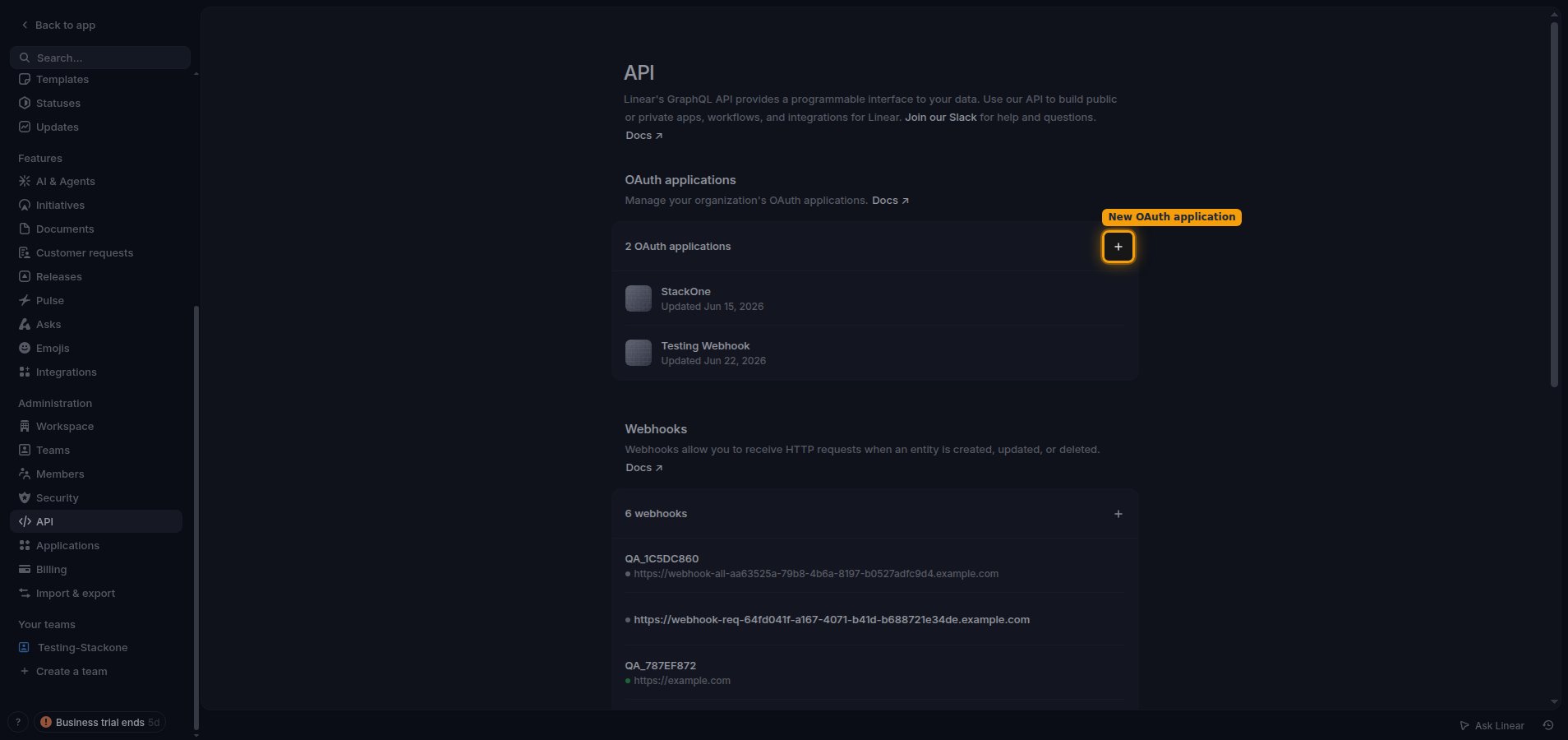
        <p>In the left sidebar under <strong>Administration</strong>, click <strong>API</strong>.</p>

        <ul>
          <li>In the <strong>OAuth applications</strong> section, click the <strong>+</strong> (<strong>New OAuth application</strong>) button.</li>
        </ul>

        <img src="https://mintcdn.com/stackone-60/wFdSk3QKacGiXmEP/connectors/linear/images/oauth2-setup-oauth-applications.png?fit=max&auto=format&n=wFdSk3QKacGiXmEP&q=85&s=136360bc7805bfff0749df007272410a" alt="The API settings page with the New OAuth application button highlighted in the OAuth applications section." width="1908" height="900" data-path="connectors/linear/images/oauth2-setup-oauth-applications.png" />
      </div>
    </Step>

    <Step title="Fill in the application details">
      <div data-guide-step data-guide-scopes="" data-guide-display-scopes-list="">
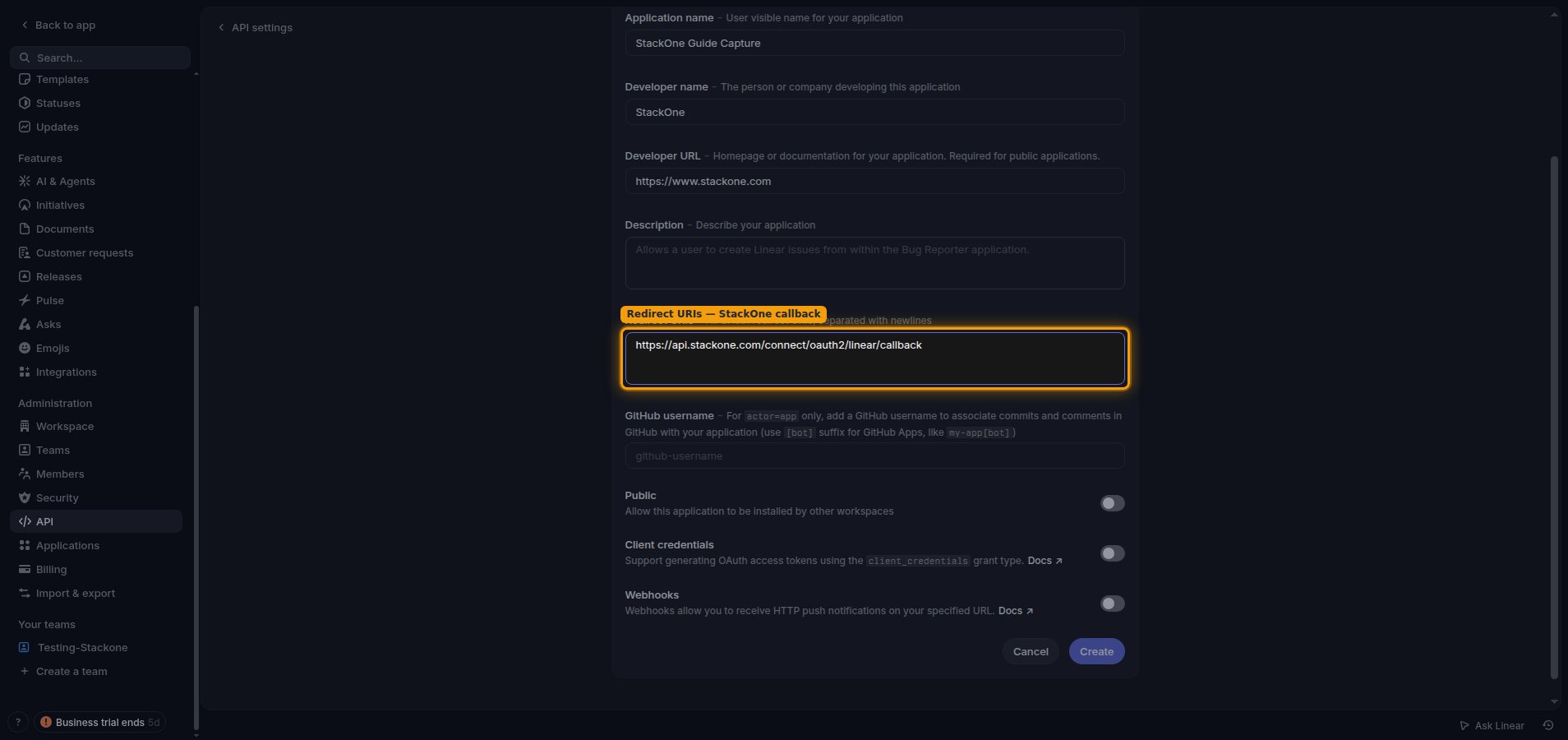
        <p>Complete the <strong>Create new application</strong> form.</p>

        <ul>
          <li><strong>Application name</strong>: a user-visible name for your application, for example `StackOne`.</li>
          <li><strong>Developer name</strong>: the person or company developing this application.</li>
          <li><strong>Developer URL</strong>: your homepage or documentation URL, for example `https://yourcompany.com`.</li>
          <li>In <strong>Redirect URIs</strong>, enter `https://api.stackone.com/connect/oauth2/linear/callback`.</li>
          <li>Optionally add a <strong>Description</strong>.</li>
          <li>Leave <strong>GitHub username</strong> blank and the <strong>Public</strong>, <strong>Client credentials</strong>, and <strong>Webhooks</strong> toggles off unless your integration specifically requires them.</li>
          <li>Click <strong>Create</strong>.</li>
        </ul>

        <img src="https://mintcdn.com/stackone-60/wFdSk3QKacGiXmEP/connectors/linear/images/oauth2-setup-create-application.png?fit=max&auto=format&n=wFdSk3QKacGiXmEP&q=85&s=f0d8fe8089566ed92a43bfaa53a82a57" alt="The Create new application form with the Redirect URIs field populated with the StackOne callback URL." width="1908" height="900" data-path="connectors/linear/images/oauth2-setup-create-application.png" />
      </div>
    </Step>

    <Step title="Copy the Client ID and Client secret">
      <div data-guide-step data-guide-scopes="" data-guide-display-scopes-list="">
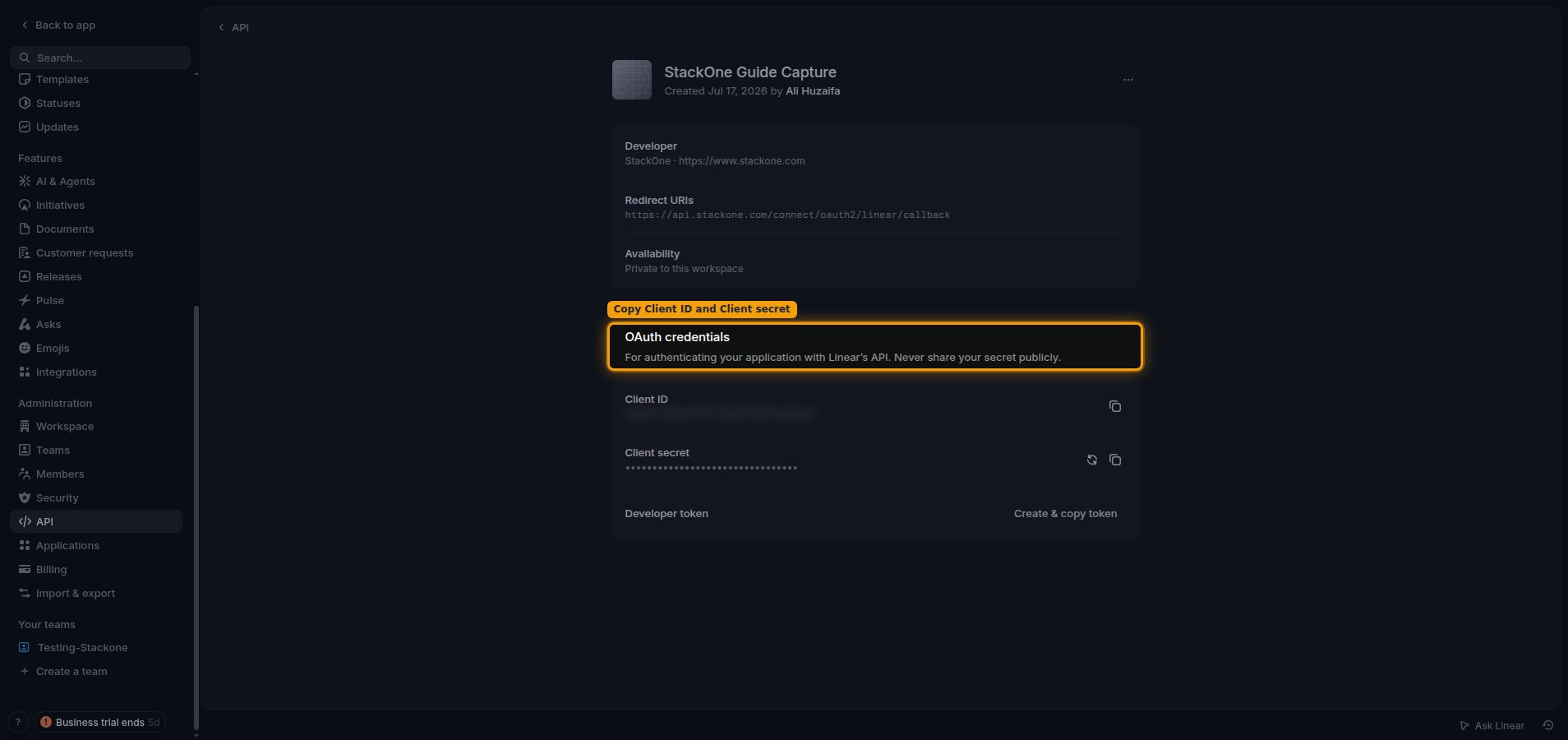
        <p>After creating the application, open the <strong>OAuth credentials</strong> section and copy the values. Paste them into the Client ID and Client Secret fields in the StackOne Connector profile.</p>

        <ul>
          <li>Use the <strong>Copy to clipboard</strong> button next to <strong>Client ID</strong> and <strong>Client secret</strong>.</li>
          <li>Store the <strong>Client secret</strong> securely — it is only shown here and must never be shared publicly.</li>
        </ul>

        <img src="https://mintcdn.com/stackone-60/wFdSk3QKacGiXmEP/connectors/linear/images/oauth2-setup-oauth-credentials.png?fit=max&auto=format&n=wFdSk3QKacGiXmEP&q=85&s=4d9e53b398b5d655678f470b9fe4ca86" alt="The OAuth credentials section showing the Client ID and Client secret each with a copy-to-clipboard button." width="1908" height="900" data-path="connectors/linear/images/oauth2-setup-oauth-credentials.png" />
      </div>
    </Step>

    <Step title="Choose the scopes to request">
      <div data-guide-step data-guide-scopes="read,write,admin,issues:create,comments:create" data-guide-display-scopes-list="read,write,admin,issues:create,comments:create">
        <div className="connector-guide-actions-badge" data-guide-actions-badge data-guide-actions-badge-scopes="read,write,admin,issues:create,comments:create" style={{ display: 'block', width: 'fit-content', maxWidth: '100%', padding: '2px 8px', borderRadius: '8px', fontSize: '12px', marginBottom: '8px', marginTop: '-10px', whiteSpace: 'nowrap', overflowX: 'auto', overflowY: 'hidden', msOverflowStyle: 'none', scrollbarWidth: 'none' }}>
          <span>Enables actions: </span><span data-guide-actions-badge-labels>Archive Cycle, Archive Initiative, Archive Issue, Archive Project, Archive Project Status, Batch Create Issues, Batch Update Issues, Complete Release, Create Attachment, Create Comment, Create Custom View, Create Customer, Create Customer Need, Create Customer Status, Create Customer Tier, Create Cycle, Create Document, Create Favorite, Create Initiative, Create Initiative To Project Link, Create Initiative Update, Create Issue, Create Issue Label, Create Issue Relation, Create Notification Subscription, Create Organization Invite, Create Project, Create Project Label, Create Project Milestone, Create Project Status, Create Project Update, Create Reaction, Create Release, Create Team, Create Team Membership, Create Template, Create Webhook, Create Workflow State, Delete Attachment, Delete Comment, Delete Custom View, Delete Customer, Delete Customer Need, Delete Customer Status, Delete Customer Tier, Delete Document, Delete Favorite, Delete Initiative, Delete Initiative To Project Link, Delete Issue, Delete Issue Label, Delete Issue Relation, Delete Project, Delete Project Label, Delete Project Milestone, Delete Reaction, Delete Release, Delete Team, Delete Team Membership, Delete Template, Delete Webhook, File Upload, Get Agent Session, Get Application Info, Get Comment, Get Customer, Get Customer Need, Get Customer Status, Get Customer Tier, Get Cycle, Get Document, Get External User, Get Initiative, Get Issue, Get Issue Label, Get Project, Get Project Label, Get Project Milestone, Get Project Status, Get Team, Get Unified Credentials, Get User, Get Viewer, Get Webhook, Get Workflow State, Issue Filter Suggestion, List Agent Sessions, List Comments, List Customer Needs, List Customer Statuses, List Customer Tiers, List Customers, List Cycles, List Documents, List External Users, List Favorites, List Initiatives, List Issue Labels, List Issues, List Project Labels, List Project Milestones, List Project Statuses, List Projects, List Team Memberships, List Teams, List Users, List Webhooks, List Workflow States, Resolve Comment, Rotate Webhook Secret, Search Issues, Suspend User, Unarchive Issue, Unresolve Comment, Update Attachment, Update Comment, Update Custom View, Update Customer, Update Customer Need, Update Customer Status, Update Customer Tier, Update Cycle, Update Document, Update Initiative, Update Issue, Update Issue Label, Update Organization, Update Project, Update Project Label, Update Project Milestone, Update Project Status, Update Release, Update Team, Update Template, Update User, Update Webhook, Update Workflow State, Upsert Customer</span>
        </div>

        <p>In the <strong>Scopes</strong> field of the StackOne Connector profile, enter the comma-separated scopes this integration needs, or leave it blank to request the default `read,write,admin`. `read` grants read access to the account and is always present; `write` grants write access to create and update Linear resources; `issues:create` allows creating new issues and their attachments; `comments:create` allows creating new issue comments; and `admin` grants full access to admin-level endpoints. The `admin` scope is required for webhook management, updating workspace/organization settings, and creating or modifying customer statuses, customer tiers, and project statuses — these actions fail with an "admin required" error without it, even for workspace admins, because Linear treats admin as a separate token grant from the user's role. Leave `admin` in place to enable the full connector; remove it only if your integration never uses those admin-gated actions.</p>

        <div style={{ marginTop: '8px' }} data-guide-display-scopes>
          <div className="connector-guide-scopes-container">
            <ul className="not-prose" style={{ listStyleType: "'- '", paddingLeft: '1em', margin: 0 }}>
              <li style={{ overflowWrap: 'anywhere', wordBreak: 'break-word' }} data-guide-display-scope="read">
                <button type="button" className="connector-guide-scope-copy" aria-label="Copy read" title="Copy scope" data-copy="read">
                  <span className="connector-guide-scope-copy__label">read</span>
                  <span className="connector-guide-scope-copy__icon" aria-hidden="true">⧉</span>
                </button>
              </li>

              <li style={{ overflowWrap: 'anywhere', wordBreak: 'break-word' }} data-guide-display-scope="write">
                <button type="button" className="connector-guide-scope-copy" aria-label="Copy write" title="Copy scope" data-copy="write">
                  <span className="connector-guide-scope-copy__label">write</span>
                  <span className="connector-guide-scope-copy__icon" aria-hidden="true">⧉</span>
                </button>
              </li>

              <li style={{ overflowWrap: 'anywhere', wordBreak: 'break-word' }} data-guide-display-scope="admin">
                <button type="button" className="connector-guide-scope-copy" aria-label="Copy admin" title="Copy scope" data-copy="admin">
                  <span className="connector-guide-scope-copy__label">admin</span>
                  <span className="connector-guide-scope-copy__icon" aria-hidden="true">⧉</span>
                </button>
              </li>

              <li style={{ overflowWrap: 'anywhere', wordBreak: 'break-word' }} data-guide-display-scope="issues:create">
                <button type="button" className="connector-guide-scope-copy" aria-label="Copy issues:create" title="Copy scope" data-copy="issues:create">
                  <span className="connector-guide-scope-copy__label">issues:create</span>
                  <span className="connector-guide-scope-copy__icon" aria-hidden="true">⧉</span>
                </button>
              </li>

              <li style={{ overflowWrap: 'anywhere', wordBreak: 'break-word' }} data-guide-display-scope="comments:create">
                <button type="button" className="connector-guide-scope-copy" aria-label="Copy comments:create" title="Copy scope" data-copy="comments:create">
                  <span className="connector-guide-scope-copy__label">comments:create</span>
                  <span className="connector-guide-scope-copy__icon" aria-hidden="true">⧉</span>
                </button>
              </li>
            </ul>
          </div>
        </div>
      </div>
    </Step>
  </Steps>
</section>

## Creating the StackOne Connector Profile

To create the Connector Profile in StackOne for <strong>Linear</strong>:

<Steps>
  <Step title="Navigate to Connector Profiles">
    Login to StackOne and navigate to [Connector Profiles](https://app.stackone.com/connector_profiles)
  </Step>

  <Step title="Create New Connector Profile">
    <ul>
      <li>Click <strong>+ Connector Profile</strong></li>
      <li>Search for and select <strong>Linear</strong></li>
      <li>Select <strong>Type</strong> as <strong>OAuth 2.0</strong></li>

      <li>
        Fill out the fields using details retrieved from your provider:

        <ul style={{ marginLeft: '20px' }}>
          <li><strong>Client ID</strong></li>
          <li><strong>Client Secret</strong></li>
          <li><strong>Scopes</strong> (Optional)</li>
        </ul>
      </li>

      <li>(Optional) Select <strong>Actions</strong> to be enabled for this Connector Profile</li>
      <li>Click <strong>Create profile</strong></li>
    </ul>
  </Step>
</Steps>

Congratulations! The new Connector Profile will now show up in your project ready to be used. You can now continue to <a href="/connect/managing-connectors/linking-accounts">Link Accounts</a> for <strong>Linear</strong>.