> ## Documentation Index
> Fetch the complete documentation index at: https://docs.stackone.com/llms.txt
> Use this file to discover all available pages before exploring further.
# Workday Integration
> Content & Completion Management
## **0. At a Glance**
* **Connector:** Workday LMS External Content Provider
* **Supported Write Resources:** Content (upsert), Completions (push), Categories (list/get)
* **Integration Direction:** Bidirectional (content push, completion tracking)
* **Partnership Requirements:** Standard Workday tenant access required
* **Key Behaviours:**
* Auto-completes content when users launch from Workday UI
* Uses both `external_reference` and `title` for content deduplication
* Requires base64 encoded cover images
* **Key Quirks:**
* Auto-creates enrollments and completions, causing potential discrepancies
* Content categorization may show as internal even for external providers
* Rate limited to 5-10 requests per second
***
## **1. Integration Overview**
### **1.1 What This Connector Does**
This connector pushes learning content and completion data from your platform into Workday's learning management system.
**What users see:**
* Content appears in Workday's **Learning → Discover** section
* Users can filter content by topics, languages, and content providers
* When users launch content, they're directed to your platform while Workday tracks their progress
**How it works:**
* Workday automatically creates course wrappers around individual content items
* Content integrates seamlessly with Workday's existing catalog
* Workday manages the enrollment and completion lifecycle
### **1.2 System UI Overview (Video)**
**Content and Completions within Workday**
### **1.3 High-Level Data Flow**
For a comprehensive overview of the data flow and integration architecture, see the [Learning Content Provider LMS Use Case](https://docs.stackone.com/lms/use-cases/learning-content-provider-lms-use-case).
***
## **2. Requirements & Prerequisites**
### **2.1 Partnership / Commercial Requirements**
* **Vendor partnership:** Not required - standard integration
* **Customer-specific setup:** Yes - Workday tenant configuration required
* **Marketplace approval:** Not required
* **Any mandatory agreements or feature enablement:** Standard Workday LMS module access
### **2.2 System-Side Prerequisites**
* **Required modules:** Workday Learning Management System
* **Required admin permissions:** Learning Administrator role for content management
* **Required system features:** External content feature enabled in Workday tenant
### **2.3 StackOne-Side Prerequisites**
* **Required connector meta fields:** Content categories configuration
* **Required configuration flags:** Enrollment requirements, mobile content duplication
* **Sandbox/test requirements:** Workday sandbox tenant for testing
***
## **3. Behaviour of Write Operations**
### **3.1 Content / Object Upsert**
**Supported operations:** Create and update content items
**How Workday identifies content:**
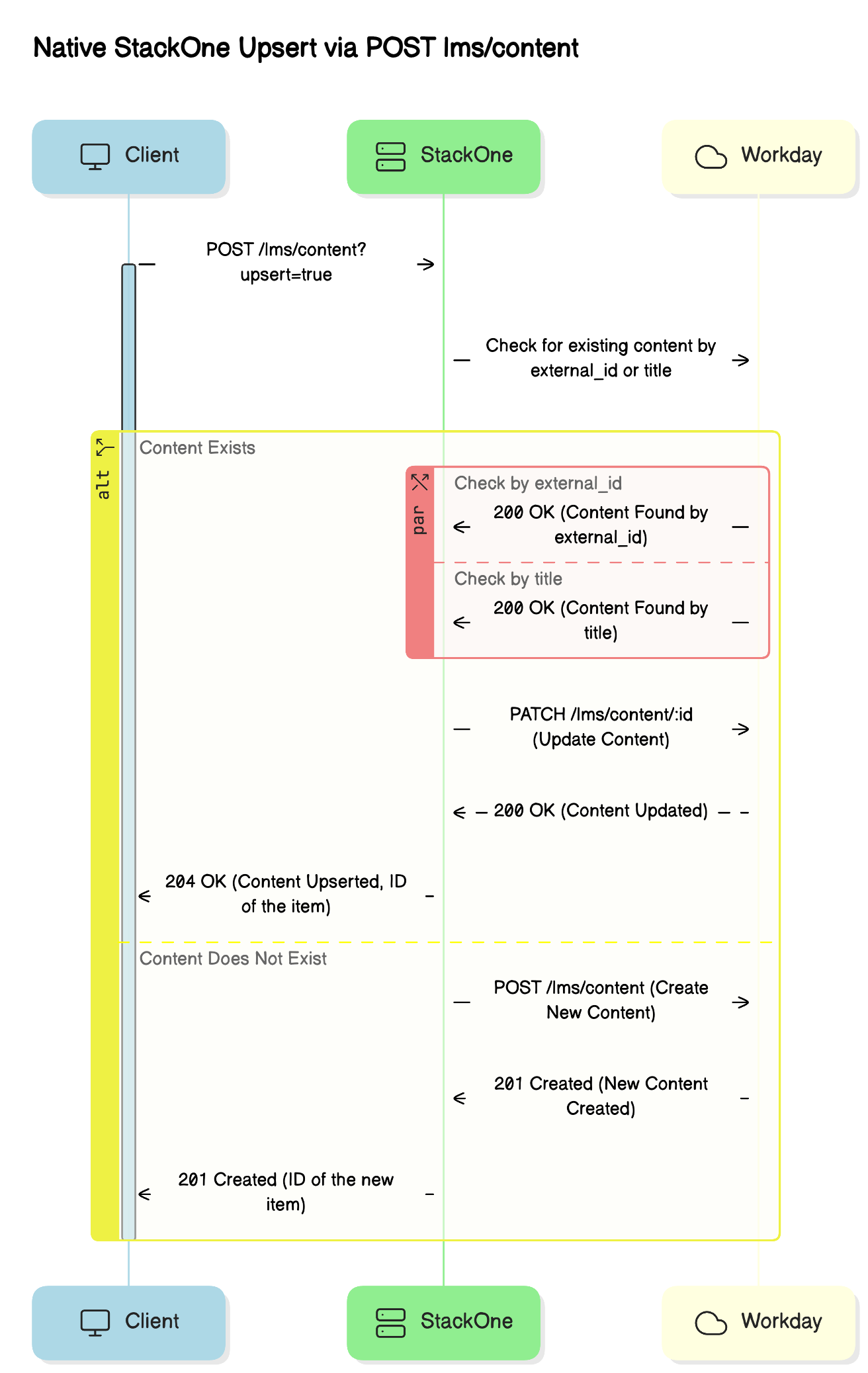
Workday uses both `external_reference` and `title` to identify content:
* If a `title` matches existing content, Workday updates the `external_reference`
* This ensures content remains unique even if references change
**Content lifecycle:**
* **Creation:** Workday automatically creates a course wrapper with these defaults:
* Lesson Order: 1
* Lesson Mandatory: True
* Registrable Status: Open
* Requires Enrollment: True (configurable)
* **Updates:** Workday updates existing content based on the matching rules above
* **Disabling content:** Set the `active` field to `false` to hide courses from learners
**Requirements and limitations:**
* Cover images must be base64 encoded (StackOne handles this automatically)
* Content must include a valid Workday category
* Categories must be customer-specific or retrieved from the unified categories endpoint
 ### **3.2 Completion / Status Push**
**How completions work:**
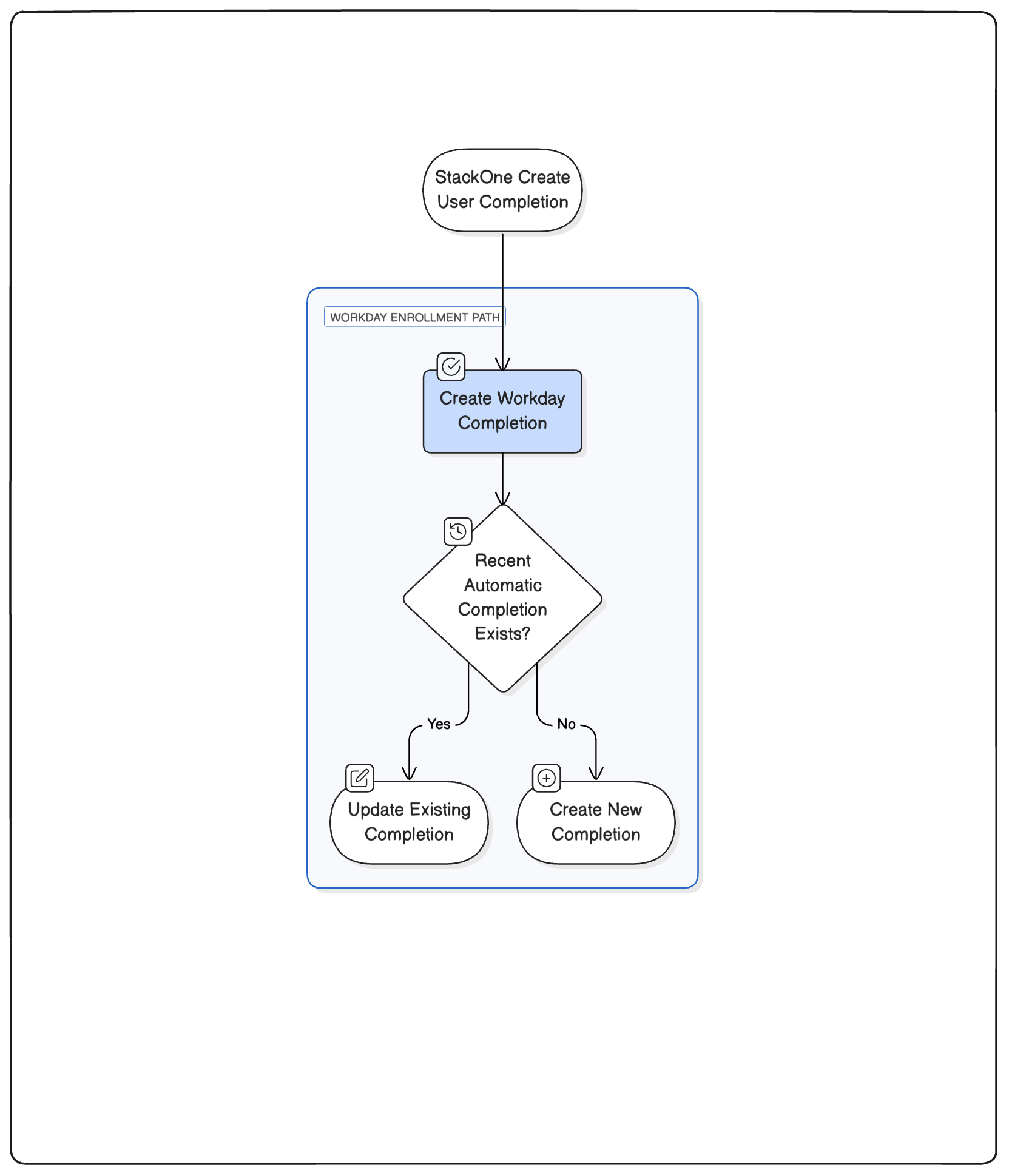
StackOne uses the `learning_object_external_reference` to identify which content the completion relates to.
**Update behavior:**
* StackOne updates existing completion records instead of creating duplicates
* This prevents discrepancies between your platform and Workday
**Important timing considerations:**
Workday automatically creates completion records when users launch content. StackOne's completion push updates these existing records to reflect the actual completion status from your platform.
**Cleanup options:**
If you need to remove incorrect completions, use the DELETE user completion endpoint.
### **3.2 Completion / Status Push**
**How completions work:**
StackOne uses the `learning_object_external_reference` to identify which content the completion relates to.
**Update behavior:**
* StackOne updates existing completion records instead of creating duplicates
* This prevents discrepancies between your platform and Workday
**Important timing considerations:**
Workday automatically creates completion records when users launch content. StackOne's completion push updates these existing records to reflect the actual completion status from your platform.
**Cleanup options:**
If you need to remove incorrect completions, use the DELETE user completion endpoint.
 ### **3.3 Additional Writeable Resources**
**Categories:**
* List/get categories from Workday tenant
* Required for content categorization during upsert
***
## **4. Field-to-UI Mapping**
### **4.1 Overview**
This section shows how each unified API field maps into the Workday learner and admin UI. This is essential for previewing how course metadata appears inside **Learning → Discover**, **Course Details**, and **Admin View**.
### **4.2 Mapping Table**
| Unified API Field | Workday Field / Behaviour | UI Location | Screenshot Placeholder | Notes |
| -------------------- | -------------------------------------------- | ----------------------------- | ----------------------------------------------------------------------------------------------------------------------------------------------------------------------------------------------------------------------------------------------------------------------------------------------------------------------------------------------------------------------------------------------------------------------------------------------------------------------------------------------------------------------------------------------------------------------------------------------------------------------------------------------------------------------------------------------------------------------------------------------------------------------------------------------------------------------------------------------------------------------------------------------------------------------------------------------------------------------------------------------------------------------------------------------------------------------------------------------------------------------------------------------------------------------------------------------------------------------------------------------------------------------------------------------------------------------------------------------------------------------------------------------------------------------------------------------------------------------------------------------------------------------------------------------------------------------------------------------------------------------------------------------------------------------------------------------------------------- | ----------------------------------------------- |
| title | Course & Lesson Title | Discover card + Course header |
### **3.3 Additional Writeable Resources**
**Categories:**
* List/get categories from Workday tenant
* Required for content categorization during upsert
***
## **4. Field-to-UI Mapping**
### **4.1 Overview**
This section shows how each unified API field maps into the Workday learner and admin UI. This is essential for previewing how course metadata appears inside **Learning → Discover**, **Course Details**, and **Admin View**.
### **4.2 Mapping Table**
| Unified API Field | Workday Field / Behaviour | UI Location | Screenshot Placeholder | Notes |
| -------------------- | -------------------------------------------- | ----------------------------- | ----------------------------------------------------------------------------------------------------------------------------------------------------------------------------------------------------------------------------------------------------------------------------------------------------------------------------------------------------------------------------------------------------------------------------------------------------------------------------------------------------------------------------------------------------------------------------------------------------------------------------------------------------------------------------------------------------------------------------------------------------------------------------------------------------------------------------------------------------------------------------------------------------------------------------------------------------------------------------------------------------------------------------------------------------------------------------------------------------------------------------------------------------------------------------------------------------------------------------------------------------------------------------------------------------------------------------------------------------------------------------------------------------------------------------------------------------------------------------------------------------------------------------------------------------------------------------------------------------------------------------------------------------------------------------------------------------------------- | ----------------------------------------------- |
| title | Course & Lesson Title | Discover card + Course header | 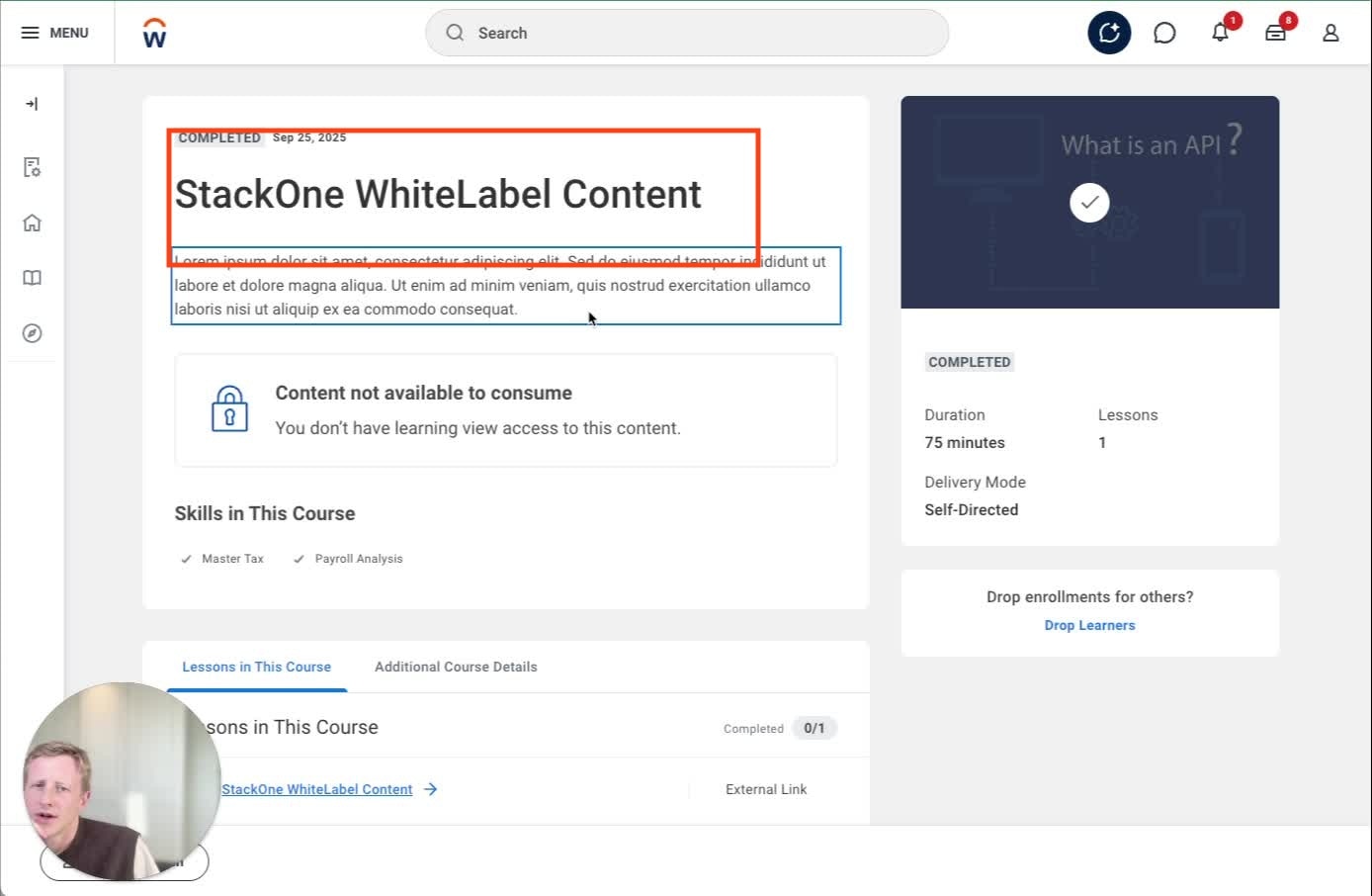 | Updates everywhere when changed |
| external\_reference | Learning Course ID | Admin View | | Must be unique; changing creates new course |
| description | Description | Course page |
| Updates everywhere when changed |
| external\_reference | Learning Course ID | Admin View | | Must be unique; changing creates new course |
| description | Description | Course page | 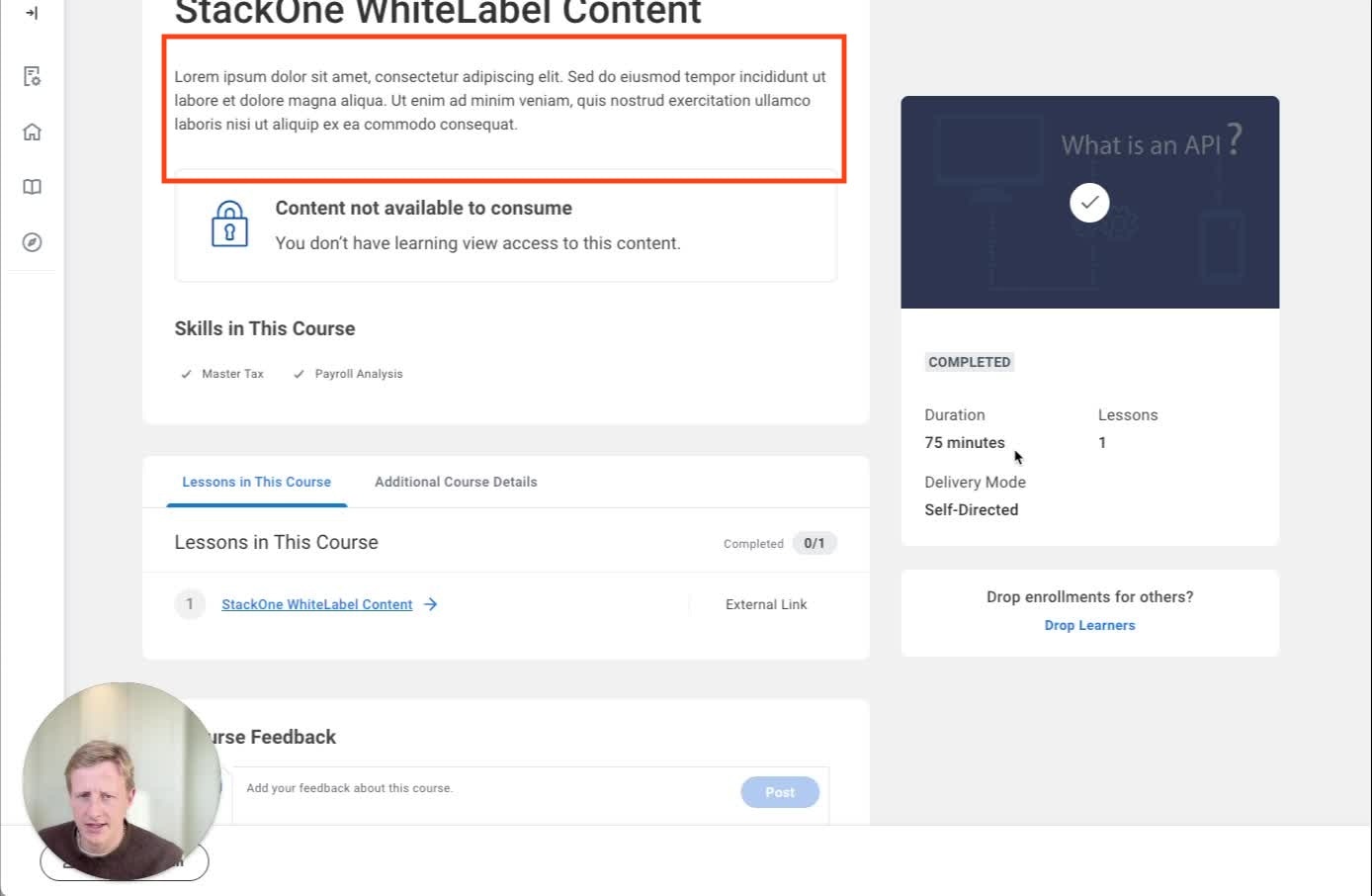 | HTML stripped; truncated on tiles |
| duration | Time Value Reference + Total Course Duration | Course page + Admin |
| HTML stripped; truncated on tiles |
| duration | Time Value Reference + Total Course Duration | Course page + Admin | 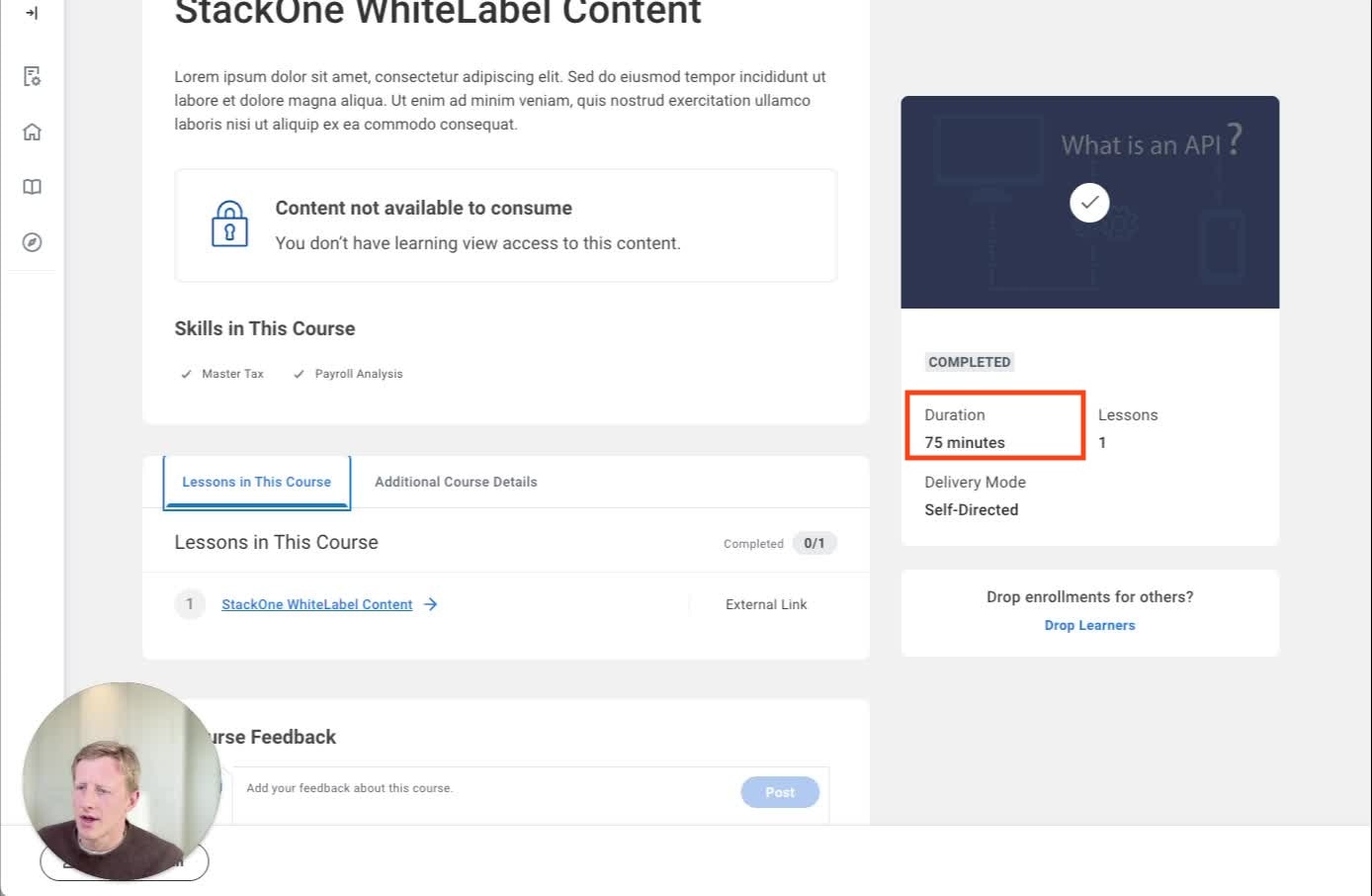 | ISO-8601 converted to minutes |
| categories | Topics Reference | Additional Course Details |
| ISO-8601 converted to minutes |
| categories | Topics Reference | Additional Course Details | 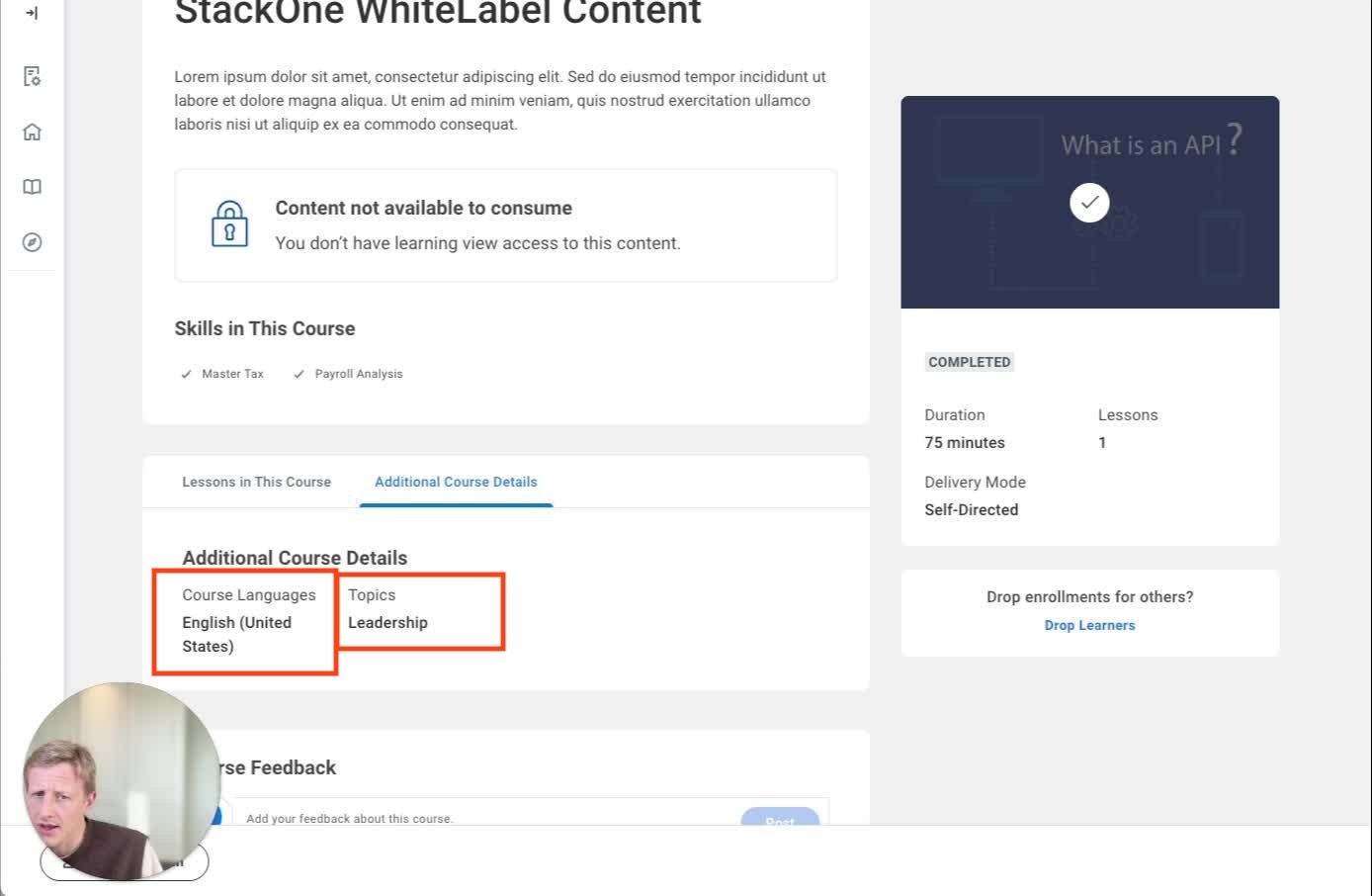 | Must match existing topics |
| skills | Skill Reference | Course page |
| Must match existing topics |
| skills | Skill Reference | Course page | 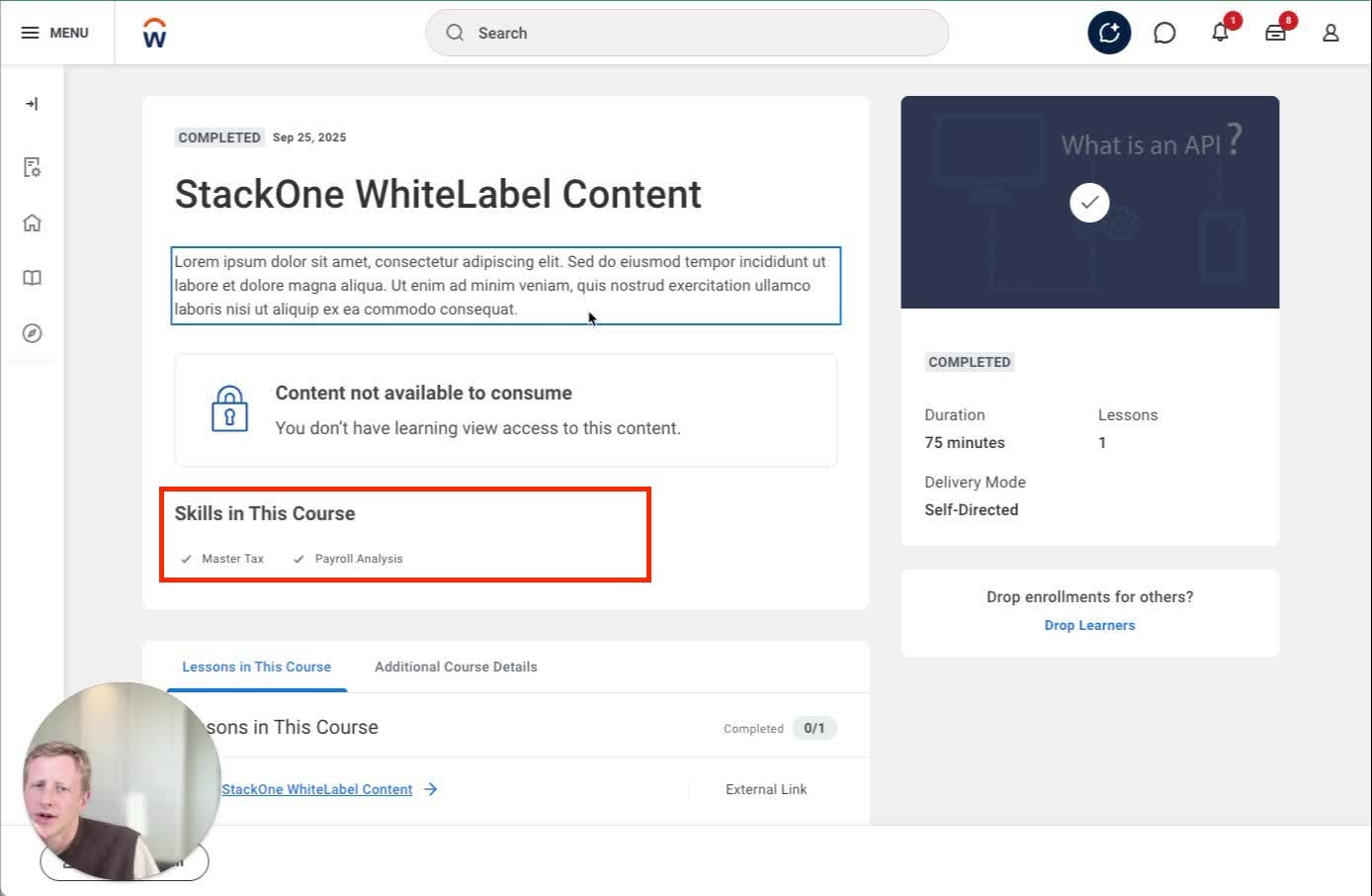 | Unknown skills cause failure |
| languages | Language Reference | Additional Details | | Only first language displayed |
| content\_url | External Content URL | Admin → Lessons |
| Unknown skills cause failure |
| languages | Language Reference | Additional Details | | Only first language displayed |
| content\_url | External Content URL | Admin → Lessons | 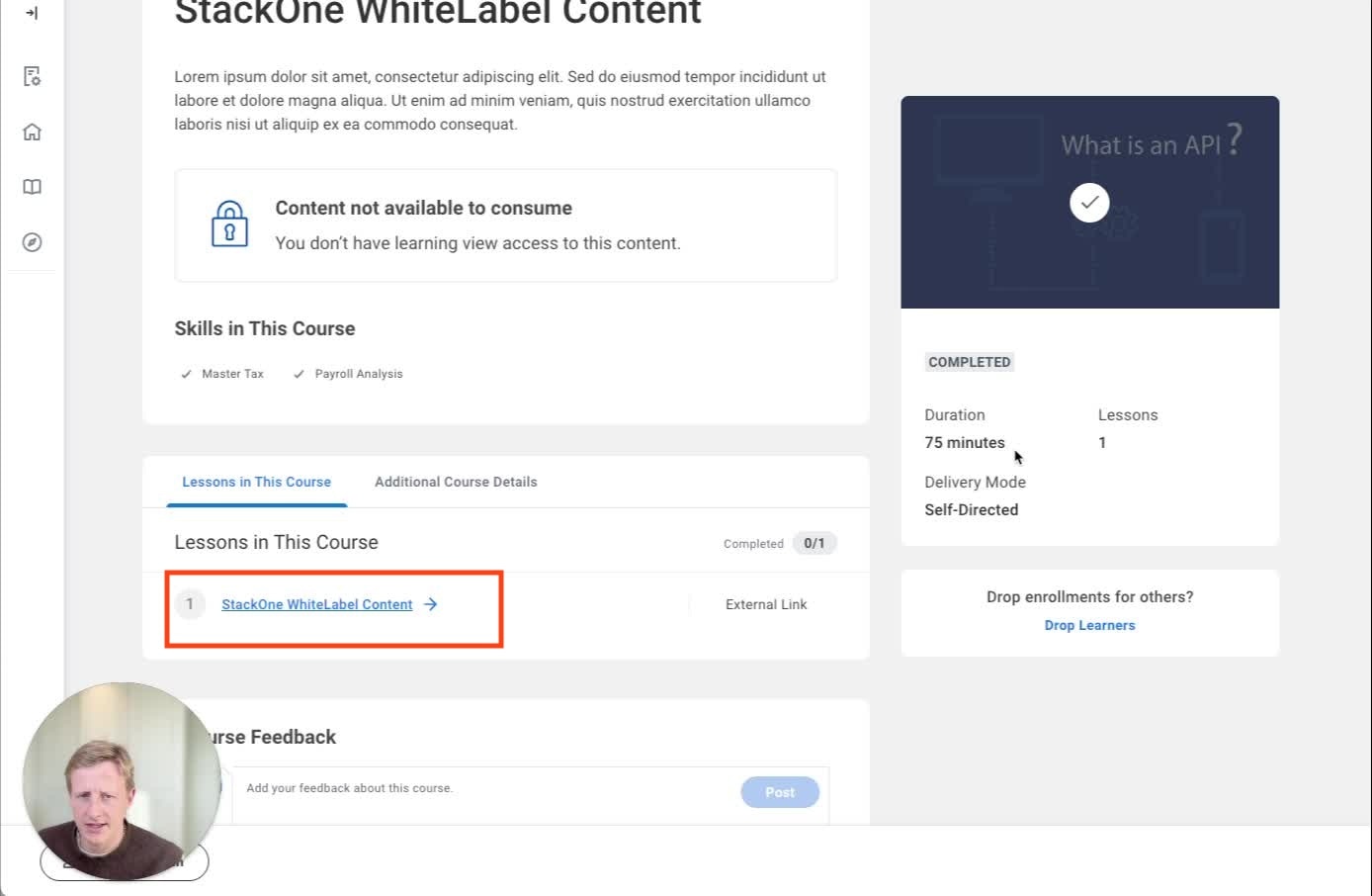 | Hidden from learners; launched via Start/Enroll |
| cover\_url | Course Image Data | Discover tile + Course page |
| Hidden from learners; launched via Start/Enroll |
| cover\_url | Course Image Data | Discover tile + Course page | 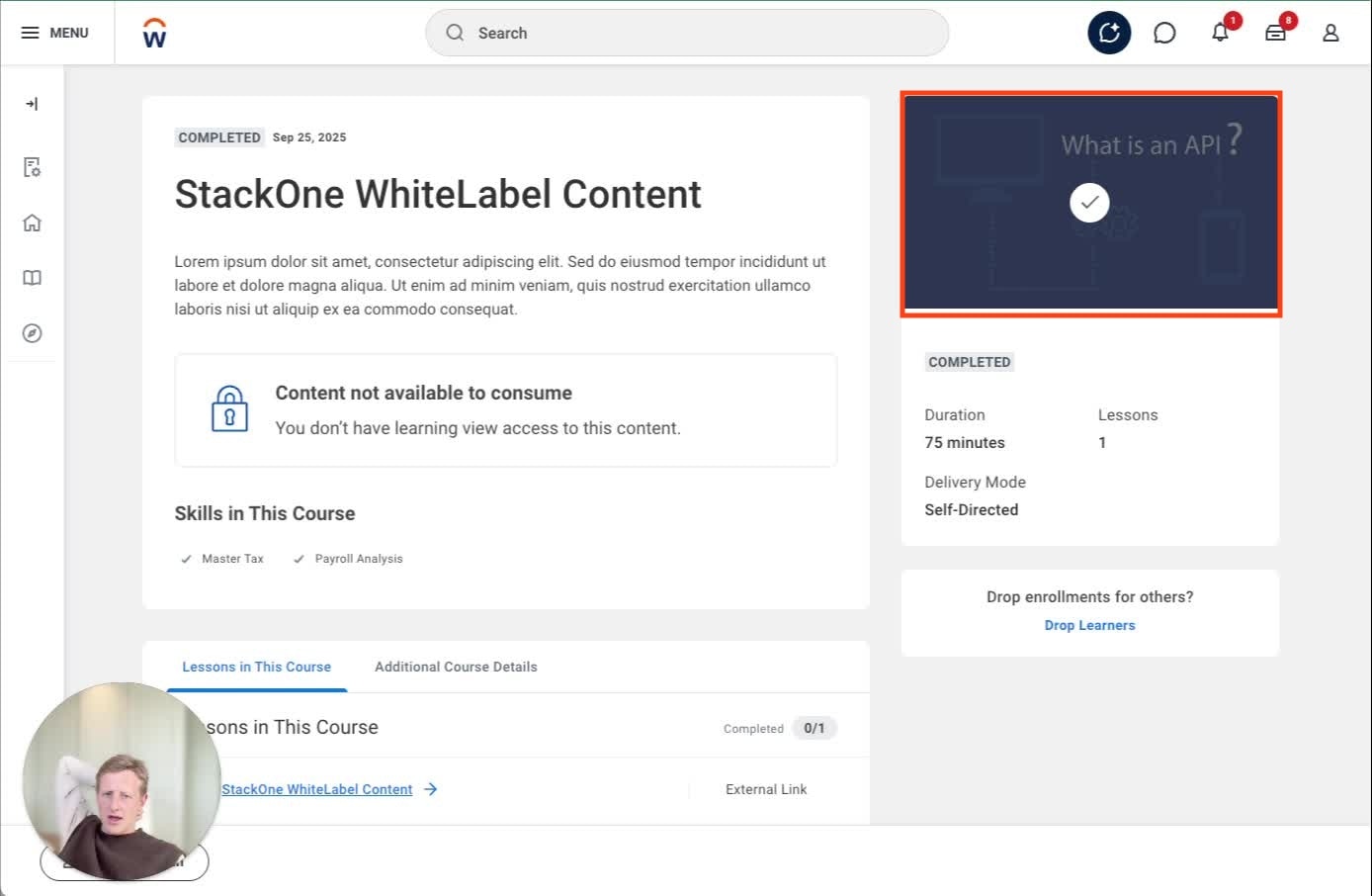 | Must be publicly accessible |
| active | Inactive | Admin | | false → hides course |
| requires\_enrollment | Requires Enrollment | Admin |
| Must be publicly accessible |
| active | Inactive | Admin | | false → hides course |
| requires\_enrollment | Requires Enrollment | Admin | 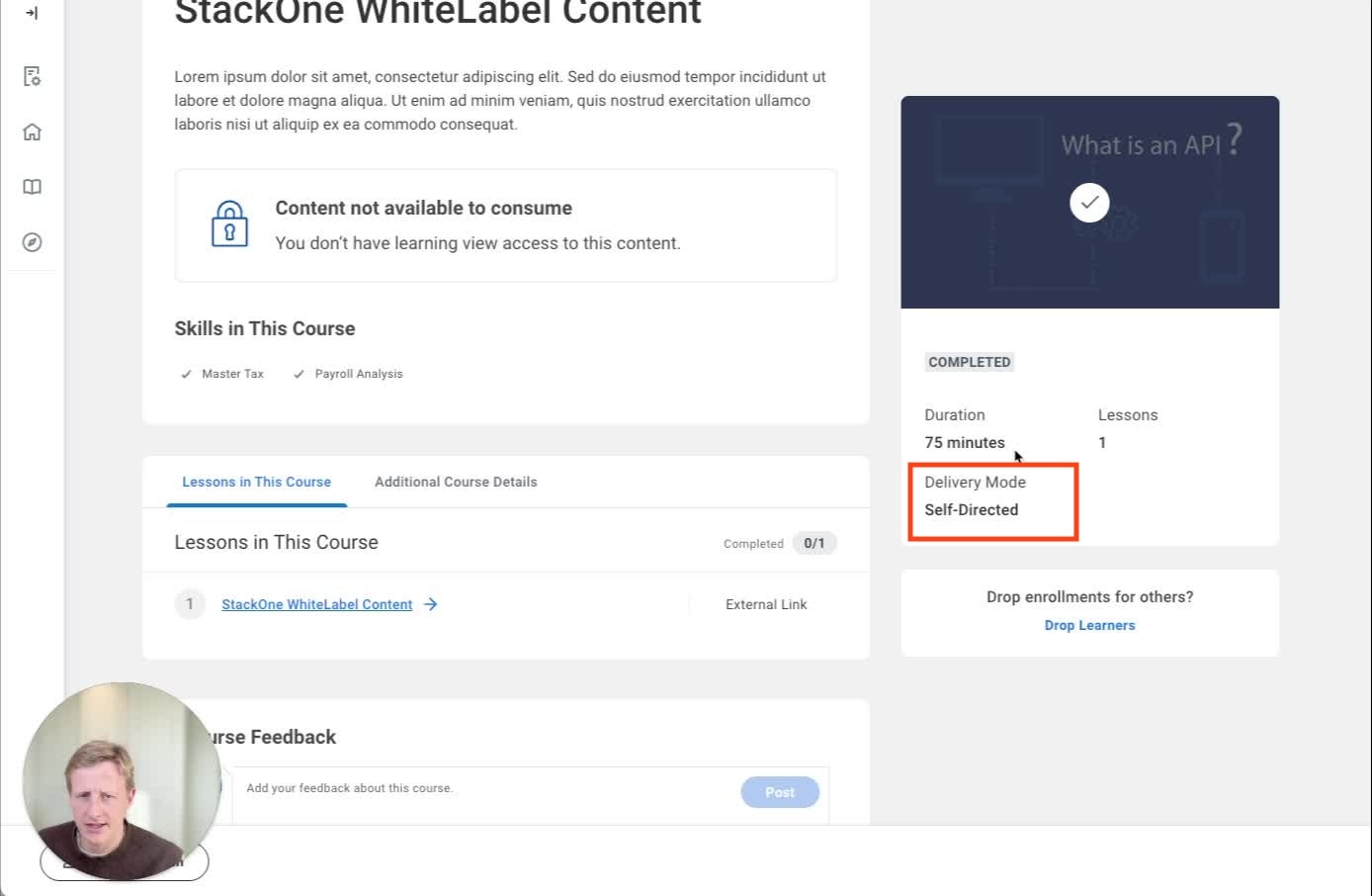 | false → self-directed |
| mobile\_url | Mobile Lesson | Lessons tab | | Creates additional mobile lesson |
### **4.3 UI Walkthrough**
#### **4.3.1 Discover Catalogue**
* Course appears with:
* Cover image
* Title
* Duration
* Short description excerpt
* Users can filter by Topic, Language, Content Provider
> **Screenshot:**
| false → self-directed |
| mobile\_url | Mobile Lesson | Lessons tab | | Creates additional mobile lesson |
### **4.3 UI Walkthrough**
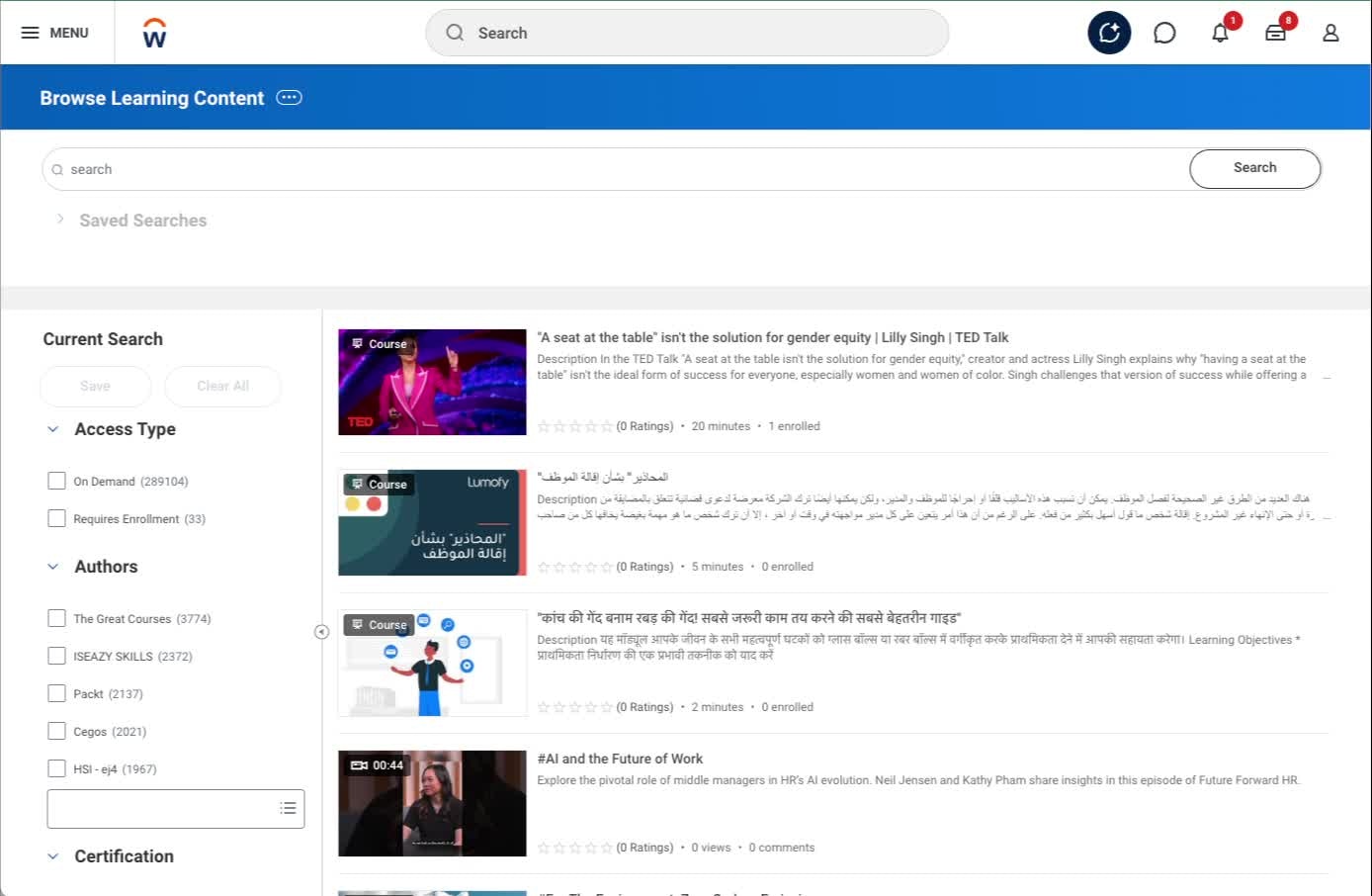
#### **4.3.1 Discover Catalogue**
* Course appears with:
* Cover image
* Title
* Duration
* Short description excerpt
* Users can filter by Topic, Language, Content Provider
> **Screenshot:**  > **Screenshot:**
  > **Screenshot:**
  #### **4.3.2 Course Page (Learner View)**
* Full description
* Skills
* Cover image
* Start/Enroll button
* Completion badge if completed
> **Screenshot:**
#### **4.3.2 Course Page (Learner View)**
* Full description
* Skills
* Cover image
* Start/Enroll button
* Completion badge if completed
> **Screenshot:**  #### **4.3.3 Lessons in This Course**
* Lesson 1 auto-generated
* Type: External Lesson
* Required flag visible
> **Screenshot:**
#### **4.3.4 Admin View**
* External Reference
* Requires Enrollment
* Enforce Lesson Order
* Topics, Skills, Languages
***
## **5. Derived Values & Defaults**
### **5.1 Derived / Computed Values**
* Cover images: URLs converted to base64 encoding automatically
* Duration: ISO-8601 format converted to minutes for Workday display
* Course wrapper: Auto-generated around individual content items
### **5.2 System Defaults Applied by StackOne**
* Content requires enrollment: True (configurable at account level)
* Lesson Mandatory: True
* Lesson Order: 1
* Registrable Status: Open
* Course creation: Auto-wraps individual content in course structure
### **5.3 Hardcoded / Strict Enums**
* **Languages:** Locale codes (e.g., `en_gb`)
* **Result:** `pass` or `fail`
* **Categories:** Must match existing Workday categories or use unified categories endpoint
***
## **6. Configuration**
### **6.1 StackOne Config Options**
* **Enrollment Required (Content):** Yes/No - Controls whether content requires enrollment
* **Create Duplicate Content for Mobile:** Yes/No - Creates additional mobile lesson when mobile\_url provided
* **Content Categories:** Customer-specific category mapping
### **6.2 System-Level Configuration**
* External content feature must be enabled in Workday tenant
* Learning Administrator role assigned to managing users
* Category structure configured for content organization
### **6.3 Identity / SSO Mapping**
* Users identified through Workday's internal user management
* Completions linked via `learning_object_external_reference`
* Auto-enrollment creates user-content relationships
### **6.4 Account Configuration**
* **Requires Enrollment (Account):** Yes/No - Toggle whether a user needs approval to launch a course.
* **Media File ID (WID):** If using the Media File CompletionBlocker approach, enter the Workday WID of the file used for the blocker.
***
## **7. Quirks & Limitations**
### **Known Limitations**
**Rate limits:**
* 5-10 requests per second maximum
**Cover images:**
* Must be base64 encoded (StackOne handles this automatically)
* If URL conversion fails, the content upsert will fail
**Mobile content:**
* Workday doesn't natively support mobile-specific URLs
* Requires creating a duplicate lesson (see Section 6.1 for configuration)
### **System-Specific Behaviors**
**Content categorization:**
* Content may appear categorized as "internal" even when it links to an external provider
* This is a Workday UI behavior and doesn't affect functionality
**Automatic completions:**
* Workday automatically marks content as complete when users launch it from the UI
* For single-lesson courses, Workday completes the entire course immediately on launch
**Content identification:**
* Workday uses both `external_reference` AND `title` for deduplication
* This differs from other LMS systems that typically use only the external reference
### **Potential Issues and Solutions**
**Completion discrepancies:** Workday auto-creates enrollments and completions, which can cause differences between your platform's progress data and Workday's status.
**How to handle this:**
* StackOne updates existing completion records instead of creating new ones
* Use the DELETE user completion endpoint to clean up incorrect records
* Consider the SCORM course blocker workaround for auto-completion issues (see Section 8 → Integration Configurations)
***
## **8. Testing & Validation**
### **8.1 Recommended Test Cases**
1. **Content Creation:** Push new content with all fields → Verify appears in Discover with correct metadata
2. **Content Update:** Update existing content title → Verify deduplication works correctly
3. **Completion Push:** Send completion for enrolled user → Verify updates existing record without duplicate
4. **Mobile Content:** Push content with mobile\_url and mobile duplication enabled → Verify two lessons created
5. **Category Validation:** Push content with invalid category → Verify appropriate error handling
6. **Cover Image Handling:** Push content with URL-based cover image → Verify base64 conversion success
### **8.2 Sample Payloads**
```json theme={null}
// Content Upsert (PUT /unified/lms/content)
{
"title": "Advanced Sales Techniques",
"external_reference": "ADV-SALES-001",
"description": "A comprehensive course covering modern B2B sales strategies.",
"languages": [
{ "value": "en_GB" },
{ "value": "fr_FR" }
],
"content_url": "https://provider.example.com/courses/adv-sales-001",
"cover_url": "https://cdn.example.com/images/adv-sales-001.jpg",
"active": true,
"duration": "PT1H30M45S",
"skills": [
{ "id": "skill-001", "name": "Sales Techniques", "hierarchy": { "value": "primary" }, "language": { "value": "en_GB" } },
{ "name": "Customer Engagement", "hierarchy": { "value": "secondary" } }
],
"order": 1,
"categories": [
{ "name": "Sales" },
{ "id": "cat-technology", "name": "Technology" }
],
}
// Completion Push (POST /unified/lms/users/{id}/completions)
{
"learning_object_external_reference": "ADV-SALES-001",
"result": { "value": "Pass" },
"completed_at": "2025-01-15T14:45:30.000Z",
"time_spent": "PT45M",
"score": {
"value": 100,
"raw_value": "A+"
}
}
```
### **8.3 Troubleshooting Checklist**
| **Issue** | **Root Cause** | **Verification Steps** |
| --------------------------------- | -------------------------------------------------- | ------------------------------------------------------------------- |
| Content not appearing in Discover | Invalid category or inactive status | Check categories endpoint, verify active=true |
| Cover image not displaying | URL conversion to base64 failed | Verify image URL is public and accessible |
| Duplicate completions | Auto-completion + manual completion | Check completion records, use DELETE endpoint if needed |
| Content update creates new course | Title changed without matching external\_reference | Verify deduplication logic using both title and external\_reference |
| Mobile lesson not created | Mobile duplication disabled or mobile\_url missing | Check connector configuration and mobile\_url field |
### **8.4 Troubleshooting Unified Logs**
When creating content in Workday, StackOne makes several API requests. Some of these requests are expected to fail during normal operation—this is not an indication of a problem.
#### **Expected Request Patterns for Each Content Item**
For each content item, StackOne makes the following requests:
**1. Two GET requests to check if content exists**
These requests search by `title` and `external_reference` to determine if content already exists in Workday.
**Expected 500 errors:** If the content doesn't exist, these requests return a 500 status code with the error message:
`Validation error occurred. Invalid ID value. 'XYZ' is not a valid ID value for type = 'Learning_Course_ID'` or `type = 'Learning_Course'`
This is normal behavior and does not indicate an underlying issue.
**Different error messages may indicate real issues:**
If you see a different `faultString`, investigate further. For example:
* `invalid username or password` indicates credential issues—contact the customer to verify their Workday credentials
**2. Cover image download**
StackOne downloads the cover image from the provided URL to convert it to a base64 string, which Workday requires.
You can identify this request by the URL, which will point to your image hosting service.
If this request fails, it indicates:
* An issue with your image hosting service
* The image URL is not publicly accessible
* Network connectivity problems
**3. Content push operation**
Finally, StackOne pushes the content to Workday using one of two methods:
* **Update:** If content already exists (based on the earlier GET requests)
* **Create:** If the content is new
### **Integration Configurations**
#### **Media File Completion Blocker**
Workday fires automatic completions when a user launches a course from the UI. If the Workday course is a single content item (i.e. one lesson within the course) Workday will also complete the course at this point.
This means that there will often be a discrepancy between the real user progress on the course in the external content provider and the completion status in Workday.
Workday doesn't allow configuration on this but we can provide a Workday approved workaround.
This will require your customer to upload a media file to the Workday system which will contain a PDF instructing the user to return to and complete any previous lessons on the external content provider page before completing the media lesson. As a result it blocks the completion of the course where it would normally auto-complete.
#### **4.3.3 Lessons in This Course**
* Lesson 1 auto-generated
* Type: External Lesson
* Required flag visible
> **Screenshot:**
#### **4.3.4 Admin View**
* External Reference
* Requires Enrollment
* Enforce Lesson Order
* Topics, Skills, Languages
***
## **5. Derived Values & Defaults**
### **5.1 Derived / Computed Values**
* Cover images: URLs converted to base64 encoding automatically
* Duration: ISO-8601 format converted to minutes for Workday display
* Course wrapper: Auto-generated around individual content items
### **5.2 System Defaults Applied by StackOne**
* Content requires enrollment: True (configurable at account level)
* Lesson Mandatory: True
* Lesson Order: 1
* Registrable Status: Open
* Course creation: Auto-wraps individual content in course structure
### **5.3 Hardcoded / Strict Enums**
* **Languages:** Locale codes (e.g., `en_gb`)
* **Result:** `pass` or `fail`
* **Categories:** Must match existing Workday categories or use unified categories endpoint
***
## **6. Configuration**
### **6.1 StackOne Config Options**
* **Enrollment Required (Content):** Yes/No - Controls whether content requires enrollment
* **Create Duplicate Content for Mobile:** Yes/No - Creates additional mobile lesson when mobile\_url provided
* **Content Categories:** Customer-specific category mapping
### **6.2 System-Level Configuration**
* External content feature must be enabled in Workday tenant
* Learning Administrator role assigned to managing users
* Category structure configured for content organization
### **6.3 Identity / SSO Mapping**
* Users identified through Workday's internal user management
* Completions linked via `learning_object_external_reference`
* Auto-enrollment creates user-content relationships
### **6.4 Account Configuration**
* **Requires Enrollment (Account):** Yes/No - Toggle whether a user needs approval to launch a course.
* **Media File ID (WID):** If using the Media File CompletionBlocker approach, enter the Workday WID of the file used for the blocker.
***
## **7. Quirks & Limitations**
### **Known Limitations**
**Rate limits:**
* 5-10 requests per second maximum
**Cover images:**
* Must be base64 encoded (StackOne handles this automatically)
* If URL conversion fails, the content upsert will fail
**Mobile content:**
* Workday doesn't natively support mobile-specific URLs
* Requires creating a duplicate lesson (see Section 6.1 for configuration)
### **System-Specific Behaviors**
**Content categorization:**
* Content may appear categorized as "internal" even when it links to an external provider
* This is a Workday UI behavior and doesn't affect functionality
**Automatic completions:**
* Workday automatically marks content as complete when users launch it from the UI
* For single-lesson courses, Workday completes the entire course immediately on launch
**Content identification:**
* Workday uses both `external_reference` AND `title` for deduplication
* This differs from other LMS systems that typically use only the external reference
### **Potential Issues and Solutions**
**Completion discrepancies:** Workday auto-creates enrollments and completions, which can cause differences between your platform's progress data and Workday's status.
**How to handle this:**
* StackOne updates existing completion records instead of creating new ones
* Use the DELETE user completion endpoint to clean up incorrect records
* Consider the SCORM course blocker workaround for auto-completion issues (see Section 8 → Integration Configurations)
***
## **8. Testing & Validation**
### **8.1 Recommended Test Cases**
1. **Content Creation:** Push new content with all fields → Verify appears in Discover with correct metadata
2. **Content Update:** Update existing content title → Verify deduplication works correctly
3. **Completion Push:** Send completion for enrolled user → Verify updates existing record without duplicate
4. **Mobile Content:** Push content with mobile\_url and mobile duplication enabled → Verify two lessons created
5. **Category Validation:** Push content with invalid category → Verify appropriate error handling
6. **Cover Image Handling:** Push content with URL-based cover image → Verify base64 conversion success
### **8.2 Sample Payloads**
```json theme={null}
// Content Upsert (PUT /unified/lms/content)
{
"title": "Advanced Sales Techniques",
"external_reference": "ADV-SALES-001",
"description": "A comprehensive course covering modern B2B sales strategies.",
"languages": [
{ "value": "en_GB" },
{ "value": "fr_FR" }
],
"content_url": "https://provider.example.com/courses/adv-sales-001",
"cover_url": "https://cdn.example.com/images/adv-sales-001.jpg",
"active": true,
"duration": "PT1H30M45S",
"skills": [
{ "id": "skill-001", "name": "Sales Techniques", "hierarchy": { "value": "primary" }, "language": { "value": "en_GB" } },
{ "name": "Customer Engagement", "hierarchy": { "value": "secondary" } }
],
"order": 1,
"categories": [
{ "name": "Sales" },
{ "id": "cat-technology", "name": "Technology" }
],
}
// Completion Push (POST /unified/lms/users/{id}/completions)
{
"learning_object_external_reference": "ADV-SALES-001",
"result": { "value": "Pass" },
"completed_at": "2025-01-15T14:45:30.000Z",
"time_spent": "PT45M",
"score": {
"value": 100,
"raw_value": "A+"
}
}
```
### **8.3 Troubleshooting Checklist**
| **Issue** | **Root Cause** | **Verification Steps** |
| --------------------------------- | -------------------------------------------------- | ------------------------------------------------------------------- |
| Content not appearing in Discover | Invalid category or inactive status | Check categories endpoint, verify active=true |
| Cover image not displaying | URL conversion to base64 failed | Verify image URL is public and accessible |
| Duplicate completions | Auto-completion + manual completion | Check completion records, use DELETE endpoint if needed |
| Content update creates new course | Title changed without matching external\_reference | Verify deduplication logic using both title and external\_reference |
| Mobile lesson not created | Mobile duplication disabled or mobile\_url missing | Check connector configuration and mobile\_url field |
### **8.4 Troubleshooting Unified Logs**
When creating content in Workday, StackOne makes several API requests. Some of these requests are expected to fail during normal operation—this is not an indication of a problem.
#### **Expected Request Patterns for Each Content Item**
For each content item, StackOne makes the following requests:
**1. Two GET requests to check if content exists**
These requests search by `title` and `external_reference` to determine if content already exists in Workday.
**Expected 500 errors:** If the content doesn't exist, these requests return a 500 status code with the error message:
`Validation error occurred. Invalid ID value. 'XYZ' is not a valid ID value for type = 'Learning_Course_ID'` or `type = 'Learning_Course'`
This is normal behavior and does not indicate an underlying issue.
**Different error messages may indicate real issues:**
If you see a different `faultString`, investigate further. For example:
* `invalid username or password` indicates credential issues—contact the customer to verify their Workday credentials
**2. Cover image download**
StackOne downloads the cover image from the provided URL to convert it to a base64 string, which Workday requires.
You can identify this request by the URL, which will point to your image hosting service.
If this request fails, it indicates:
* An issue with your image hosting service
* The image URL is not publicly accessible
* Network connectivity problems
**3. Content push operation**
Finally, StackOne pushes the content to Workday using one of two methods:
* **Update:** If content already exists (based on the earlier GET requests)
* **Create:** If the content is new
### **Integration Configurations**
#### **Media File Completion Blocker**
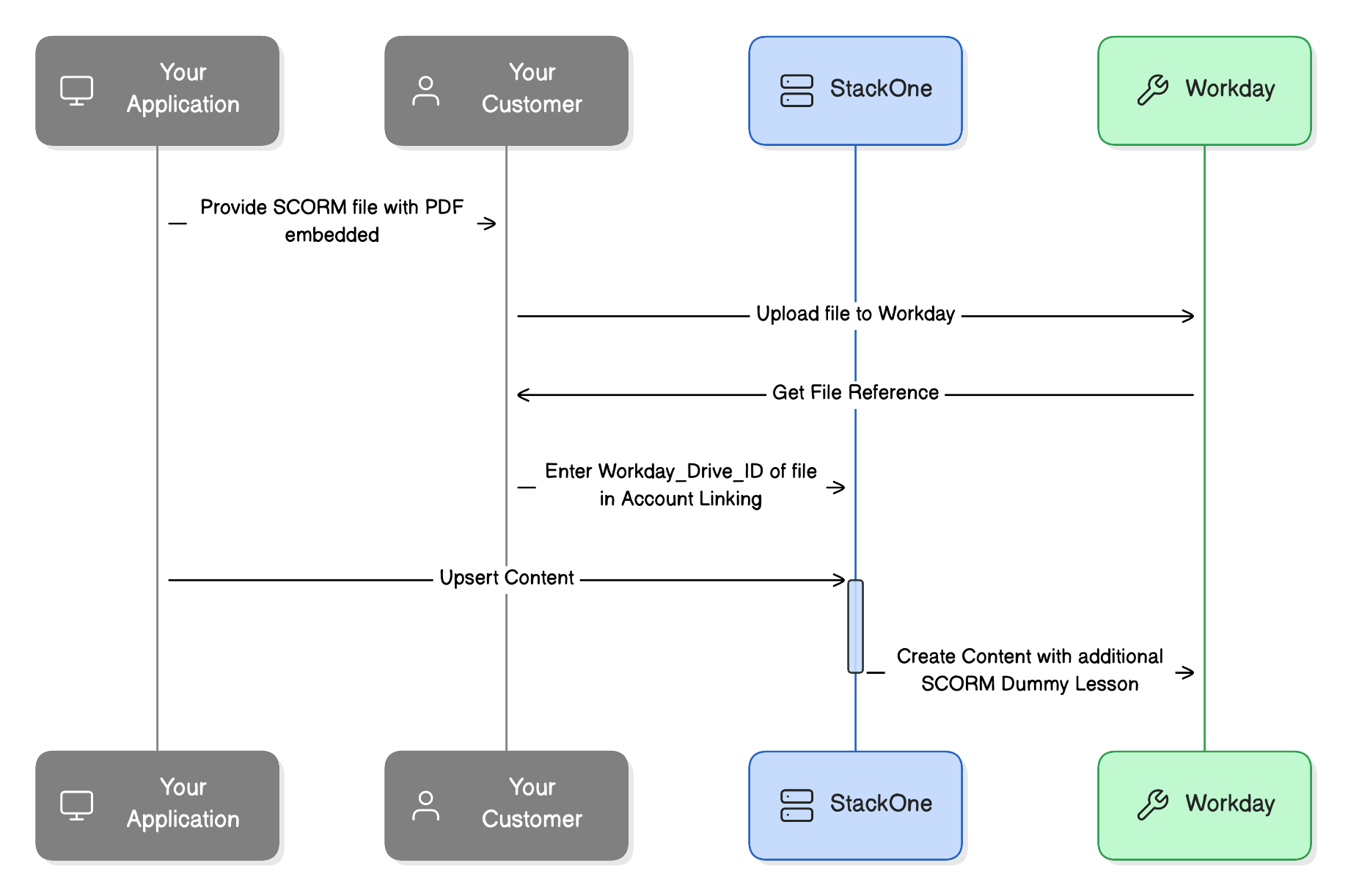
Workday fires automatic completions when a user launches a course from the UI. If the Workday course is a single content item (i.e. one lesson within the course) Workday will also complete the course at this point.
This means that there will often be a discrepancy between the real user progress on the course in the external content provider and the completion status in Workday.
Workday doesn't allow configuration on this but we can provide a Workday approved workaround.
This will require your customer to upload a media file to the Workday system which will contain a PDF instructing the user to return to and complete any previous lessons on the external content provider page before completing the media lesson. As a result it blocks the completion of the course where it would normally auto-complete.
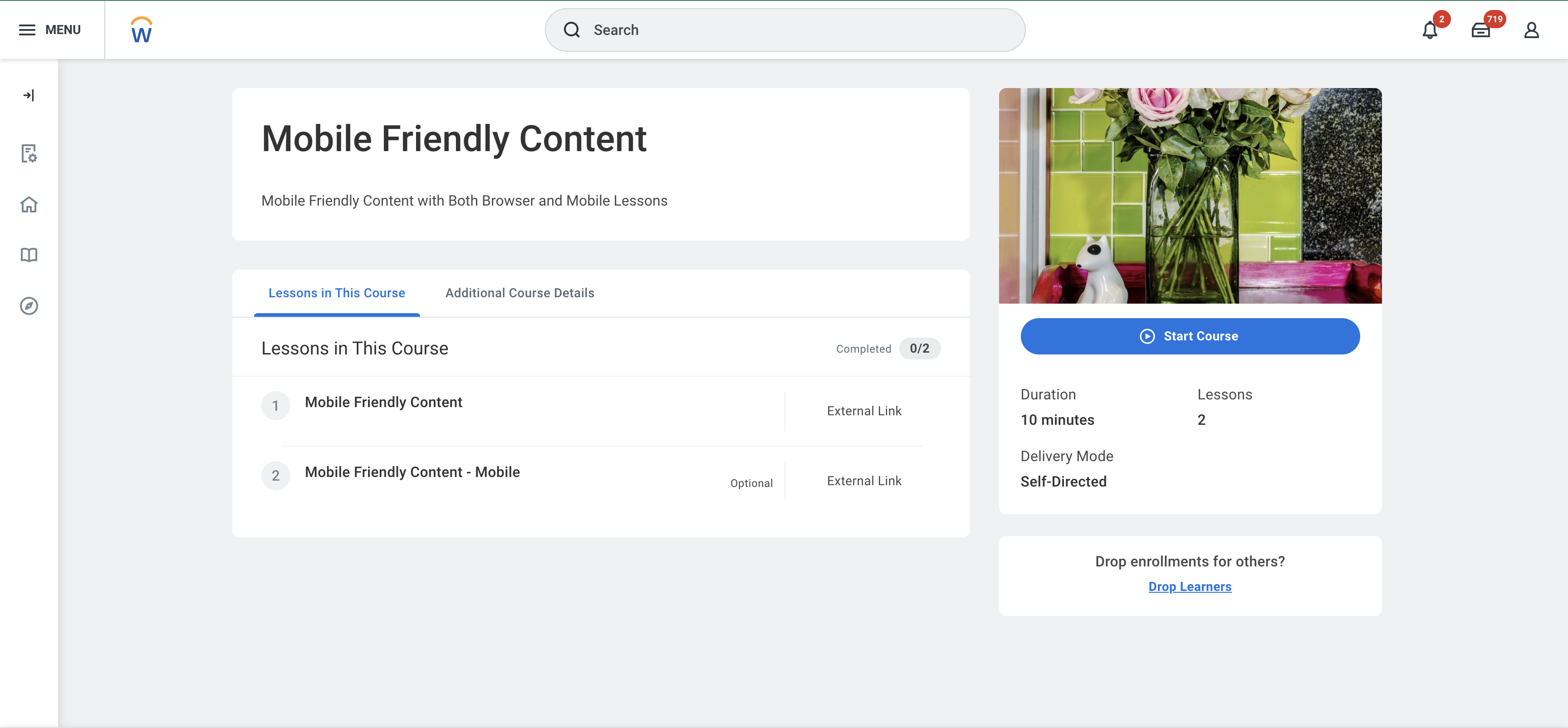
 #### **Mobile Content Lesson**
Workday doesn't support the use of additional mobile friendly content urls with a lesson. In order to help support this we can create an additional duplicate lesson in the content with a mobile specific url.
There are 2 steps to enabling this:
1. Configure the **Create Duplicate Content for Mobile** to Yes in the Integration Configuration
2. Include a value in the [Mobile Launch Content URL](https://docs.stackone.com/lms/api-reference/content/upsert-content#body-mobile-launch-content-url) field.
#### **Mobile Content Lesson**
Workday doesn't support the use of additional mobile friendly content urls with a lesson. In order to help support this we can create an additional duplicate lesson in the content with a mobile specific url.
There are 2 steps to enabling this:
1. Configure the **Create Duplicate Content for Mobile** to Yes in the Integration Configuration
2. Include a value in the [Mobile Launch Content URL](https://docs.stackone.com/lms/api-reference/content/upsert-content#body-mobile-launch-content-url) field.
 ***
***