> ## Documentation Index
> Fetch the complete documentation index at: https://docs.stackone.com/llms.txt
> Use this file to discover all available pages before exploring further.
# Using Expand and Include Parameters
> Learn how to use expand and include parameters to retrieve related data in a single API request.
## Overview
While getting familiar with Unified API, you want to extend API functionality. StackOne API allows joining data from different objects into one combined response.
The StackOne implementation adds advanced query parameters, `include` or `expand`, to obtain the required information.
## Example scenario
Let's imagine an example:
1. You've acquired a [list of your available Accounts](/platform/api-reference/accounts/list-accounts) (account `id`)
2. Then you've retrieved a [list of employees](/hris/api-reference/employees/list-employees) for a specific `x-account-id` and selected one particular employee by specifying the resource`id` in the path
3. Next you want to [get all available information of that employee](/hris/api-reference/employees/get-employee)
At this point, you're getting basic info, such as name, gender, birthday, email, etc. However, you may be missing information documented in the API reference such as `avatar_url` or additional information about the `work_location` and `employment`. This is where the `include ` and `expand` parameters become handy.
## Including optional params
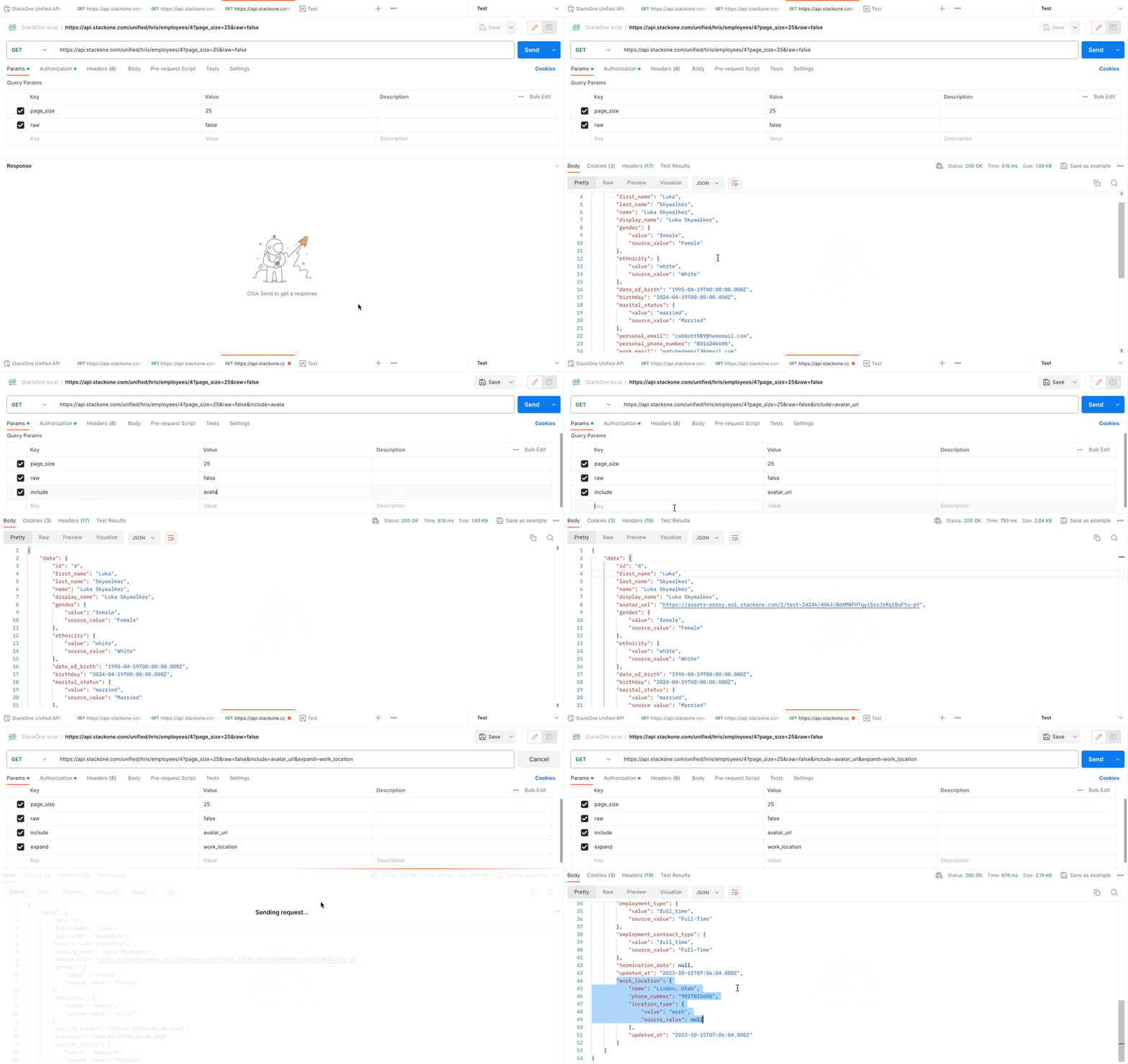
`include` and `expand` reserved keywords allow retrieving additional information about the employee. As an example, the usage of `include`=`avatar_url` and `expand`=`work_location` returns a link to the employee's avatar and details of work location.
**Include**
Include is meant to return additional fields not included by default for privacy or performance reasons. For example, the `avatar_url` field may require the hosting of the underlying image, which can slow down the response unnecessarily if you do not need it.
**Expand**
Expand, on the other hand, is used to expand objects (also called `models`) for which only the ID would otherwise be given and would therefore require a call to another resource to retrieve the underlying data (such as an employee's employment or work location details )
 ## Supported parameter-value mapping
The supported include and expand parameters are specific to the unified API endpoints. They can be seen within the individual endpoints in the API references (e.g., [List Employees](/hris/api-reference/employees/list-employees))
## Supported parameter-value mapping
The supported include and expand parameters are specific to the unified API endpoints. They can be seen within the individual endpoints in the API references (e.g., [List Employees](/hris/api-reference/employees/list-employees))