

 MCP
MCP A2A
A2A- Why Utility Tools
- How It Works
- Evidence
- Examples
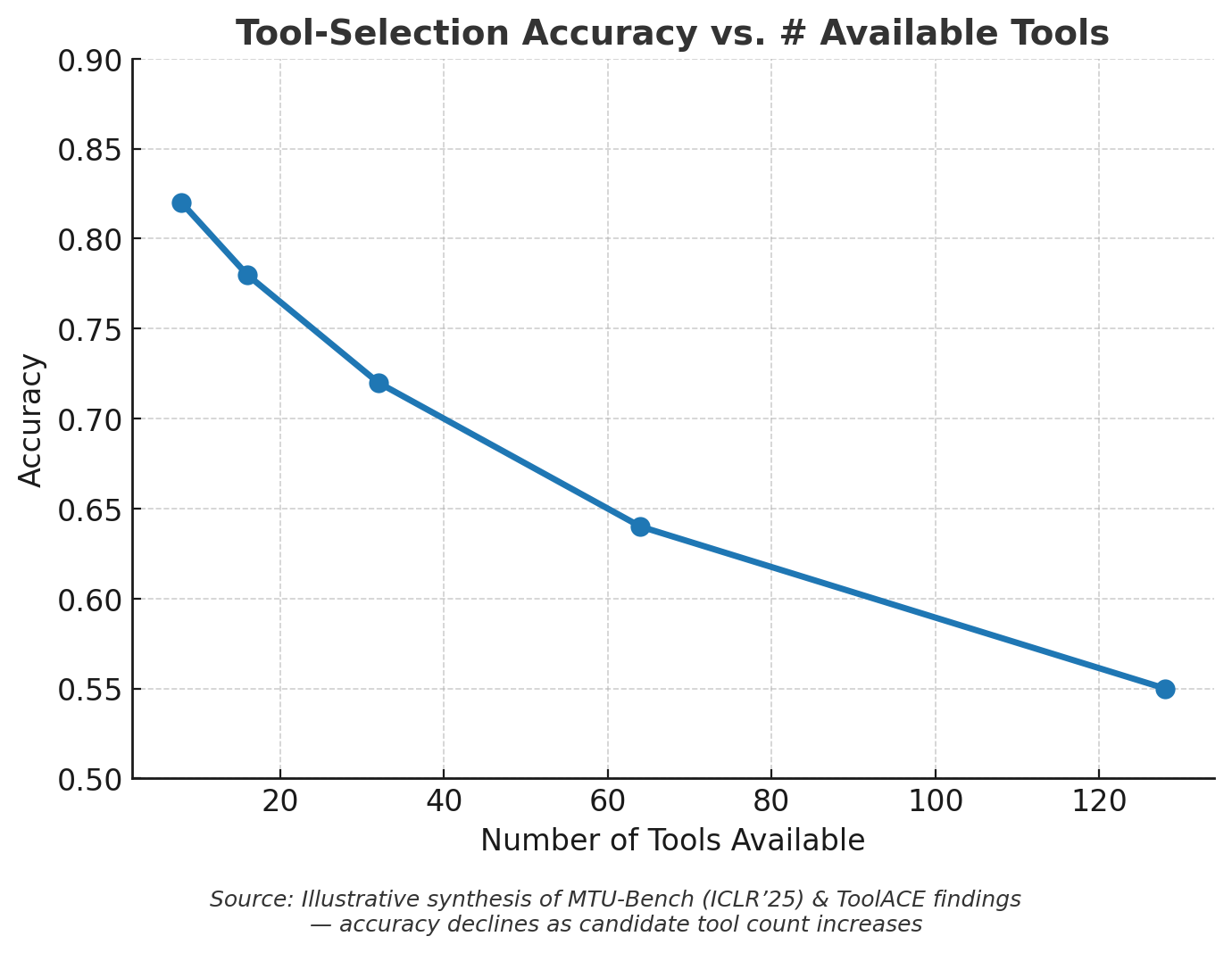
The Problem: Modern LLMs struggle when presented with too many tools in their context window. Every tool definition consumes tokens, bloats prompts, and dilutes reasoning ability.Key Issues:
- Accuracy drops when choosing between hundreds of tools (MTU‑Bench, ToolACE, BFCL v3)
- Context limits hit quickly; “Lost in the Middle” shows long prompts degrade reasoning
- Provider caps: OpenAI/Vertex limit ~128 tools/functions (OpenAI community)
Core Benefits
Scales Effortlessly
Access thousands of tools without token bloat or context overflow
Improves Accuracy
Only relevant tools exposed per request, reducing misfires and hallucinations
Account-Aware
Only returns tools relevant to configured Account IDs, respecting auth and governance controls
Composable
Works with unified actions (HRIS, ATS, LMS, Documents, IAM)
Architecture Overview
Utility tools consist of two main functions:tool_search: Searches for relevant tools based on natural language queries using BM25 semantic searchtool_execute: Executes discovered tools with the provided parameters
How It Works
Benefits
- Dynamic Discovery: No need to hardcode tool names or maintain static lists
- Multi-Tenant Ready: Agents adapt to available integrations per customer
- Natural Language: Search tools using descriptive queries
- Intelligent Routing: BM25 algorithm finds the most relevant tools automatically
TypeScript Implementation
In the TypeScript SDK, utility tools are implemented using:- Orama Database: Fast in-memory search index for tool discovery
- BM25 Algorithm: Statistical ranking function for relevance scoring
- Native TypeScript Types: Full type safety for tool parameters and responses
Read more: For guidance on using utility tools in TypeScript, including advanced use cases, multi-agent workflows, and framework integrations, see Utility Tools.
Next Steps
- Get started with utility tools - Practical implementation guide
- Advanced Utility Tools usage - Framework integration patterns
- OpenAI integration - Use utility tools with OpenAI
- Vercel AI SDK - Stream utility tool responses