> ## Documentation Index
> Fetch the complete documentation index at: https://docs.stackone.com/llms.txt
> Use this file to discover all available pages before exploring further.

# Connect Envoy with OAuth2 Password Grant – StackOne Hub

> Link a Envoy account in the StackOne Hub using OAuth2 Password Grant. End-user guide to authorize the integration and start using Envoy actions.

<Panel>
  <div className="not-prose guides-scope-selector" data-guides-scope-selector data-guide-actions-json="[{&#x22;id&#x22;:&#x22;envoy_get_company&#x22;,&#x22;label&#x22;:&#x22;Get Company&#x22;,&#x22;scopes&#x22;:[&#x22;companies.read&#x22;]},{&#x22;id&#x22;:&#x22;envoy_list_entries&#x22;,&#x22;label&#x22;:&#x22;List Entries&#x22;,&#x22;scopes&#x22;:[&#x22;entries.read&#x22;]},{&#x22;id&#x22;:&#x22;envoy_get_entry&#x22;,&#x22;label&#x22;:&#x22;Get Entry&#x22;,&#x22;scopes&#x22;:[&#x22;entries.read&#x22;]},{&#x22;id&#x22;:&#x22;envoy_list_invites&#x22;,&#x22;label&#x22;:&#x22;List Invites&#x22;,&#x22;scopes&#x22;:[&#x22;invites.read&#x22;]},{&#x22;id&#x22;:&#x22;envoy_create_invite&#x22;,&#x22;label&#x22;:&#x22;Create Invite&#x22;,&#x22;scopes&#x22;:[&#x22;invites.write&#x22;]},{&#x22;id&#x22;:&#x22;envoy_get_invite&#x22;,&#x22;label&#x22;:&#x22;Get Invite&#x22;,&#x22;scopes&#x22;:[&#x22;invites.read&#x22;]},{&#x22;id&#x22;:&#x22;envoy_update_invite&#x22;,&#x22;label&#x22;:&#x22;Update Invite&#x22;,&#x22;scopes&#x22;:[&#x22;invites.write&#x22;]},{&#x22;id&#x22;:&#x22;envoy_delete_invite&#x22;,&#x22;label&#x22;:&#x22;Delete Invite&#x22;,&#x22;scopes&#x22;:[&#x22;invites.write&#x22;]},{&#x22;id&#x22;:&#x22;envoy_checkin_invite&#x22;,&#x22;label&#x22;:&#x22;Check In Invite&#x22;,&#x22;scopes&#x22;:[&#x22;entries.write&#x22;]},{&#x22;id&#x22;:&#x22;envoy_create_recurring_invite&#x22;,&#x22;label&#x22;:&#x22;Create Recurring Invite&#x22;,&#x22;scopes&#x22;:[&#x22;invites.write&#x22;]},{&#x22;id&#x22;:&#x22;envoy_get_recurring_invite&#x22;,&#x22;label&#x22;:&#x22;Get Recurring Invite&#x22;,&#x22;scopes&#x22;:[&#x22;invites.read&#x22;]},{&#x22;id&#x22;:&#x22;envoy_update_recurring_invite&#x22;,&#x22;label&#x22;:&#x22;Update Recurring Invite&#x22;,&#x22;scopes&#x22;:[&#x22;invites.write&#x22;]},{&#x22;id&#x22;:&#x22;envoy_list_blocklists&#x22;,&#x22;label&#x22;:&#x22;List Blocklist Entries&#x22;,&#x22;scopes&#x22;:[&#x22;blacklist-filters.read&#x22;]},{&#x22;id&#x22;:&#x22;envoy_create_blocklist&#x22;,&#x22;label&#x22;:&#x22;Create Blocklist Entry&#x22;,&#x22;scopes&#x22;:[&#x22;blacklist-filters.write&#x22;]},{&#x22;id&#x22;:&#x22;envoy_get_blocklist&#x22;,&#x22;label&#x22;:&#x22;Get Blocklist Entry&#x22;,&#x22;scopes&#x22;:[&#x22;blacklist-filters.read&#x22;]},{&#x22;id&#x22;:&#x22;envoy_update_blocklist&#x22;,&#x22;label&#x22;:&#x22;Update Blocklist Entry&#x22;,&#x22;scopes&#x22;:[&#x22;blacklist-filters.write&#x22;]},{&#x22;id&#x22;:&#x22;envoy_delete_blocklist&#x22;,&#x22;label&#x22;:&#x22;Delete Blocklist Entry&#x22;,&#x22;scopes&#x22;:[&#x22;blacklist-filters.write&#x22;]},{&#x22;id&#x22;:&#x22;envoy_list_employees&#x22;,&#x22;label&#x22;:&#x22;List Employees&#x22;,&#x22;scopes&#x22;:[&#x22;employees.read&#x22;]},{&#x22;id&#x22;:&#x22;envoy_get_employee&#x22;,&#x22;label&#x22;:&#x22;Get Employee&#x22;,&#x22;scopes&#x22;:[&#x22;employees.read&#x22;]},{&#x22;id&#x22;:&#x22;envoy_list_flows&#x22;,&#x22;label&#x22;:&#x22;List Flows&#x22;,&#x22;scopes&#x22;:[&#x22;flows.read&#x22;]},{&#x22;id&#x22;:&#x22;envoy_get_flow&#x22;,&#x22;label&#x22;:&#x22;Get Flow&#x22;,&#x22;scopes&#x22;:[&#x22;flows.read&#x22;]},{&#x22;id&#x22;:&#x22;envoy_list_locations&#x22;,&#x22;label&#x22;:&#x22;List Locations&#x22;,&#x22;scopes&#x22;:[&#x22;locations.read&#x22;]},{&#x22;id&#x22;:&#x22;envoy_get_location&#x22;,&#x22;label&#x22;:&#x22;Get Location&#x22;,&#x22;scopes&#x22;:[&#x22;locations.read&#x22;]},{&#x22;id&#x22;:&#x22;envoy_list_work_schedules&#x22;,&#x22;label&#x22;:&#x22;List Work Schedules&#x22;,&#x22;scopes&#x22;:[&#x22;work-schedules.read&#x22;]},{&#x22;id&#x22;:&#x22;envoy_get_work_schedule&#x22;,&#x22;label&#x22;:&#x22;Get Work Schedule&#x22;,&#x22;scopes&#x22;:[&#x22;work-schedules.read&#x22;]},{&#x22;id&#x22;:&#x22;envoy_create_work_schedule&#x22;,&#x22;label&#x22;:&#x22;Create Work Schedule&#x22;,&#x22;scopes&#x22;:[&#x22;work-schedules.write&#x22;]},{&#x22;id&#x22;:&#x22;envoy_delete_work_schedule&#x22;,&#x22;label&#x22;:&#x22;Delete Work Schedule&#x22;,&#x22;scopes&#x22;:[&#x22;work-schedules.write&#x22;]},{&#x22;id&#x22;:&#x22;envoy_checkin_work_schedule&#x22;,&#x22;label&#x22;:&#x22;Check In Work Schedule&#x22;,&#x22;scopes&#x22;:[&#x22;work-schedules.write&#x22;]},{&#x22;id&#x22;:&#x22;envoy_checkout_work_schedule&#x22;,&#x22;label&#x22;:&#x22;Check Out Work Schedule&#x22;,&#x22;scopes&#x22;:[&#x22;work-schedules.write&#x22;]},{&#x22;id&#x22;:&#x22;envoy_list_spaces&#x22;,&#x22;label&#x22;:&#x22;List Spaces&#x22;,&#x22;scopes&#x22;:[&#x22;spaces.read&#x22;]},{&#x22;id&#x22;:&#x22;envoy_get_space&#x22;,&#x22;label&#x22;:&#x22;Get Space&#x22;,&#x22;scopes&#x22;:[&#x22;spaces.read&#x22;]},{&#x22;id&#x22;:&#x22;envoy_list_desks&#x22;,&#x22;label&#x22;:&#x22;List Desks&#x22;,&#x22;scopes&#x22;:[&#x22;spaces.read&#x22;]},{&#x22;id&#x22;:&#x22;envoy_get_desk&#x22;,&#x22;label&#x22;:&#x22;Get Desk&#x22;,&#x22;scopes&#x22;:[&#x22;spaces.read&#x22;]},{&#x22;id&#x22;:&#x22;envoy_create_desk&#x22;,&#x22;label&#x22;:&#x22;Create Desk&#x22;,&#x22;scopes&#x22;:[&#x22;spaces.write&#x22;]},{&#x22;id&#x22;:&#x22;envoy_update_desk&#x22;,&#x22;label&#x22;:&#x22;Update Desk&#x22;,&#x22;scopes&#x22;:[&#x22;spaces.write&#x22;]},{&#x22;id&#x22;:&#x22;envoy_delete_desk&#x22;,&#x22;label&#x22;:&#x22;Delete Desk&#x22;,&#x22;scopes&#x22;:[&#x22;spaces.write&#x22;]},{&#x22;id&#x22;:&#x22;envoy_list_reservations&#x22;,&#x22;label&#x22;:&#x22;List Reservations&#x22;,&#x22;scopes&#x22;:[&#x22;reservations.read&#x22;]},{&#x22;id&#x22;:&#x22;envoy_get_reservation&#x22;,&#x22;label&#x22;:&#x22;Get Reservation&#x22;,&#x22;scopes&#x22;:[&#x22;reservations.read&#x22;]},{&#x22;id&#x22;:&#x22;envoy_create_reservation&#x22;,&#x22;label&#x22;:&#x22;Create Reservation&#x22;,&#x22;scopes&#x22;:[&#x22;reservations.write&#x22;]},{&#x22;id&#x22;:&#x22;envoy_checkin_reservation&#x22;,&#x22;label&#x22;:&#x22;Check In Reservation&#x22;,&#x22;scopes&#x22;:[&#x22;reservations.write&#x22;]},{&#x22;id&#x22;:&#x22;envoy_checkout_reservation&#x22;,&#x22;label&#x22;:&#x22;Check Out Reservation&#x22;,&#x22;scopes&#x22;:[&#x22;reservations.write&#x22;]},{&#x22;id&#x22;:&#x22;envoy_cancel_reservation&#x22;,&#x22;label&#x22;:&#x22;Cancel Reservation&#x22;,&#x22;scopes&#x22;:[&#x22;reservations.write&#x22;]},{&#x22;id&#x22;:&#x22;envoy_unified_get_me&#x22;,&#x22;label&#x22;:&#x22;Get Unified Credentials&#x22;,&#x22;scopes&#x22;:[&#x22;employees.read&#x22;]},{&#x22;id&#x22;:&#x22;envoy_unified_list_groups&#x22;,&#x22;label&#x22;:&#x22;List Unified Groups&#x22;,&#x22;scopes&#x22;:[&#x22;locations.read&#x22;]},{&#x22;id&#x22;:&#x22;envoy_unified_get_group&#x22;,&#x22;label&#x22;:&#x22;Get Unified Group&#x22;,&#x22;scopes&#x22;:[&#x22;locations.read&#x22;]},{&#x22;id&#x22;:&#x22;envoy_unified_list_organizations&#x22;,&#x22;label&#x22;:&#x22;List Unified Organizations&#x22;,&#x22;scopes&#x22;:[&#x22;companies.read&#x22;]},{&#x22;id&#x22;:&#x22;envoy_unified_get_organization&#x22;,&#x22;label&#x22;:&#x22;Get Unified Organization&#x22;,&#x22;scopes&#x22;:[&#x22;companies.read&#x22;]},{&#x22;id&#x22;:&#x22;envoy_unified_list_users&#x22;,&#x22;label&#x22;:&#x22;List Unified Users&#x22;,&#x22;scopes&#x22;:[&#x22;employees.read&#x22;]},{&#x22;id&#x22;:&#x22;envoy_unified_get_user&#x22;,&#x22;label&#x22;:&#x22;Get Unified User&#x22;,&#x22;scopes&#x22;:[&#x22;employees.read&#x22;]}]" style={{ borderRadius: '8px', padding: '16px', marginBottom: '24px' }}>
    <div className="guides-scope-selector__title" style={{ fontSize: '16px', fontWeight: '600', marginBottom: '12px' }}>Select Actions to adjust the guide</div>
    <div className="guides-scope-selector__muted" style={{ fontSize: '13px', marginBottom: '12px' }}>Some actions may require additional configuration in the provider to be accessible. Choose the actions you need and the guide will be updated.</div>

    <div style={{ display: 'flex', gap: '8px', marginBottom: '12px', flexWrap: 'wrap' }}>
      <input type="text" placeholder="Search actions..." className="guides-scope-selector__input" data-guide-action-search style={{ padding: '8px 12px', borderRadius: '6px', fontSize: '13px', flex: 1, minWidth: '160px' }} />

      <button type="button" className="guides-scope-selector__quick-btn" data-guide-select-all style={{ padding: '6px 10px', borderRadius: '6px', fontSize: '12px', cursor: 'pointer' }}>Select all</button>
      <button type="button" className="guides-scope-selector__quick-btn" data-guide-clear style={{ padding: '6px 10px', borderRadius: '6px', fontSize: '12px', cursor: 'pointer' }}>Clear</button>
    </div>

    <div className="guides-scope-selector__list" style={{ maxHeight: '240px', overflowY: 'auto', borderRadius: '6px', marginBottom: '12px' }}>
      <div className="guides-scope-selector__list-header" style={{ display: 'flex', alignItems: 'center', gap: '10px', padding: '8px 12px', fontSize: '12px', fontWeight: '600', position: 'sticky', top: 0, zIndex: 1 }}>
        <div style={{ width: '16px', flexShrink: 0 }} />

        <div style={{ flex: 1, textAlign: 'left' }}>Action</div>
        <div style={{ minWidth: '120px', marginLeft: 'auto', textAlign: 'right' }}>Scope(s)</div>
      </div>

      <div className="guides-scope-selector__muted" data-guide-loading style={{ padding: '16px', textAlign: 'center', fontSize: '13px' }}>Loading actions...</div>
      <div className="guides-scope-selector__muted" data-guide-no-results hidden style={{ padding: '16px', textAlign: 'center', fontSize: '13px' }}>No actions match your search.</div>
    </div>

    <div className="guides-scope-selector__url-section" style={{ marginTop: '12px', paddingTop: '12px' }}>
      <div className="guides-scope-selector__muted" style={{ fontSize: '12px', fontWeight: '500', marginBottom: '6px' }}>Dynamic Guide URL</div>

      <div style={{ display: 'flex', alignItems: 'center', gap: '8px', flexWrap: 'wrap' }}>
        <input type="text" readOnly className="guides-scope-selector__input" data-guide-url style={{ flex: 1, minWidth: '200px', padding: '8px 10px', borderRadius: '6px', fontSize: '12px', fontFamily: 'monospace' }} />

        <button type="button" className="guides-scope-selector__copy-btn" data-guide-copy-url style={{ width: '120px', padding: '8px 14px', borderRadius: '6px', fontSize: '13px', fontWeight: '500', cursor: 'pointer', whiteSpace: 'nowrap', marginLeft: 'auto' }}>Copy URL</button>
      </div>

      <div style={{ marginTop: '12px' }}>
        <div className="guides-scope-selector__muted" style={{ fontSize: '12px', fontWeight: '500', marginBottom: '6px' }}>Scopes Selected</div>

        <div style={{ display: 'flex', alignItems: 'stretch', gap: '8px', flexWrap: 'wrap' }}>
          <pre className="guides-scope-selector__input" role="textbox" aria-readonly="true" tabIndex={0} data-guide-scopes-output style={{ flex: 1, minWidth: '200px', minHeight: '88px', maxHeight: '120px', overflowY: 'auto', margin: 0, padding: '8px 10px', borderRadius: '6px', fontSize: '12px', fontFamily: 'monospace', whiteSpace: 'pre-wrap' }} />

          <div className="guides-scope-selector__muted" style={{ display: 'flex', flexDirection: 'column', gap: '8px', fontSize: '12px', fontWeight: '500', flexShrink: 0, alignItems: 'flex-start' }}>
            <div style={{ whiteSpace: 'nowrap' }}>Separator</div>

            <select className="guides-scope-selector__input" data-guide-scope-delimiter style={{ width: '100%', padding: '6px 10px', borderRadius: '6px', fontSize: '12px' }}>
              <option value="space">Space</option>
              <option value="comma">Comma</option>
              <option value="semicolon">Semicolon</option>
              <option value="pipe">Pipe</option>
              <option value="newline">Newline</option>
            </select>

            <button type="button" className="guides-scope-selector__copy-btn" data-guide-copy-scopes style={{ width: '120px', padding: '8px 14px', borderRadius: '6px', fontSize: '13px', fontWeight: '500', cursor: 'pointer', whiteSpace: 'nowrap' }}>Copy scopes</button>
          </div>
        </div>
      </div>
    </div>
  </div>
</Panel>

<section data-guide-section data-guide-scopes="">
  <h2>Enter your Envoy account credentials</h2>

  <p>The OAuth2 password grant signs in with an Envoy user's own email and password, so the connection has exactly that user's permissions. Enter the credentials of the Envoy account you want StackOne to act as into StackOne Hub.</p>

  <Steps>
    <Step title="Enter your Envoy email and password">
      <div data-guide-step data-guide-scopes="" data-guide-display-scopes-list="">
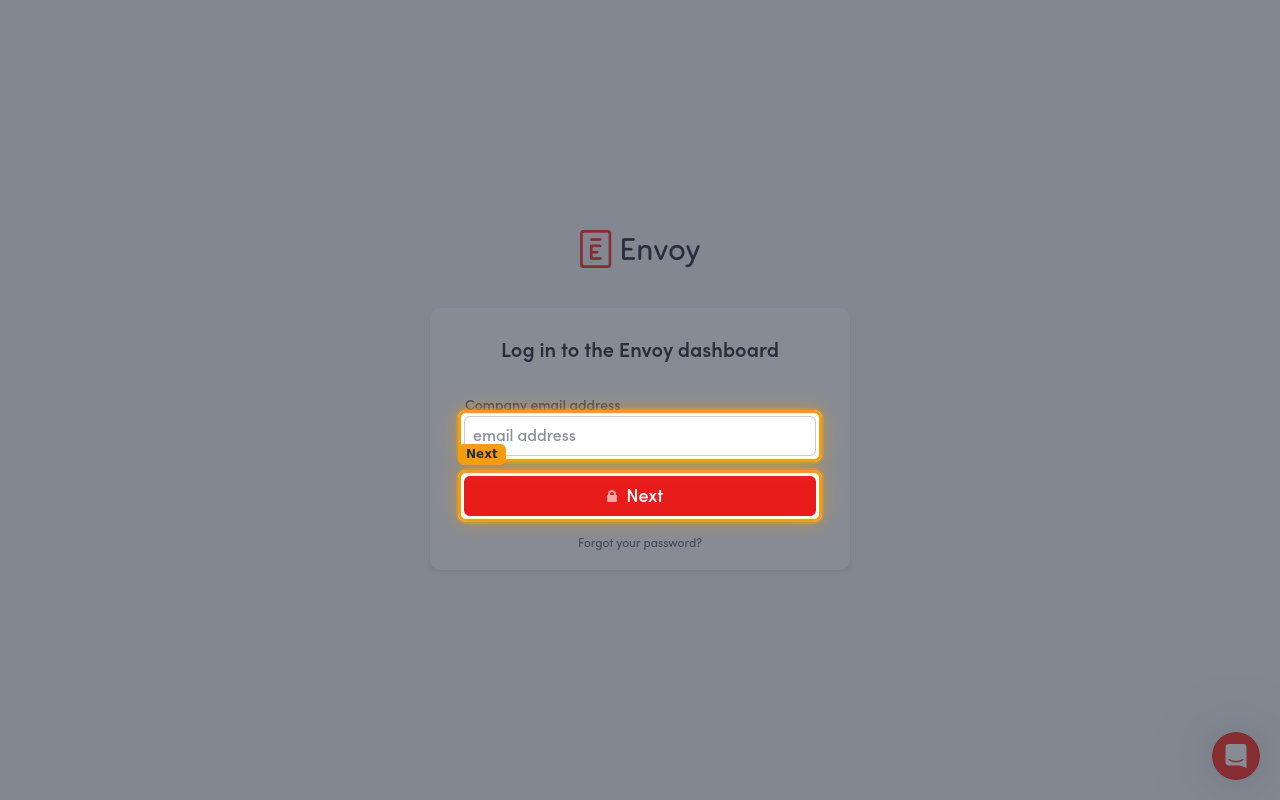
        <p>These are the same credentials you use at the <a href="https://dashboard.envoy.com/login" target="_blank" rel="noopener noreferrer">Envoy dashboard sign-in page</a>. Enter them into StackOne Hub.</p>

        <ul>
          <li><strong>Username (Email)</strong> — the email address of the Envoy user account, entered under <strong>Company email address</strong> when signing in to Envoy.</li>
          <li><strong>Password</strong> — the password for that same Envoy user account.</li>
        </ul>

        <img src="https://mintcdn.com/stackone-60/D00IWmX5oQquoTlc/connectors/envoy/images/oauth2-config-sign-in.png?fit=max&auto=format&n=D00IWmX5oQquoTlc&q=85&s=c4c42a59f7b2dc73d39c3076a0ccaa85" alt="Envoy dashboard login screen with the Company email address field and Next button" width="1280" height="800" data-path="connectors/envoy/images/oauth2-config-sign-in.png" />
      </div>
    </Step>

    <Step title="Configure the scopes (optional)">
      <div data-guide-step data-guide-scopes="companies.read,flows.read,entries.read,entries.write,invites.read,invites.write,blacklist-filters.read,blacklist-filters.write,locations.read,employees.read,work-schedules.read,work-schedules.write,spaces.read,spaces.write,reservations.read,reservations.write" data-guide-display-scopes-list="companies.read,flows.read,entries.read,entries.write,invites.read,invites.write,blacklist-filters.read,blacklist-filters.write,locations.read,employees.read,work-schedules.read,work-schedules.write,spaces.read,spaces.write,reservations.read,reservations.write">
        <div className="connector-guide-actions-badge" data-guide-actions-badge data-guide-actions-badge-scopes="companies.read,flows.read,entries.read,entries.write,invites.read,invites.write,blacklist-filters.read,blacklist-filters.write,locations.read,employees.read,work-schedules.read,work-schedules.write,spaces.read,spaces.write,reservations.read,reservations.write" style={{ display: 'block', width: 'fit-content', maxWidth: '100%', padding: '2px 8px', borderRadius: '8px', fontSize: '12px', marginBottom: '8px', marginTop: '-10px', whiteSpace: 'nowrap', overflowX: 'auto', overflowY: 'hidden', msOverflowStyle: 'none', scrollbarWidth: 'none' }}>
          <span>Enables actions: </span><span data-guide-actions-badge-labels>Cancel Reservation, Check In Invite, Check In Reservation, Check In Work Schedule, Check Out Reservation, Check Out Work Schedule, Create Blocklist Entry, Create Desk, Create Invite, Create Recurring Invite, Create Reservation, Create Work Schedule, Delete Blocklist Entry, Delete Desk, Delete Invite, Delete Work Schedule, Get Blocklist Entry, Get Company, Get Desk, Get Employee, Get Entry, Get Flow, Get Invite, Get Location, Get Recurring Invite, Get Reservation, Get Space, Get Unified Credentials, Get Unified Group, Get Unified Organization, Get Unified User, Get Work Schedule, List Blocklist Entries, List Desks, List Employees, List Entries, List Flows, List Invites, List Locations, List Reservations, List Spaces, List Unified Groups, List Unified Organizations, List Unified Users, List Work Schedules, Update Blocklist Entry, Update Desk, Update Invite, Update Recurring Invite</span>
        </div>

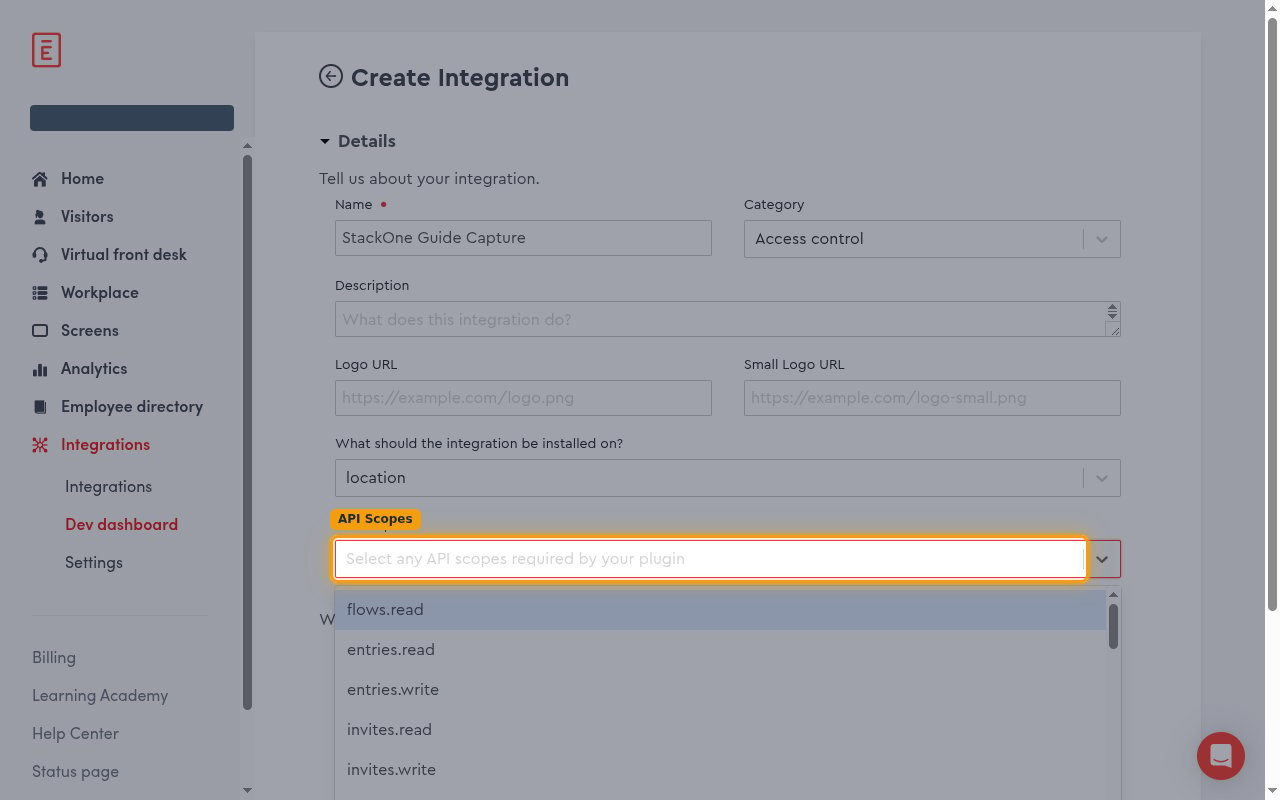
        <p>The <strong>Scopes</strong> field is optional. Leave it blank to request all the permissions the StackOne actions need. Only set it if you want to narrow the access — enter a comma-separated list of Envoy scopes.</p>

        <ul>
          <li>Format: `scope1,scope2,scope3` (comma-separated, no spaces)</li>
          <li>Example: `locations.read,entries.read,invites.read`</li>
        </ul>

        <img src="https://mintcdn.com/stackone-60/D00IWmX5oQquoTlc/connectors/envoy/images/oauth2-config-api-scopes.png?fit=max&auto=format&n=D00IWmX5oQquoTlc&q=85&s=5ede57fc45823e014176215741c63e9e" alt="Envoy API Scopes dropdown open, showing the available scope names" width="1280" height="800" data-path="connectors/envoy/images/oauth2-config-api-scopes.png" />

        <div style={{ marginTop: '8px' }} data-guide-display-scopes>
          <div className="connector-guide-scopes-container connector-guide-scopes-container--scrollable">
            <ul className="not-prose" style={{ listStyleType: "'- '", paddingLeft: '1em', margin: 0 }}>
              <li style={{ overflowWrap: 'anywhere', wordBreak: 'break-word' }} data-guide-display-scope="companies.read">
                <button type="button" className="connector-guide-scope-copy" aria-label="Copy companies.read" title="Copy scope" data-copy="companies.read">
                  <span className="connector-guide-scope-copy__label">companies.read</span>
                  <span className="connector-guide-scope-copy__icon" aria-hidden="true">⧉</span>
                </button>
              </li>

              <li style={{ overflowWrap: 'anywhere', wordBreak: 'break-word' }} data-guide-display-scope="flows.read">
                <button type="button" className="connector-guide-scope-copy" aria-label="Copy flows.read" title="Copy scope" data-copy="flows.read">
                  <span className="connector-guide-scope-copy__label">flows.read</span>
                  <span className="connector-guide-scope-copy__icon" aria-hidden="true">⧉</span>
                </button>
              </li>

              <li style={{ overflowWrap: 'anywhere', wordBreak: 'break-word' }} data-guide-display-scope="entries.read">
                <button type="button" className="connector-guide-scope-copy" aria-label="Copy entries.read" title="Copy scope" data-copy="entries.read">
                  <span className="connector-guide-scope-copy__label">entries.read</span>
                  <span className="connector-guide-scope-copy__icon" aria-hidden="true">⧉</span>
                </button>
              </li>

              <li style={{ overflowWrap: 'anywhere', wordBreak: 'break-word' }} data-guide-display-scope="entries.write">
                <button type="button" className="connector-guide-scope-copy" aria-label="Copy entries.write" title="Copy scope" data-copy="entries.write">
                  <span className="connector-guide-scope-copy__label">entries.write</span>
                  <span className="connector-guide-scope-copy__icon" aria-hidden="true">⧉</span>
                </button>
              </li>

              <li style={{ overflowWrap: 'anywhere', wordBreak: 'break-word' }} data-guide-display-scope="invites.read">
                <button type="button" className="connector-guide-scope-copy" aria-label="Copy invites.read" title="Copy scope" data-copy="invites.read">
                  <span className="connector-guide-scope-copy__label">invites.read</span>
                  <span className="connector-guide-scope-copy__icon" aria-hidden="true">⧉</span>
                </button>
              </li>

              <li style={{ overflowWrap: 'anywhere', wordBreak: 'break-word' }} data-guide-display-scope="invites.write">
                <button type="button" className="connector-guide-scope-copy" aria-label="Copy invites.write" title="Copy scope" data-copy="invites.write">
                  <span className="connector-guide-scope-copy__label">invites.write</span>
                  <span className="connector-guide-scope-copy__icon" aria-hidden="true">⧉</span>
                </button>
              </li>

              <li style={{ overflowWrap: 'anywhere', wordBreak: 'break-word' }} data-guide-display-scope="blacklist-filters.read">
                <button type="button" className="connector-guide-scope-copy" aria-label="Copy blacklist-filters.read" title="Copy scope" data-copy="blacklist-filters.read">
                  <span className="connector-guide-scope-copy__label">blacklist-filters.read</span>
                  <span className="connector-guide-scope-copy__icon" aria-hidden="true">⧉</span>
                </button>
              </li>

              <li style={{ overflowWrap: 'anywhere', wordBreak: 'break-word' }} data-guide-display-scope="blacklist-filters.write">
                <button type="button" className="connector-guide-scope-copy" aria-label="Copy blacklist-filters.write" title="Copy scope" data-copy="blacklist-filters.write">
                  <span className="connector-guide-scope-copy__label">blacklist-filters.write</span>
                  <span className="connector-guide-scope-copy__icon" aria-hidden="true">⧉</span>
                </button>
              </li>

              <li style={{ overflowWrap: 'anywhere', wordBreak: 'break-word' }} data-guide-display-scope="locations.read">
                <button type="button" className="connector-guide-scope-copy" aria-label="Copy locations.read" title="Copy scope" data-copy="locations.read">
                  <span className="connector-guide-scope-copy__label">locations.read</span>
                  <span className="connector-guide-scope-copy__icon" aria-hidden="true">⧉</span>
                </button>
              </li>

              <li style={{ overflowWrap: 'anywhere', wordBreak: 'break-word' }} data-guide-display-scope="employees.read">
                <button type="button" className="connector-guide-scope-copy" aria-label="Copy employees.read" title="Copy scope" data-copy="employees.read">
                  <span className="connector-guide-scope-copy__label">employees.read</span>
                  <span className="connector-guide-scope-copy__icon" aria-hidden="true">⧉</span>
                </button>
              </li>

              <li style={{ overflowWrap: 'anywhere', wordBreak: 'break-word' }} data-guide-display-scope="work-schedules.read">
                <button type="button" className="connector-guide-scope-copy" aria-label="Copy work-schedules.read" title="Copy scope" data-copy="work-schedules.read">
                  <span className="connector-guide-scope-copy__label">work-schedules.read</span>
                  <span className="connector-guide-scope-copy__icon" aria-hidden="true">⧉</span>
                </button>
              </li>

              <li style={{ overflowWrap: 'anywhere', wordBreak: 'break-word' }} data-guide-display-scope="work-schedules.write">
                <button type="button" className="connector-guide-scope-copy" aria-label="Copy work-schedules.write" title="Copy scope" data-copy="work-schedules.write">
                  <span className="connector-guide-scope-copy__label">work-schedules.write</span>
                  <span className="connector-guide-scope-copy__icon" aria-hidden="true">⧉</span>
                </button>
              </li>

              <li style={{ overflowWrap: 'anywhere', wordBreak: 'break-word' }} data-guide-display-scope="spaces.read">
                <button type="button" className="connector-guide-scope-copy" aria-label="Copy spaces.read" title="Copy scope" data-copy="spaces.read">
                  <span className="connector-guide-scope-copy__label">spaces.read</span>
                  <span className="connector-guide-scope-copy__icon" aria-hidden="true">⧉</span>
                </button>
              </li>

              <li style={{ overflowWrap: 'anywhere', wordBreak: 'break-word' }} data-guide-display-scope="spaces.write">
                <button type="button" className="connector-guide-scope-copy" aria-label="Copy spaces.write" title="Copy scope" data-copy="spaces.write">
                  <span className="connector-guide-scope-copy__label">spaces.write</span>
                  <span className="connector-guide-scope-copy__icon" aria-hidden="true">⧉</span>
                </button>
              </li>

              <li style={{ overflowWrap: 'anywhere', wordBreak: 'break-word' }} data-guide-display-scope="reservations.read">
                <button type="button" className="connector-guide-scope-copy" aria-label="Copy reservations.read" title="Copy scope" data-copy="reservations.read">
                  <span className="connector-guide-scope-copy__label">reservations.read</span>
                  <span className="connector-guide-scope-copy__icon" aria-hidden="true">⧉</span>
                </button>
              </li>

              <li style={{ overflowWrap: 'anywhere', wordBreak: 'break-word' }} data-guide-display-scope="reservations.write">
                <button type="button" className="connector-guide-scope-copy" aria-label="Copy reservations.write" title="Copy scope" data-copy="reservations.write">
                  <span className="connector-guide-scope-copy__label">reservations.write</span>
                  <span className="connector-guide-scope-copy__icon" aria-hidden="true">⧉</span>
                </button>
              </li>
            </ul>
          </div>
        </div>
      </div>
    </Step>
  </Steps>
</section>

<div data-whitelabel-hide>
  <h2>Linking the Account from the Hub</h2>

  <Steps>
    <Step title="Navigate to the Hub">
      Use one of the three <a href="/connect/managing-connectors/linking-accounts">Linking Account Methods</a> to access the Hub.
    </Step>

    <Step title="Fill out the fields">
      Fill out the following fields using details from your provider:

      <ul>
        <li><strong>Username (Email)</strong></li>
        <li><strong>Password</strong></li>
        <li><strong>Scopes</strong> (Optional)</li>
      </ul>
    </Step>

    <Step title="Connect">
      <ul>
        <li>Click <strong>Connect</strong></li>
        <li>If applicable, the provider will redirect you to a sign-in or authorization page. Complete the provider's authorization flow.</li>
        <li>Once authorization is successful, you will see a confirmation popup</li>
      </ul>
    </Step>
  </Steps>

  <p>If the account linking is successful, you will see the newly linked account in your <a href="/gateway/concepts/linked-accounts">Accounts</a> page.</p>
</div>