> ## Documentation Index
> Fetch the complete documentation index at: https://docs.stackone.com/llms.txt
> Use this file to discover all available pages before exploring further.

# Connect Front with API Token – StackOne Hub

> Link a Front account in the StackOne Hub using API Token. End-user guide to authorize the integration and start using Front actions.

<Warning>Creating an API token requires access to your Front company settings (admin access).</Warning>

<Panel>
  <div className="not-prose guides-scope-selector" data-guides-scope-selector data-guide-actions-json="[{&#x22;id&#x22;:&#x22;front_list_conversations&#x22;,&#x22;label&#x22;:&#x22;List Conversations&#x22;,&#x22;scopes&#x22;:[&#x22;conversations:read&#x22;]},{&#x22;id&#x22;:&#x22;front_get_conversation&#x22;,&#x22;label&#x22;:&#x22;Get Conversation&#x22;,&#x22;scopes&#x22;:[&#x22;conversations:read&#x22;]},{&#x22;id&#x22;:&#x22;front_update_conversation&#x22;,&#x22;label&#x22;:&#x22;Update Conversation&#x22;,&#x22;scopes&#x22;:[&#x22;conversations:write&#x22;]},{&#x22;id&#x22;:&#x22;front_update_conversation_assignee&#x22;,&#x22;label&#x22;:&#x22;Update Conversation Assignee&#x22;,&#x22;scopes&#x22;:[&#x22;conversations:write&#x22;]},{&#x22;id&#x22;:&#x22;front_list_conversation_messages&#x22;,&#x22;label&#x22;:&#x22;List Conversation Messages&#x22;,&#x22;scopes&#x22;:[&#x22;messages:read&#x22;]},{&#x22;id&#x22;:&#x22;front_list_conversation_comments&#x22;,&#x22;label&#x22;:&#x22;List Conversation Comments&#x22;,&#x22;scopes&#x22;:[&#x22;comments:read&#x22;]},{&#x22;id&#x22;:&#x22;front_add_conversation_comment&#x22;,&#x22;label&#x22;:&#x22;Add Conversation Comment&#x22;,&#x22;scopes&#x22;:[&#x22;comments:write&#x22;]},{&#x22;id&#x22;:&#x22;front_add_conversation_tag&#x22;,&#x22;label&#x22;:&#x22;Add Conversation Tag&#x22;,&#x22;scopes&#x22;:[&#x22;conversations:write&#x22;]},{&#x22;id&#x22;:&#x22;front_remove_conversation_tag&#x22;,&#x22;label&#x22;:&#x22;Remove Conversation Tag&#x22;,&#x22;scopes&#x22;:[&#x22;conversations:write&#x22;]},{&#x22;id&#x22;:&#x22;front_list_conversation_followers&#x22;,&#x22;label&#x22;:&#x22;List Conversation Followers&#x22;,&#x22;scopes&#x22;:[&#x22;teammates:read&#x22;]},{&#x22;id&#x22;:&#x22;front_add_conversation_followers&#x22;,&#x22;label&#x22;:&#x22;Add Conversation Followers&#x22;,&#x22;scopes&#x22;:[&#x22;conversations:write&#x22;]},{&#x22;id&#x22;:&#x22;front_search_conversations&#x22;,&#x22;label&#x22;:&#x22;Search Conversations&#x22;,&#x22;scopes&#x22;:[&#x22;conversations:read&#x22;]},{&#x22;id&#x22;:&#x22;front_delete_conversation&#x22;,&#x22;label&#x22;:&#x22;Delete Conversation&#x22;,&#x22;scopes&#x22;:[&#x22;conversations:delete&#x22;]},{&#x22;id&#x22;:&#x22;front_list_contacts&#x22;,&#x22;label&#x22;:&#x22;List Contacts&#x22;,&#x22;scopes&#x22;:[&#x22;contacts:read&#x22;]},{&#x22;id&#x22;:&#x22;front_get_contact&#x22;,&#x22;label&#x22;:&#x22;Get Contact&#x22;,&#x22;scopes&#x22;:[&#x22;contacts:read&#x22;]},{&#x22;id&#x22;:&#x22;front_create_contact&#x22;,&#x22;label&#x22;:&#x22;Create Contact&#x22;,&#x22;scopes&#x22;:[&#x22;contacts:write&#x22;]},{&#x22;id&#x22;:&#x22;front_update_contact&#x22;,&#x22;label&#x22;:&#x22;Update Contact&#x22;,&#x22;scopes&#x22;:[&#x22;contacts:write&#x22;]},{&#x22;id&#x22;:&#x22;front_delete_contact&#x22;,&#x22;label&#x22;:&#x22;Delete Contact&#x22;,&#x22;scopes&#x22;:[&#x22;contacts:delete&#x22;]},{&#x22;id&#x22;:&#x22;front_list_contact_conversations&#x22;,&#x22;label&#x22;:&#x22;List Contact Conversations&#x22;,&#x22;scopes&#x22;:[&#x22;conversations:read&#x22;]},{&#x22;id&#x22;:&#x22;front_add_contact_handle&#x22;,&#x22;label&#x22;:&#x22;Add Contact Handle&#x22;,&#x22;scopes&#x22;:[&#x22;contacts:write&#x22;]},{&#x22;id&#x22;:&#x22;front_add_contact_note&#x22;,&#x22;label&#x22;:&#x22;Add Contact Note&#x22;,&#x22;scopes&#x22;:[&#x22;contacts:write&#x22;]},{&#x22;id&#x22;:&#x22;front_list_teammates&#x22;,&#x22;label&#x22;:&#x22;List Teammates&#x22;,&#x22;scopes&#x22;:[&#x22;teammates:read&#x22;]},{&#x22;id&#x22;:&#x22;front_get_teammate&#x22;,&#x22;label&#x22;:&#x22;Get Teammate&#x22;,&#x22;scopes&#x22;:[&#x22;teammates:read&#x22;]},{&#x22;id&#x22;:&#x22;front_update_teammate&#x22;,&#x22;label&#x22;:&#x22;Update Teammate&#x22;,&#x22;scopes&#x22;:[&#x22;teammates:write&#x22;]},{&#x22;id&#x22;:&#x22;front_list_inboxes&#x22;,&#x22;label&#x22;:&#x22;List Inboxes&#x22;,&#x22;scopes&#x22;:[&#x22;inboxes:read&#x22;]},{&#x22;id&#x22;:&#x22;front_get_inbox&#x22;,&#x22;label&#x22;:&#x22;Get Inbox&#x22;,&#x22;scopes&#x22;:[&#x22;inboxes:read&#x22;]},{&#x22;id&#x22;:&#x22;front_list_inbox_conversations&#x22;,&#x22;label&#x22;:&#x22;List Inbox Conversations&#x22;,&#x22;scopes&#x22;:[&#x22;conversations:read&#x22;]},{&#x22;id&#x22;:&#x22;front_list_inbox_channels&#x22;,&#x22;label&#x22;:&#x22;List Inbox Channels&#x22;,&#x22;scopes&#x22;:[&#x22;channels:read&#x22;]},{&#x22;id&#x22;:&#x22;front_create_inbox&#x22;,&#x22;label&#x22;:&#x22;Create Inbox&#x22;,&#x22;scopes&#x22;:[&#x22;inboxes:write&#x22;]},{&#x22;id&#x22;:&#x22;front_list_channels&#x22;,&#x22;label&#x22;:&#x22;List Channels&#x22;,&#x22;scopes&#x22;:[&#x22;channels:read&#x22;]},{&#x22;id&#x22;:&#x22;front_get_channel&#x22;,&#x22;label&#x22;:&#x22;Get Channel&#x22;,&#x22;scopes&#x22;:[&#x22;channels:read&#x22;]},{&#x22;id&#x22;:&#x22;front_update_channel&#x22;,&#x22;label&#x22;:&#x22;Update Channel&#x22;,&#x22;scopes&#x22;:[&#x22;channels:write&#x22;]},{&#x22;id&#x22;:&#x22;front_send_message&#x22;,&#x22;label&#x22;:&#x22;Send Message&#x22;,&#x22;scopes&#x22;:[&#x22;messages:send&#x22;]},{&#x22;id&#x22;:&#x22;front_create_channel&#x22;,&#x22;label&#x22;:&#x22;Create Channel&#x22;,&#x22;scopes&#x22;:[&#x22;channels:write&#x22;]},{&#x22;id&#x22;:&#x22;front_list_tags&#x22;,&#x22;label&#x22;:&#x22;List Tags&#x22;,&#x22;scopes&#x22;:[&#x22;tags:read&#x22;]},{&#x22;id&#x22;:&#x22;front_get_tag&#x22;,&#x22;label&#x22;:&#x22;Get Tag&#x22;,&#x22;scopes&#x22;:[&#x22;tags:read&#x22;]},{&#x22;id&#x22;:&#x22;front_create_tag&#x22;,&#x22;label&#x22;:&#x22;Create Tag&#x22;,&#x22;scopes&#x22;:[&#x22;tags:write&#x22;]},{&#x22;id&#x22;:&#x22;front_update_tag&#x22;,&#x22;label&#x22;:&#x22;Update Tag&#x22;,&#x22;scopes&#x22;:[&#x22;tags:write&#x22;]},{&#x22;id&#x22;:&#x22;front_delete_tag&#x22;,&#x22;label&#x22;:&#x22;Delete Tag&#x22;,&#x22;scopes&#x22;:[&#x22;tags:delete&#x22;]},{&#x22;id&#x22;:&#x22;front_list_tagged_conversations&#x22;,&#x22;label&#x22;:&#x22;List Tagged Conversations&#x22;,&#x22;scopes&#x22;:[&#x22;conversations:read&#x22;]},{&#x22;id&#x22;:&#x22;front_list_child_tags&#x22;,&#x22;label&#x22;:&#x22;List Child Tags&#x22;,&#x22;scopes&#x22;:[&#x22;tags:read&#x22;]},{&#x22;id&#x22;:&#x22;front_create_child_tag&#x22;,&#x22;label&#x22;:&#x22;Create Child Tag&#x22;,&#x22;scopes&#x22;:[&#x22;tags:write&#x22;]},{&#x22;id&#x22;:&#x22;front_list_accounts&#x22;,&#x22;label&#x22;:&#x22;List Accounts&#x22;,&#x22;scopes&#x22;:[&#x22;accounts:read&#x22;]},{&#x22;id&#x22;:&#x22;front_get_account&#x22;,&#x22;label&#x22;:&#x22;Get Account&#x22;,&#x22;scopes&#x22;:[&#x22;accounts:read&#x22;]},{&#x22;id&#x22;:&#x22;front_create_account&#x22;,&#x22;label&#x22;:&#x22;Create Account&#x22;,&#x22;scopes&#x22;:[&#x22;accounts:write&#x22;]},{&#x22;id&#x22;:&#x22;front_update_account&#x22;,&#x22;label&#x22;:&#x22;Update Account&#x22;,&#x22;scopes&#x22;:[&#x22;accounts:write&#x22;]},{&#x22;id&#x22;:&#x22;front_delete_account&#x22;,&#x22;label&#x22;:&#x22;Delete Account&#x22;,&#x22;scopes&#x22;:[&#x22;accounts:delete&#x22;]},{&#x22;id&#x22;:&#x22;front_list_account_contacts&#x22;,&#x22;label&#x22;:&#x22;List Account Contacts&#x22;,&#x22;scopes&#x22;:[&#x22;contacts:read&#x22;]},{&#x22;id&#x22;:&#x22;front_list_events&#x22;,&#x22;label&#x22;:&#x22;List Events&#x22;,&#x22;scopes&#x22;:[&#x22;events:*:read&#x22;]},{&#x22;id&#x22;:&#x22;front_get_event&#x22;,&#x22;label&#x22;:&#x22;Get Event&#x22;,&#x22;scopes&#x22;:[&#x22;events:*:read&#x22;]},{&#x22;id&#x22;:&#x22;front_list_conversation_events&#x22;,&#x22;label&#x22;:&#x22;List Conversation Events&#x22;,&#x22;scopes&#x22;:[&#x22;events:*:read&#x22;]},{&#x22;id&#x22;:&#x22;front_get_message&#x22;,&#x22;label&#x22;:&#x22;Get Message&#x22;,&#x22;scopes&#x22;:[&#x22;messages:read&#x22;]},{&#x22;id&#x22;:&#x22;front_create_draft&#x22;,&#x22;label&#x22;:&#x22;Create Draft&#x22;,&#x22;scopes&#x22;:[&#x22;drafts:write&#x22;]}]" style={{ borderRadius: '8px', padding: '16px', marginBottom: '24px' }}>
    <div className="guides-scope-selector__title" style={{ fontSize: '16px', fontWeight: '600', marginBottom: '12px' }}>Select Actions to adjust the guide</div>
    <div className="guides-scope-selector__muted" style={{ fontSize: '13px', marginBottom: '12px' }}>Some actions may require additional configuration in the provider to be accessible. Choose the actions you need and the guide will be updated.</div>

    <div style={{ display: 'flex', gap: '8px', marginBottom: '12px', flexWrap: 'wrap' }}>
      <input type="text" placeholder="Search actions..." className="guides-scope-selector__input" data-guide-action-search style={{ padding: '8px 12px', borderRadius: '6px', fontSize: '13px', flex: 1, minWidth: '160px' }} />

      <button type="button" className="guides-scope-selector__quick-btn" data-guide-select-all style={{ padding: '6px 10px', borderRadius: '6px', fontSize: '12px', cursor: 'pointer' }}>Select all</button>
      <button type="button" className="guides-scope-selector__quick-btn" data-guide-clear style={{ padding: '6px 10px', borderRadius: '6px', fontSize: '12px', cursor: 'pointer' }}>Clear</button>
    </div>

    <div className="guides-scope-selector__list" style={{ maxHeight: '240px', overflowY: 'auto', borderRadius: '6px', marginBottom: '12px' }}>
      <div className="guides-scope-selector__list-header" style={{ display: 'flex', alignItems: 'center', gap: '10px', padding: '8px 12px', fontSize: '12px', fontWeight: '600', position: 'sticky', top: 0, zIndex: 1 }}>
        <div style={{ width: '16px', flexShrink: 0 }} />

        <div style={{ flex: 1, textAlign: 'left' }}>Action</div>
        <div style={{ minWidth: '120px', marginLeft: 'auto', textAlign: 'right' }}>Scope(s)</div>
      </div>

      <div className="guides-scope-selector__muted" data-guide-loading style={{ padding: '16px', textAlign: 'center', fontSize: '13px' }}>Loading actions...</div>
      <div className="guides-scope-selector__muted" data-guide-no-results hidden style={{ padding: '16px', textAlign: 'center', fontSize: '13px' }}>No actions match your search.</div>
    </div>

    <div className="guides-scope-selector__url-section" style={{ marginTop: '12px', paddingTop: '12px' }}>
      <div className="guides-scope-selector__muted" style={{ fontSize: '12px', fontWeight: '500', marginBottom: '6px' }}>Dynamic Guide URL</div>

      <div style={{ display: 'flex', alignItems: 'center', gap: '8px', flexWrap: 'wrap' }}>
        <input type="text" readOnly className="guides-scope-selector__input" data-guide-url style={{ flex: 1, minWidth: '200px', padding: '8px 10px', borderRadius: '6px', fontSize: '12px', fontFamily: 'monospace' }} />

        <button type="button" className="guides-scope-selector__copy-btn" data-guide-copy-url style={{ width: '120px', padding: '8px 14px', borderRadius: '6px', fontSize: '13px', fontWeight: '500', cursor: 'pointer', whiteSpace: 'nowrap', marginLeft: 'auto' }}>Copy URL</button>
      </div>

      <div style={{ marginTop: '12px' }}>
        <div className="guides-scope-selector__muted" style={{ fontSize: '12px', fontWeight: '500', marginBottom: '6px' }}>Scopes Selected</div>

        <div style={{ display: 'flex', alignItems: 'stretch', gap: '8px', flexWrap: 'wrap' }}>
          <pre className="guides-scope-selector__input" role="textbox" aria-readonly="true" tabIndex={0} data-guide-scopes-output style={{ flex: 1, minWidth: '200px', minHeight: '88px', maxHeight: '120px', overflowY: 'auto', margin: 0, padding: '8px 10px', borderRadius: '6px', fontSize: '12px', fontFamily: 'monospace', whiteSpace: 'pre-wrap' }} />

          <div className="guides-scope-selector__muted" style={{ display: 'flex', flexDirection: 'column', gap: '8px', fontSize: '12px', fontWeight: '500', flexShrink: 0, alignItems: 'flex-start' }}>
            <div style={{ whiteSpace: 'nowrap' }}>Separator</div>

            <select className="guides-scope-selector__input" data-guide-scope-delimiter style={{ width: '100%', padding: '6px 10px', borderRadius: '6px', fontSize: '12px' }}>
              <option value="space">Space</option>
              <option value="comma">Comma</option>
              <option value="semicolon">Semicolon</option>
              <option value="pipe">Pipe</option>
              <option value="newline">Newline</option>
            </select>

            <button type="button" className="guides-scope-selector__copy-btn" data-guide-copy-scopes style={{ width: '120px', padding: '8px 14px', borderRadius: '6px', fontSize: '13px', fontWeight: '500', cursor: 'pointer', whiteSpace: 'nowrap' }}>Copy scopes</button>
          </div>
        </div>
      </div>
    </div>
  </div>
</Panel>

<section data-guide-section data-guide-scopes="">
  <h2>Open the Developers settings</h2>

  <p>Front API tokens are created from the Developers area of your company settings. Sign in to your <a href="https://app.frontapp.com" target="_blank" rel="noopener noreferrer">Front account</a> to begin.</p>

  <Steps>
    <Step title="Open Developers">
      <div data-guide-step data-guide-scopes="" data-guide-display-scopes-list="">
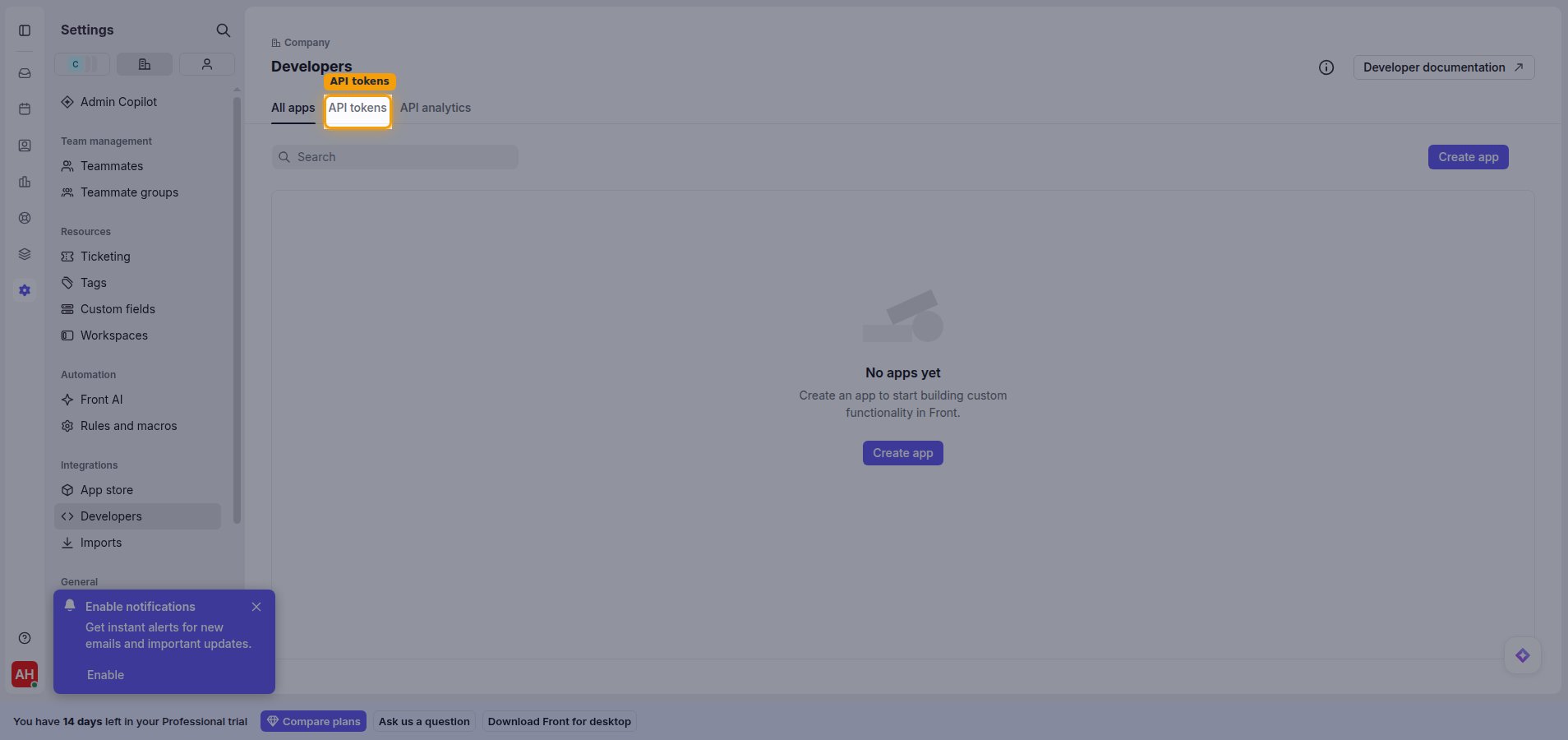
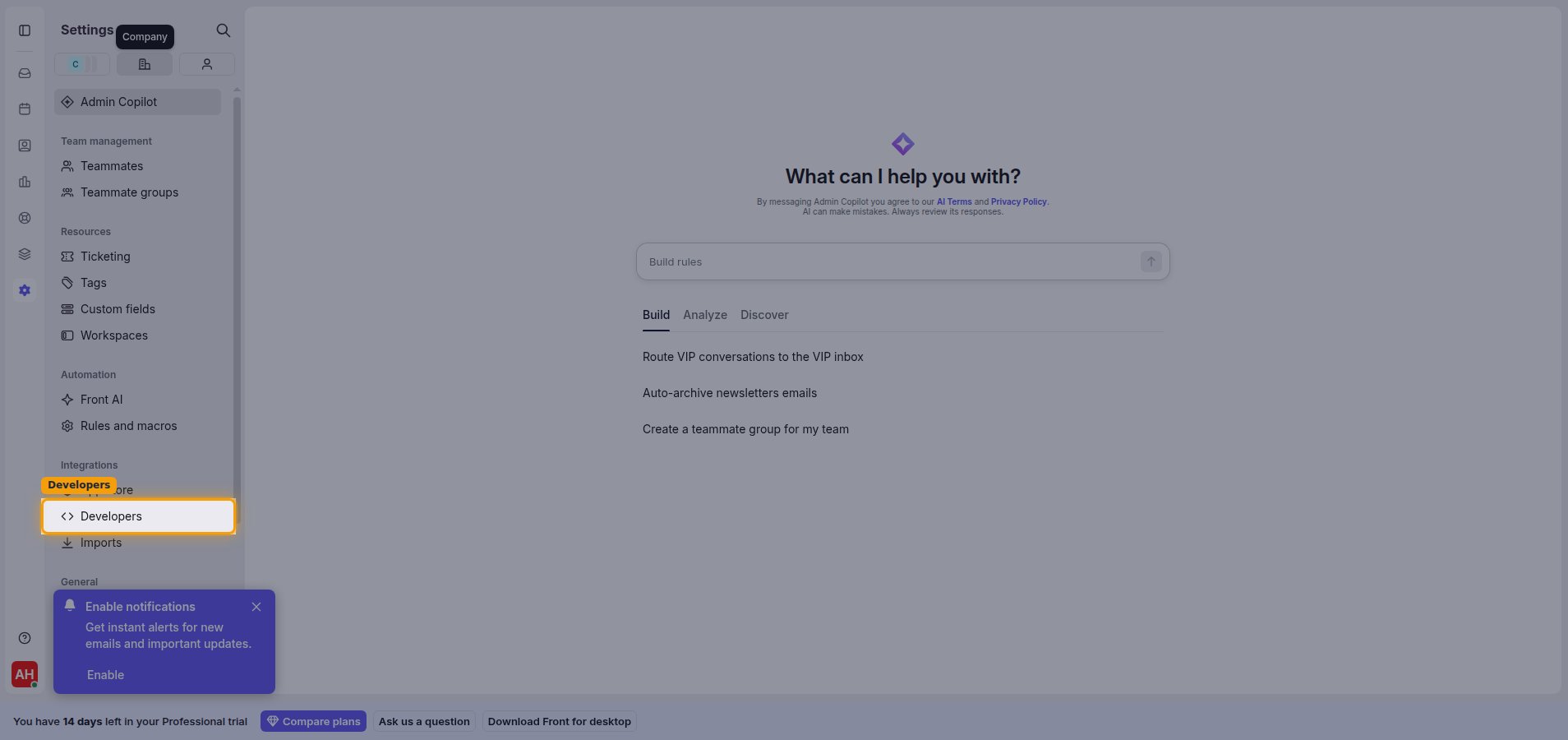
        <p>In Front, open <strong>Settings</strong> from the left sidebar. Switch to the <strong>Company</strong> settings tab, then under <strong>Integrations</strong> click <strong>Developers</strong>.</p>

        <img src="https://mintcdn.com/stackone-60/6ESBCHWt8WW0ggeD/connectors/front/images/custom-config-open-developers.png?fit=max&auto=format&n=6ESBCHWt8WW0ggeD&q=85&s=900fb2be97e76fa5acc6d9f129d86dfe" alt="Front company settings with Developers highlighted under Integrations" width="1908" height="900" data-path="connectors/front/images/custom-config-open-developers.png" />
      </div>
    </Step>

    <Step title="Open the API tokens tab">
      <div data-guide-step data-guide-scopes="" data-guide-display-scopes-list="">
        <p>On the <strong>Developers</strong> page, select the <strong>API tokens</strong> tab.</p>

        <img src="https://mintcdn.com/stackone-60/6ESBCHWt8WW0ggeD/connectors/front/images/custom-config-api-tokens-tab.png?fit=max&auto=format&n=6ESBCHWt8WW0ggeD&q=85&s=0b073a196ef6b8a932f293fd7d6b7c3a" alt="Developers page with the API tokens tab highlighted" width="1908" height="900" data-path="connectors/front/images/custom-config-api-tokens-tab.png" />
      </div>
    </Step>
  </Steps>
</section>

<section data-guide-section data-guide-scopes="">
  <h2>Create an API token</h2>

  <p>Create a token and grant it the resource permissions this integration uses.</p>

  <Steps>
    <Step title="Create a new token">
      <div data-guide-step data-guide-scopes="" data-guide-display-scopes-list="">
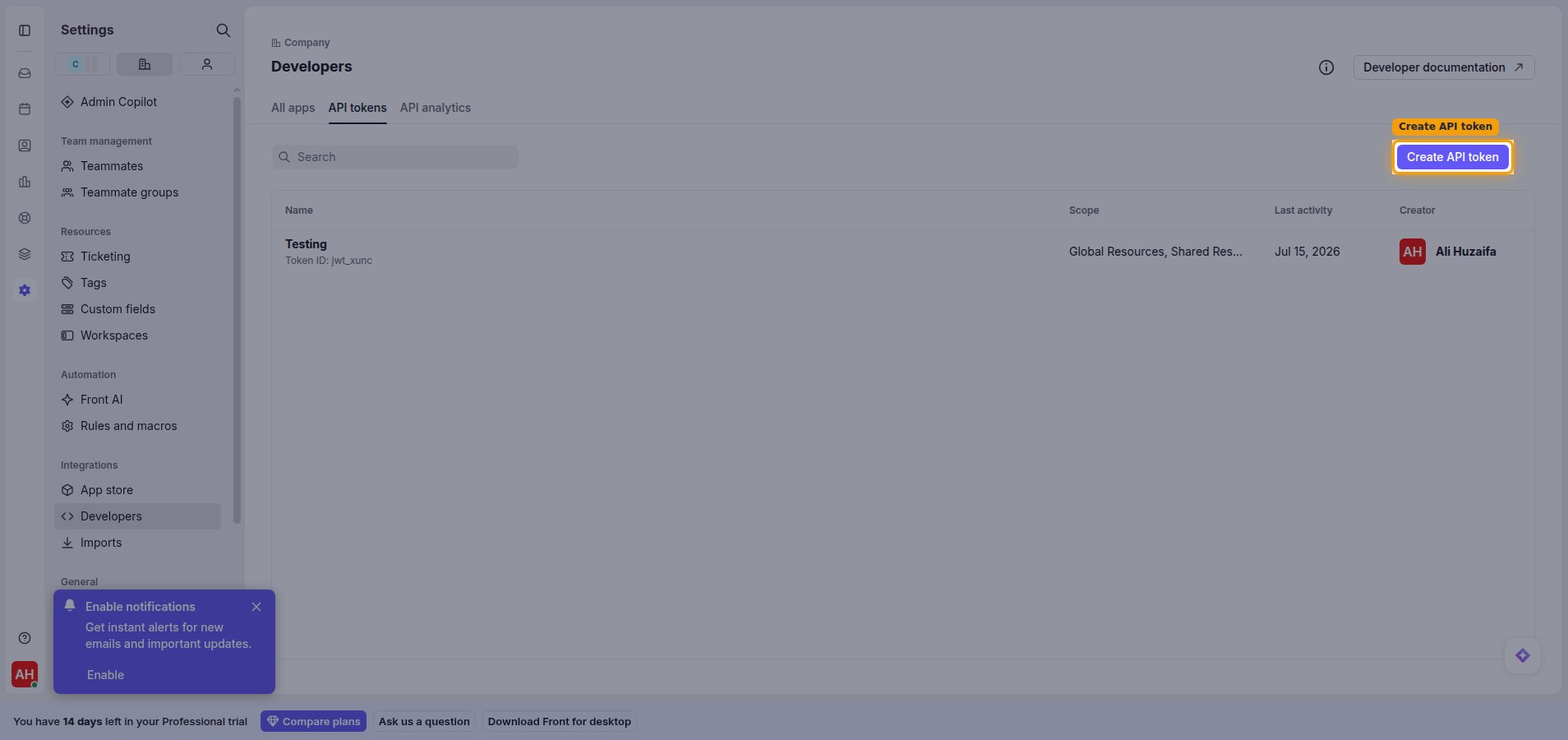
        <p>Click <strong>Create API token</strong> in the top-right corner.</p>

        <img src="https://mintcdn.com/stackone-60/6ESBCHWt8WW0ggeD/connectors/front/images/custom-config-create-token.png?fit=max&auto=format&n=6ESBCHWt8WW0ggeD&q=85&s=c0f136b82f838967507298c3a1bc7d4b" alt="API tokens tab with the Create API token button highlighted" width="1908" height="900" data-path="connectors/front/images/custom-config-create-token.png" />
      </div>
    </Step>

    <Step title="Enter a token name">
      <div data-guide-step data-guide-scopes="" data-guide-display-scopes-list="">
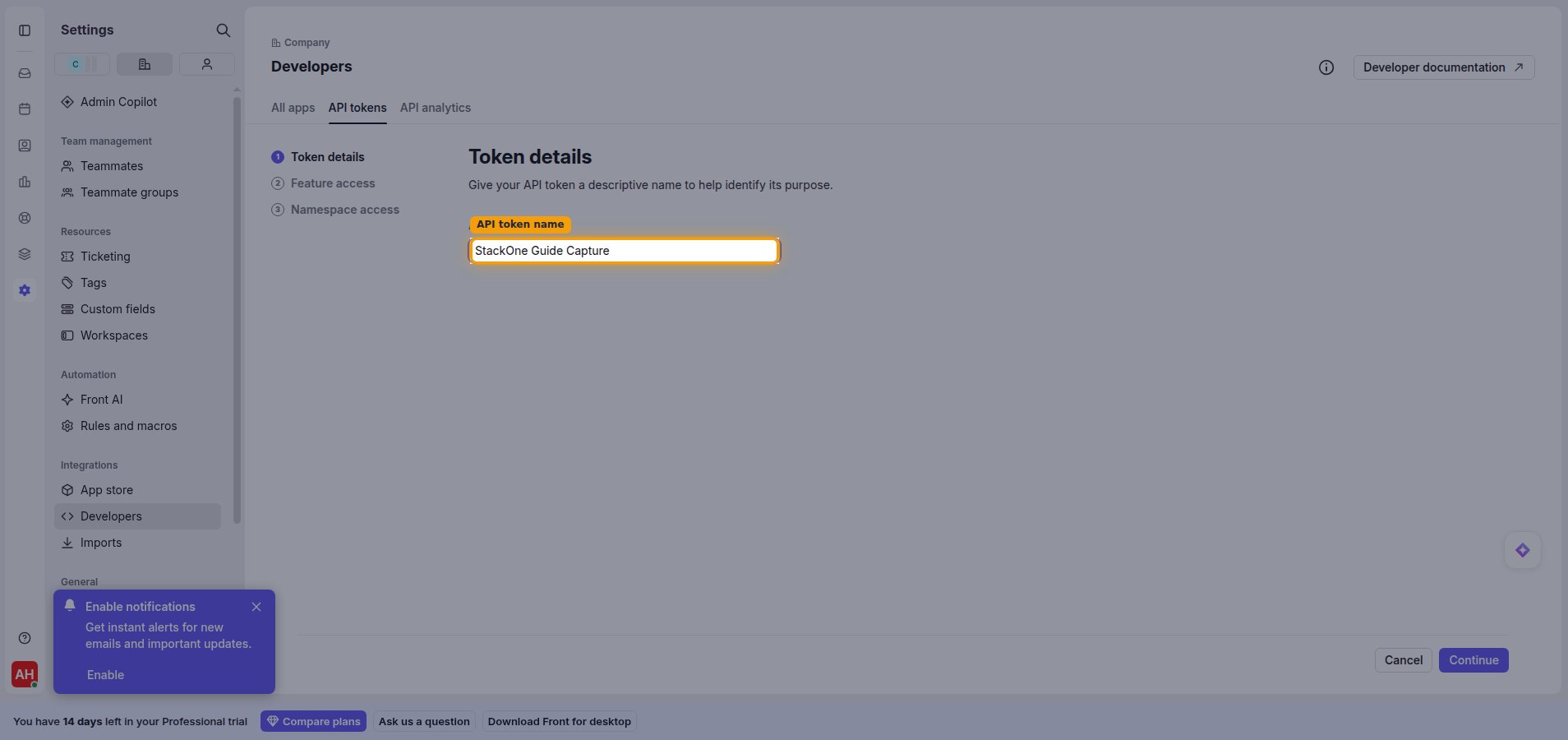
        <p>In <strong>Token details</strong>, enter a name in the <strong>API token name</strong> field (for example, StackOne Integration), then click <strong>Continue</strong>.</p>

        <img src="https://mintcdn.com/stackone-60/6ESBCHWt8WW0ggeD/connectors/front/images/custom-config-token-details.png?fit=max&auto=format&n=6ESBCHWt8WW0ggeD&q=85&s=5b6bbb6e5dc392c8e7b6cf8869494ba1" alt="Token details step with the API token name field" width="1908" height="900" data-path="connectors/front/images/custom-config-token-details.png" />
      </div>
    </Step>

    <Step title="Enable feature access">
      <div data-guide-step data-guide-scopes="" data-guide-display-scopes-list="">
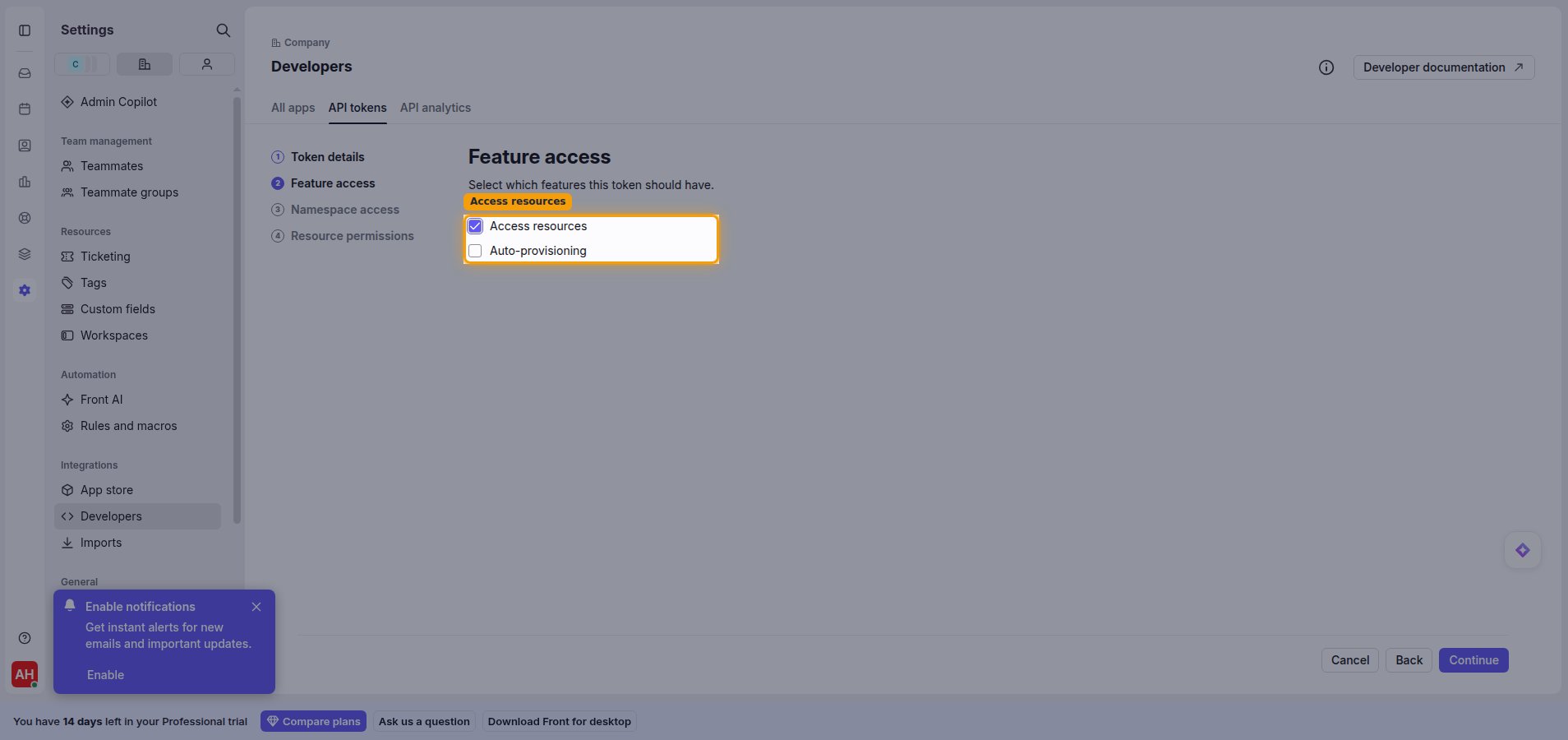
        <p>In <strong>Feature access</strong>, enable <strong>Access resources</strong>, then click <strong>Continue</strong>.</p>

        <img src="https://mintcdn.com/stackone-60/6ESBCHWt8WW0ggeD/connectors/front/images/custom-config-feature-access.png?fit=max&auto=format&n=6ESBCHWt8WW0ggeD&q=85&s=d92100da7fa00c772e31406b18f6d403" alt="Feature access step with Access resources enabled" width="1908" height="900" data-path="connectors/front/images/custom-config-feature-access.png" />
      </div>
    </Step>

    <Step title="Select namespace access">
      <div data-guide-step data-guide-scopes="" data-guide-display-scopes-list="">
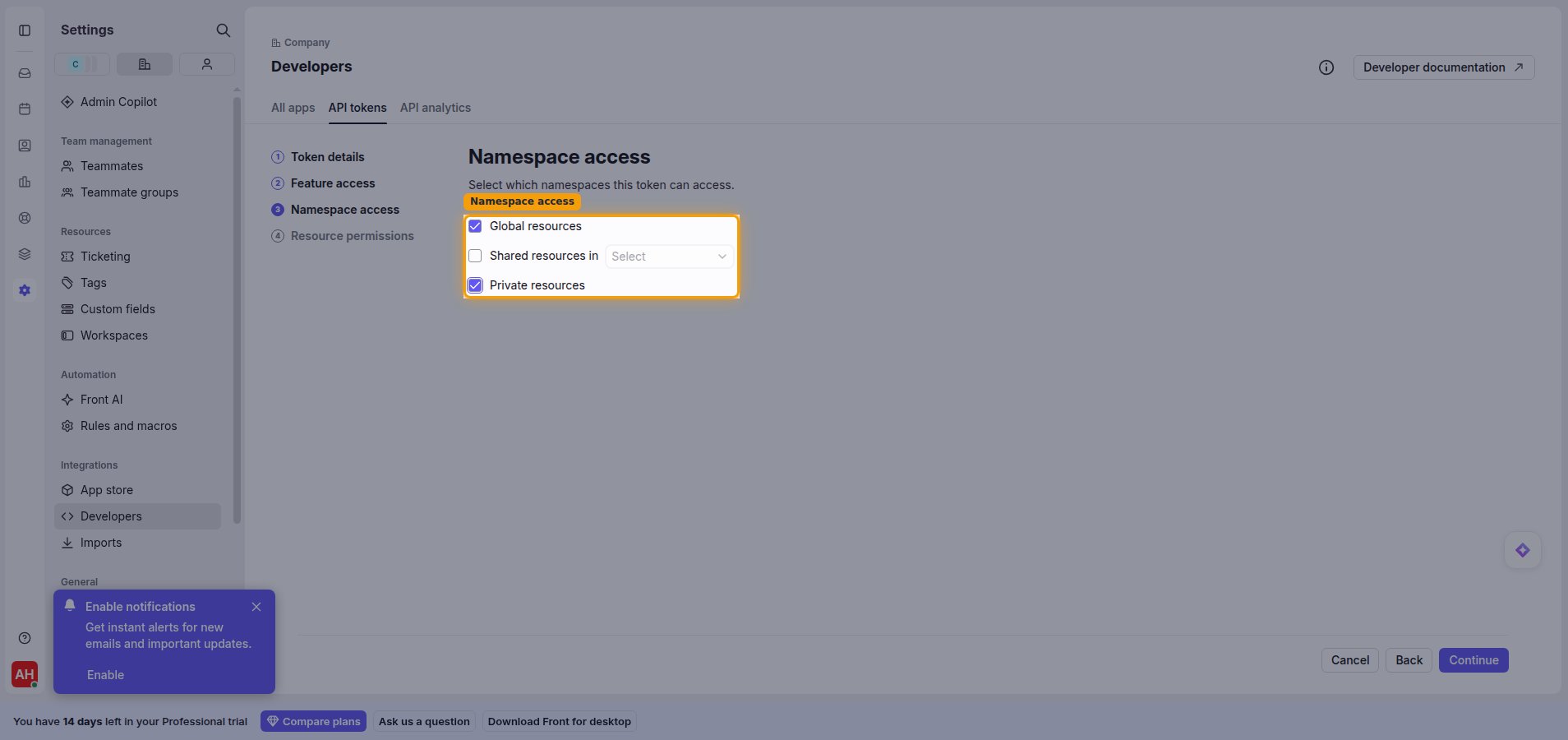
        <p>In <strong>Namespace access</strong>, choose which namespaces the token can reach. Enable <strong>Global resources</strong>, and also enable <strong>Private resources</strong> if you need access to private resources, then click <strong>Continue</strong>.</p>

        <img src="https://mintcdn.com/stackone-60/6ESBCHWt8WW0ggeD/connectors/front/images/custom-config-namespace-access.png?fit=max&auto=format&n=6ESBCHWt8WW0ggeD&q=85&s=f7ecda346e3b1860f54e02c3782be334" alt="Namespace access step with Global resources and Private resources" width="1908" height="900" data-path="connectors/front/images/custom-config-namespace-access.png" />
      </div>
    </Step>

    <Step title="Configure resource permissions">
      <div data-guide-step data-guide-scopes="accounts:read,accounts:write,accounts:delete,channels:read,channels:write,comments:read,comments:write,contacts:read,contacts:write,contacts:delete,conversations:read,conversations:write,conversations:delete,drafts:write,events:*:read,inboxes:read,inboxes:write,messages:read,messages:send,tags:read,tags:write,tags:delete,teammates:read,teammates:write" data-guide-display-scopes-list="accounts:read,accounts:write,accounts:delete,channels:read,channels:write,comments:read,comments:write,contacts:read,contacts:write,contacts:delete,conversations:read,conversations:write,conversations:delete,drafts:write,events:*:read,inboxes:read,inboxes:write,messages:read,messages:send,tags:read,tags:write,tags:delete,teammates:read,teammates:write">
        <div className="connector-guide-actions-badge" data-guide-actions-badge data-guide-actions-badge-scopes="accounts:read,accounts:write,accounts:delete,channels:read,channels:write,comments:read,comments:write,contacts:read,contacts:write,contacts:delete,conversations:read,conversations:write,conversations:delete,drafts:write,events:*:read,inboxes:read,inboxes:write,messages:read,messages:send,tags:read,tags:write,tags:delete,teammates:read,teammates:write" style={{ display: 'block', width: 'fit-content', maxWidth: '100%', padding: '2px 8px', borderRadius: '8px', fontSize: '12px', marginBottom: '8px', marginTop: '-10px', whiteSpace: 'nowrap', overflowX: 'auto', overflowY: 'hidden', msOverflowStyle: 'none', scrollbarWidth: 'none' }}>
          <span>Enables actions: </span><span data-guide-actions-badge-labels>Add Contact Handle, Add Contact Note, Add Conversation Comment, Add Conversation Followers, Add Conversation Tag, Create Account, Create Channel, Create Child Tag, Create Contact, Create Draft, Create Inbox, Create Tag, Delete Account, Delete Contact, Delete Conversation, Delete Tag, Get Account, Get Channel, Get Contact, Get Conversation, Get Event, Get Inbox, Get Message, Get Tag, Get Teammate, List Account Contacts, List Accounts, List Channels, List Child Tags, List Contact Conversations, List Contacts, List Conversation Comments, List Conversation Events, List Conversation Followers, List Conversation Messages, List Conversations, List Events, List Inbox Channels, List Inbox Conversations, List Inboxes, List Tagged Conversations, List Tags, List Teammates, Remove Conversation Tag, Search Conversations, Send Message, Update Account, Update Channel, Update Contact, Update Conversation, Update Conversation Assignee, Update Tag, Update Teammate</span>
        </div>

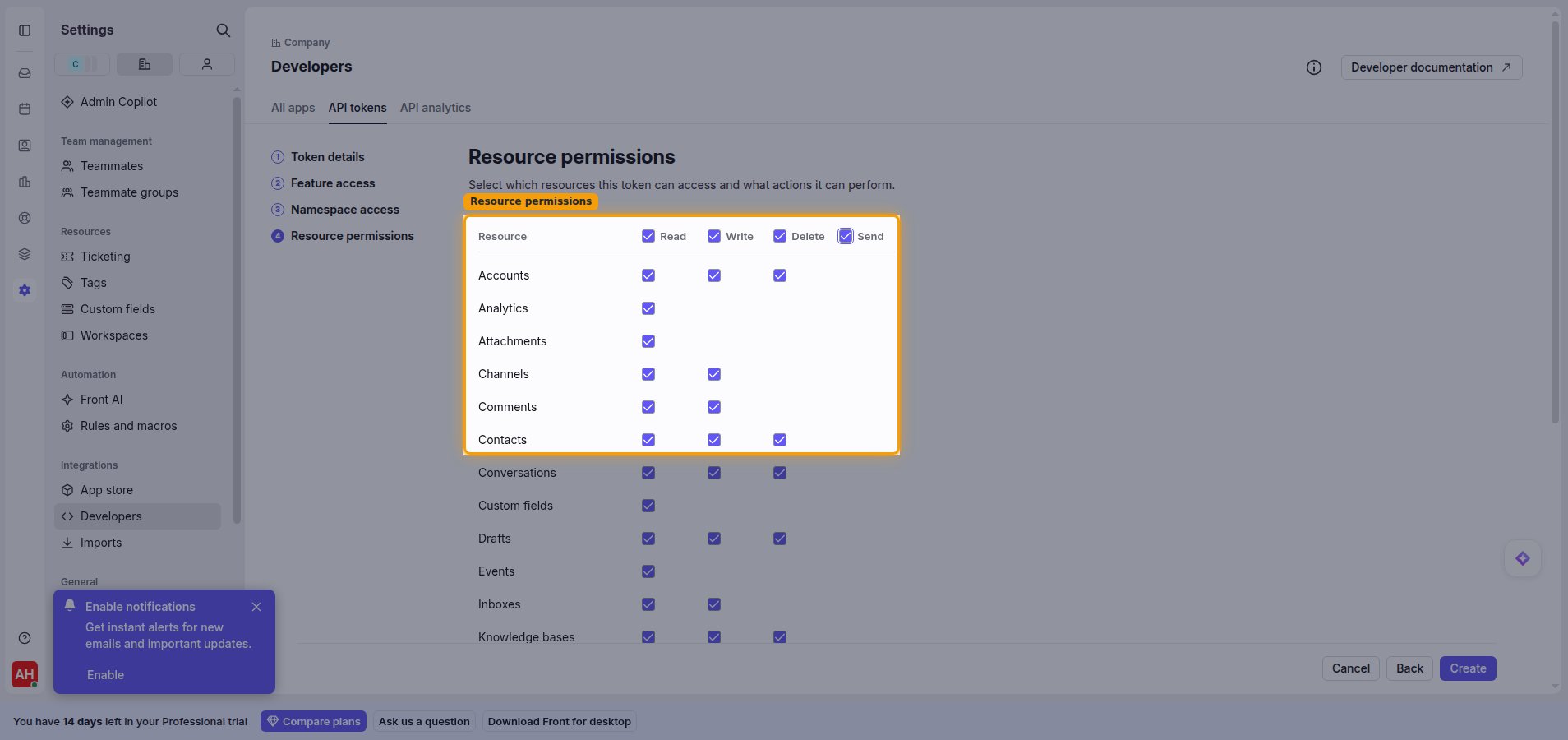
        <p>In <strong>Resource permissions</strong>, enable the permissions this integration needs. You can toggle a whole column using the <strong>Read</strong>, <strong>Write</strong>, <strong>Delete</strong>, and <strong>Send</strong> column headers. When you are done, click <strong>Create</strong>.</p>

        <img src="https://mintcdn.com/stackone-60/6ESBCHWt8WW0ggeD/connectors/front/images/custom-config-resource-permissions.png?fit=max&auto=format&n=6ESBCHWt8WW0ggeD&q=85&s=3969a6c610a47432ce42edac19e548f8" alt="Resource permissions matrix with Read, Write, Delete and Send columns" width="1908" height="900" data-path="connectors/front/images/custom-config-resource-permissions.png" />

        <div style={{ marginTop: '8px' }} data-guide-display-scopes>
          <div className="connector-guide-scopes-container connector-guide-scopes-container--scrollable">
            <ul className="not-prose" style={{ listStyleType: "'- '", paddingLeft: '1em', margin: 0 }}>
              <li style={{ overflowWrap: 'anywhere', wordBreak: 'break-word' }} data-guide-display-scope="accounts:read">
                <button type="button" className="connector-guide-scope-copy" aria-label="Copy accounts:read" title="Copy scope" data-copy="accounts:read">
                  <span className="connector-guide-scope-copy__label">accounts:read</span>
                  <span className="connector-guide-scope-copy__icon" aria-hidden="true">⧉</span>
                </button>
              </li>

              <li style={{ overflowWrap: 'anywhere', wordBreak: 'break-word' }} data-guide-display-scope="accounts:write">
                <button type="button" className="connector-guide-scope-copy" aria-label="Copy accounts:write" title="Copy scope" data-copy="accounts:write">
                  <span className="connector-guide-scope-copy__label">accounts:write</span>
                  <span className="connector-guide-scope-copy__icon" aria-hidden="true">⧉</span>
                </button>
              </li>

              <li style={{ overflowWrap: 'anywhere', wordBreak: 'break-word' }} data-guide-display-scope="accounts:delete">
                <button type="button" className="connector-guide-scope-copy" aria-label="Copy accounts:delete" title="Copy scope" data-copy="accounts:delete">
                  <span className="connector-guide-scope-copy__label">accounts:delete</span>
                  <span className="connector-guide-scope-copy__icon" aria-hidden="true">⧉</span>
                </button>
              </li>

              <li style={{ overflowWrap: 'anywhere', wordBreak: 'break-word' }} data-guide-display-scope="channels:read">
                <button type="button" className="connector-guide-scope-copy" aria-label="Copy channels:read" title="Copy scope" data-copy="channels:read">
                  <span className="connector-guide-scope-copy__label">channels:read</span>
                  <span className="connector-guide-scope-copy__icon" aria-hidden="true">⧉</span>
                </button>
              </li>

              <li style={{ overflowWrap: 'anywhere', wordBreak: 'break-word' }} data-guide-display-scope="channels:write">
                <button type="button" className="connector-guide-scope-copy" aria-label="Copy channels:write" title="Copy scope" data-copy="channels:write">
                  <span className="connector-guide-scope-copy__label">channels:write</span>
                  <span className="connector-guide-scope-copy__icon" aria-hidden="true">⧉</span>
                </button>
              </li>

              <li style={{ overflowWrap: 'anywhere', wordBreak: 'break-word' }} data-guide-display-scope="comments:read">
                <button type="button" className="connector-guide-scope-copy" aria-label="Copy comments:read" title="Copy scope" data-copy="comments:read">
                  <span className="connector-guide-scope-copy__label">comments:read</span>
                  <span className="connector-guide-scope-copy__icon" aria-hidden="true">⧉</span>
                </button>
              </li>

              <li style={{ overflowWrap: 'anywhere', wordBreak: 'break-word' }} data-guide-display-scope="comments:write">
                <button type="button" className="connector-guide-scope-copy" aria-label="Copy comments:write" title="Copy scope" data-copy="comments:write">
                  <span className="connector-guide-scope-copy__label">comments:write</span>
                  <span className="connector-guide-scope-copy__icon" aria-hidden="true">⧉</span>
                </button>
              </li>

              <li style={{ overflowWrap: 'anywhere', wordBreak: 'break-word' }} data-guide-display-scope="contacts:read">
                <button type="button" className="connector-guide-scope-copy" aria-label="Copy contacts:read" title="Copy scope" data-copy="contacts:read">
                  <span className="connector-guide-scope-copy__label">contacts:read</span>
                  <span className="connector-guide-scope-copy__icon" aria-hidden="true">⧉</span>
                </button>
              </li>

              <li style={{ overflowWrap: 'anywhere', wordBreak: 'break-word' }} data-guide-display-scope="contacts:write">
                <button type="button" className="connector-guide-scope-copy" aria-label="Copy contacts:write" title="Copy scope" data-copy="contacts:write">
                  <span className="connector-guide-scope-copy__label">contacts:write</span>
                  <span className="connector-guide-scope-copy__icon" aria-hidden="true">⧉</span>
                </button>
              </li>

              <li style={{ overflowWrap: 'anywhere', wordBreak: 'break-word' }} data-guide-display-scope="contacts:delete">
                <button type="button" className="connector-guide-scope-copy" aria-label="Copy contacts:delete" title="Copy scope" data-copy="contacts:delete">
                  <span className="connector-guide-scope-copy__label">contacts:delete</span>
                  <span className="connector-guide-scope-copy__icon" aria-hidden="true">⧉</span>
                </button>
              </li>

              <li style={{ overflowWrap: 'anywhere', wordBreak: 'break-word' }} data-guide-display-scope="conversations:read">
                <button type="button" className="connector-guide-scope-copy" aria-label="Copy conversations:read" title="Copy scope" data-copy="conversations:read">
                  <span className="connector-guide-scope-copy__label">conversations:read</span>
                  <span className="connector-guide-scope-copy__icon" aria-hidden="true">⧉</span>
                </button>
              </li>

              <li style={{ overflowWrap: 'anywhere', wordBreak: 'break-word' }} data-guide-display-scope="conversations:write">
                <button type="button" className="connector-guide-scope-copy" aria-label="Copy conversations:write" title="Copy scope" data-copy="conversations:write">
                  <span className="connector-guide-scope-copy__label">conversations:write</span>
                  <span className="connector-guide-scope-copy__icon" aria-hidden="true">⧉</span>
                </button>
              </li>

              <li style={{ overflowWrap: 'anywhere', wordBreak: 'break-word' }} data-guide-display-scope="conversations:delete">
                <button type="button" className="connector-guide-scope-copy" aria-label="Copy conversations:delete" title="Copy scope" data-copy="conversations:delete">
                  <span className="connector-guide-scope-copy__label">conversations:delete</span>
                  <span className="connector-guide-scope-copy__icon" aria-hidden="true">⧉</span>
                </button>
              </li>

              <li style={{ overflowWrap: 'anywhere', wordBreak: 'break-word' }} data-guide-display-scope="drafts:write">
                <button type="button" className="connector-guide-scope-copy" aria-label="Copy drafts:write" title="Copy scope" data-copy="drafts:write">
                  <span className="connector-guide-scope-copy__label">drafts:write</span>
                  <span className="connector-guide-scope-copy__icon" aria-hidden="true">⧉</span>
                </button>
              </li>

              <li style={{ overflowWrap: 'anywhere', wordBreak: 'break-word' }} data-guide-display-scope="events:*:read">
                <button type="button" className="connector-guide-scope-copy" aria-label="Copy events:*:read" title="Copy scope" data-copy="events:*:read">
                  <span className="connector-guide-scope-copy__label">events:\*:read</span>
                  <span className="connector-guide-scope-copy__icon" aria-hidden="true">⧉</span>
                </button>
              </li>

              <li style={{ overflowWrap: 'anywhere', wordBreak: 'break-word' }} data-guide-display-scope="inboxes:read">
                <button type="button" className="connector-guide-scope-copy" aria-label="Copy inboxes:read" title="Copy scope" data-copy="inboxes:read">
                  <span className="connector-guide-scope-copy__label">inboxes:read</span>
                  <span className="connector-guide-scope-copy__icon" aria-hidden="true">⧉</span>
                </button>
              </li>

              <li style={{ overflowWrap: 'anywhere', wordBreak: 'break-word' }} data-guide-display-scope="inboxes:write">
                <button type="button" className="connector-guide-scope-copy" aria-label="Copy inboxes:write" title="Copy scope" data-copy="inboxes:write">
                  <span className="connector-guide-scope-copy__label">inboxes:write</span>
                  <span className="connector-guide-scope-copy__icon" aria-hidden="true">⧉</span>
                </button>
              </li>

              <li style={{ overflowWrap: 'anywhere', wordBreak: 'break-word' }} data-guide-display-scope="messages:read">
                <button type="button" className="connector-guide-scope-copy" aria-label="Copy messages:read" title="Copy scope" data-copy="messages:read">
                  <span className="connector-guide-scope-copy__label">messages:read</span>
                  <span className="connector-guide-scope-copy__icon" aria-hidden="true">⧉</span>
                </button>
              </li>

              <li style={{ overflowWrap: 'anywhere', wordBreak: 'break-word' }} data-guide-display-scope="messages:send">
                <button type="button" className="connector-guide-scope-copy" aria-label="Copy messages:send" title="Copy scope" data-copy="messages:send">
                  <span className="connector-guide-scope-copy__label">messages:send</span>
                  <span className="connector-guide-scope-copy__icon" aria-hidden="true">⧉</span>
                </button>
              </li>

              <li style={{ overflowWrap: 'anywhere', wordBreak: 'break-word' }} data-guide-display-scope="tags:read">
                <button type="button" className="connector-guide-scope-copy" aria-label="Copy tags:read" title="Copy scope" data-copy="tags:read">
                  <span className="connector-guide-scope-copy__label">tags:read</span>
                  <span className="connector-guide-scope-copy__icon" aria-hidden="true">⧉</span>
                </button>
              </li>

              <li style={{ overflowWrap: 'anywhere', wordBreak: 'break-word' }} data-guide-display-scope="tags:write">
                <button type="button" className="connector-guide-scope-copy" aria-label="Copy tags:write" title="Copy scope" data-copy="tags:write">
                  <span className="connector-guide-scope-copy__label">tags:write</span>
                  <span className="connector-guide-scope-copy__icon" aria-hidden="true">⧉</span>
                </button>
              </li>

              <li style={{ overflowWrap: 'anywhere', wordBreak: 'break-word' }} data-guide-display-scope="tags:delete">
                <button type="button" className="connector-guide-scope-copy" aria-label="Copy tags:delete" title="Copy scope" data-copy="tags:delete">
                  <span className="connector-guide-scope-copy__label">tags:delete</span>
                  <span className="connector-guide-scope-copy__icon" aria-hidden="true">⧉</span>
                </button>
              </li>

              <li style={{ overflowWrap: 'anywhere', wordBreak: 'break-word' }} data-guide-display-scope="teammates:read">
                <button type="button" className="connector-guide-scope-copy" aria-label="Copy teammates:read" title="Copy scope" data-copy="teammates:read">
                  <span className="connector-guide-scope-copy__label">teammates:read</span>
                  <span className="connector-guide-scope-copy__icon" aria-hidden="true">⧉</span>
                </button>
              </li>

              <li style={{ overflowWrap: 'anywhere', wordBreak: 'break-word' }} data-guide-display-scope="teammates:write">
                <button type="button" className="connector-guide-scope-copy" aria-label="Copy teammates:write" title="Copy scope" data-copy="teammates:write">
                  <span className="connector-guide-scope-copy__label">teammates:write</span>
                  <span className="connector-guide-scope-copy__icon" aria-hidden="true">⧉</span>
                </button>
              </li>
            </ul>
          </div>
        </div>
      </div>
    </Step>
  </Steps>
</section>

<section data-guide-section data-guide-scopes="">
  <h2>Copy the API token</h2>

  <p>Copy the generated token and paste it into StackOne Hub.</p>

  <Steps>
    <Step title="Copy and paste the token">
      <div data-guide-step data-guide-scopes="" data-guide-display-scopes-list="">
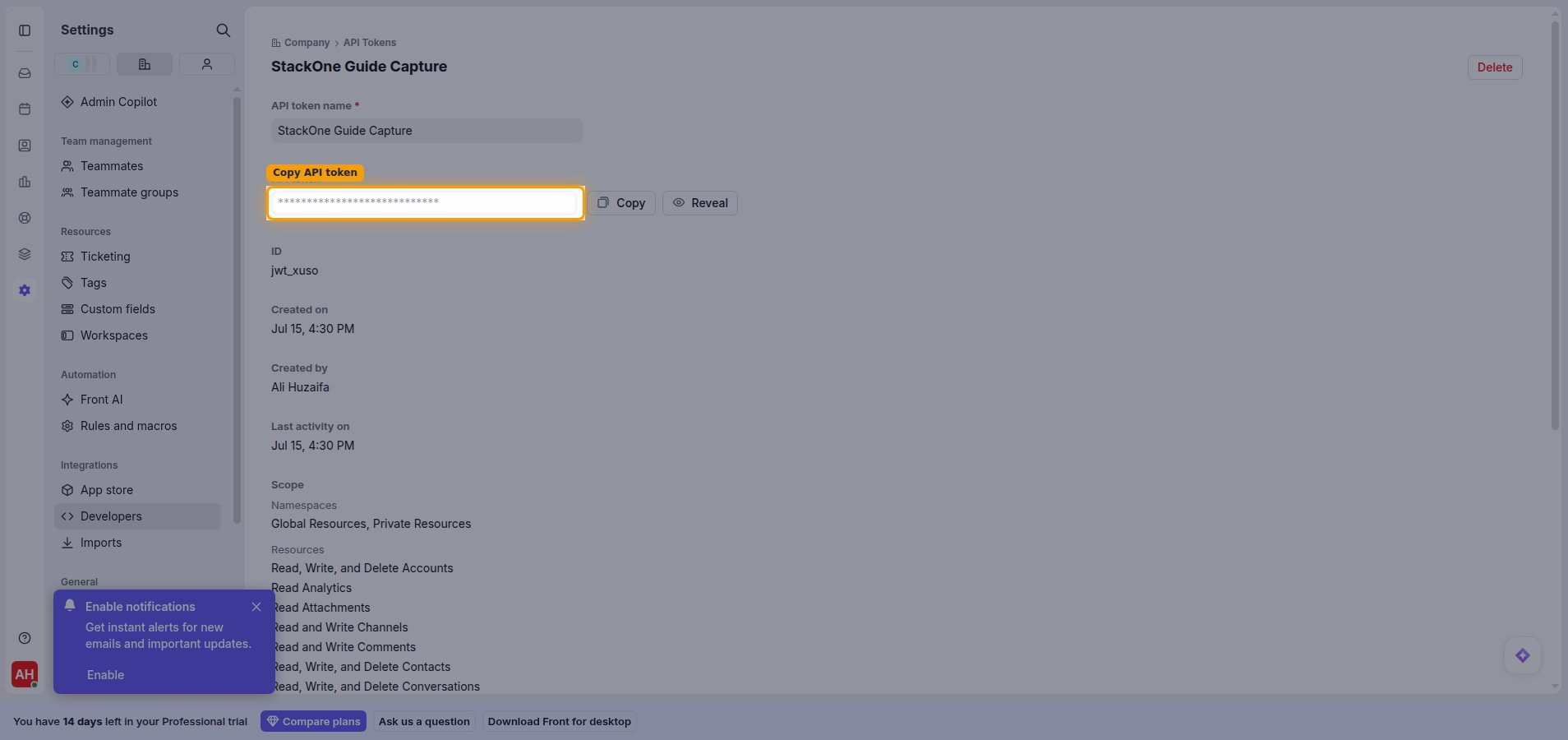
        <p>Open the token you just created. Click <strong>Copy</strong> next to the <strong>API token</strong> field to copy its value, then paste it into the <strong>API Token</strong> field in StackOne Hub.</p>

        <ul>
          <li>You can return to the token later and use <strong>Reveal</strong> or <strong>Copy</strong> to view the value again.</li>
        </ul>

        <img src="https://mintcdn.com/stackone-60/6ESBCHWt8WW0ggeD/connectors/front/images/custom-config-copy-token.png?fit=max&auto=format&n=6ESBCHWt8WW0ggeD&q=85&s=1d1c04a195af72f54f7d3198ddfe431a" alt="Token detail view with the API token field and Copy button highlighted" width="1908" height="900" data-path="connectors/front/images/custom-config-copy-token.png" />
      </div>
    </Step>
  </Steps>
</section>

<div data-whitelabel-hide>
  <h2>Linking the Account from the Hub</h2>

  <Steps>
    <Step title="Navigate to the Hub">
      Use one of the three <a href="/connect/managing-connectors/linking-accounts">Linking Account Methods</a> to access the Hub.
    </Step>

    <Step title="Fill out the fields">
      Fill out the following fields using details from your provider:

      <ul>
        <li><strong>API Token</strong></li>
      </ul>
    </Step>

    <Step title="Connect">
      <ul>
        <li>Click <strong>Connect</strong></li>
        <li>If applicable, the provider will redirect you to a sign-in or authorization page. Complete the provider's authorization flow.</li>
        <li>Once authorization is successful, you will see a confirmation popup</li>
      </ul>
    </Step>
  </Steps>

  <p>If the account linking is successful, you will see the newly linked account in your <a href="/gateway/concepts/linked-accounts">Accounts</a> page.</p>
</div>

## Next Steps

<Columns cols={2}>
  <Card title="Webhooks setup" href="/connectors/front/guides/webhook-setup">
    <p className="connector-page-auth-description" style={{ fontSize: '14px', marginTop: 0, marginBottom: 0 }}>
      Configure receiving Events for Front into StackOne.
    </p>
  </Card>
</Columns>