

<REDACTED_EMAIL>. It runs in two places, each turned on separately.
A Redact PII rule in Policies cleans what the agent sends to a tool and what the tool returns. The Redact personal information (PII) setting in Advanced Logs cleans request and response bodies before they are stored.
Choose where to redact
The two surfaces are independent, so a project can use either or both.Redact PII and semantic rules
Redact PII and the Semantic rule capability both use a model to work out what the data in a call contains, then apply your policy to it, on a tool’s inputs and its response. A semantic rule answers a plain-language question you write. Redact PII looks for four fixed classes of PII with StackOne’s own model, and finds them inside any field, including free text such as a ticket description. See Capabilities for both.How detection works
StackOne scans every string value in the body, in two passes:- Patterns match well-formed values such as email addresses.
- StackOne’s PII model, a token classifier StackOne trained for this task, reads the text for personal data the patterns miss, such as a phone number inside a ticket comment.
Redact PII in tool calls
A Redact PII rule is a policy capability. Denying it for a class redacts that class from tool inputs and responses, or blocks any call where it appears. Every class you don’t select passes through unchanged, so a customer number or record UUID next to a redacted email address stays as it was.1
Create a policy
- Select the project and open Project Settings > Policies.
- Click Create policy and give the policy a descriptive name.
- Set Enforcement to Monitored.
2
Choose who it applies to
- Under Who it applies to, select Everyone, Users, or Groups, then pick the users or groups.
- Under What it does, select Deny.
3
Add the Redact PII capability
Under Capabilities, add Redact PII.Denying Redact PII checks calls for the chosen classes of PII. StackOne’s own PII model scans the tool’s inputs before it runs and the response before the agent sees it, including free-text fields such as ticket bodies and notes. Record UUIDs, order numbers, and API keys stay intact.The PII Redaction benchmark compares the model with Microsoft Presidio on connector data.Choose which targets it applies under Applies to:
- Everything covers every connector and account in the project.
- An account covers specific Linked Accounts. Search accounts by name or owner.
- Redact replaces each detected span in the inputs and in the response, and lets the call continue. The rest of the input or response is unchanged.
- Block refuses the call. When the PII is in the inputs, the provider is never called. When it is detected in the response, the agent receives a refusal instead of the data.
4
Create the policy
Review the rule in the panel footer, then click Create policy.
5
Review what it would do
Under Monitored, PII detections are recorded and the call goes through unchanged. Run real calls, then open an action log and select the Policy tab to review the record.
6
Switch to Enforced
Once the rule catches what you expect, edit the policy, set Enforcement to Enforced, and save. The rule acts from the project’s next call.
What changes in the call
With Redact, each match is replaced by a tag naming its class, such as<POLICY_REDACTED:EMAIL>, in the input the provider receives or the response the agent receives. The agent can tell a value was withheld by policy, and which class it was.
With Block, the agent receives a refusal as the tool result. If a chosen class is in the inputs, the provider is never called. If it is detected in the response, the agent gets the refusal instead of the data.
When a rule removed something, the tool result also carries policyMetadata. Its result is partial, and redactedClasses names each class removed and the policy level, not the rule.
For example, a response from which an email address was removed:
email, phone_number, ssn, and credit_card.
Redact PII in Advanced Logs
1
Open Advanced Logs
Select the project and open Project Settings > Advanced Logs.
2
Turn on redaction
- Turn Status on, if it is off. The other settings can only be changed while it is on.
- Turn on Redact personal information (PII).
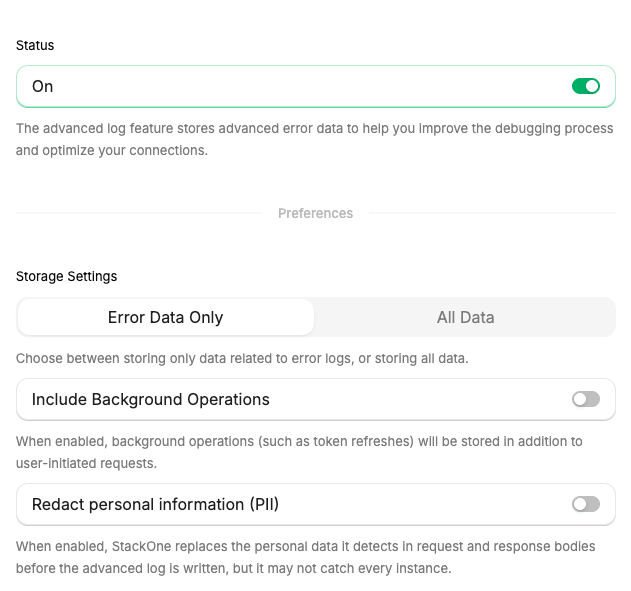
Advanced Logs settings, with Redact personal information (PII) under Storage Settings.
<REDACTED_EMAIL> or <REDACTED_PHONE_NUMBER>. Credential-like tokens the patterns catch have no type and become <REDACTED>; named credential fields follow the Credentials rule below. Only the redacted copy is stored.
- Detection. Patterns catch email addresses and credential-like tokens. A model finds names, phone numbers, postal addresses, government ID numbers, payment card numbers, and other personal data.
- Scope. Request and response bodies only. Log metadata such as the path, status code, connector, and Linked Account stays intact, so logs remain searchable.
- Coverage. The bodies of action call logs.
- Applies to new logs only. Logs that are already stored are not changed.
- Credentials. Fields whose names match a fixed list of credential names, such as
password,token,api_key,client_secret, andauthorization, are masked in every stored body whether or not PII redaction is on. The value is replaced with**redacted**, followed by its last five characters when it is longer than 10 characters.
What is recorded
Each surface leaves a different trace:- Redact PII rule. Open the action log and select the Policy tab. A call the rule changed is recorded with result
partial, and the rule that acted shows the effectredacted. Under Monitored, the record shows the PII the rule detected instead. - Advanced Logs. The stored body is the redacted copy. Nothing records which values were replaced.
FAQ
Does PII Redaction send my data to another service?
Does PII Redaction send my data to another service?
No. Both passes run inside StackOne’s runtime, in the process that runs the action. No third-party detection service sees your data.
How much latency does it add?
How much latency does it add?
On connector data, detection takes about a millisecond per field at the median, measured for detection alone on 4 CPU cores. Longer text, such as a full document, takes longer. Detection runs in the process that runs the action, so there is no extra network call.
Why does the agent still see record UUIDs and API keys?
Why does the agent still see record UUIDs and API keys?
A Redact PII rule removes only the classes you select, and record UUIDs, order numbers, and API keys belong to none of them.
Which setting redacts names and postal addresses?
Which setting redacts names and postal addresses?
The Advanced Logs setting detects them in stored bodies. The Redact PII rule covers the four classes listed in Choose where to redact. To keep a field such as a home address away from the agent, deny Read a field on it in a policy.
How accurate is detection?
How accurate is detection?
Span-level F1 score compared with Microsoft Presidio, on 247 Connector PII examples and 1,000 examples for each other dataset:
On 129 connector field values with no personal data, StackOne’s model flagged 3.1% as PII, and Presidio flagged 48.8%.The OpenPII row uses 1,000 English validation rows of OpenPII 1.5M by Ai4Privacy / Ai Suisse SA (CC BY 4.0). All rows were measured in October 2026.StackOne’s model was trained on the training splits of Nemotron-PII and Privy and on connector data, among other sources, and never on OpenPII. Connector PII is StackOne’s own dataset. No test example appears in the training data.
Next steps
Tool Policies
Combine Redact PII with tool and field rules for the same users.
Observability
Configure Advanced Logs storage and retention.
Defender
Scan tool responses for prompt injection.
Scoping Connectors
Limit which actions each Connector Profile exposes.
PII Redaction product page
Benchmark and examples.